
0x00 Preface
---
Recently, Chris Le Roy from SensePost open-sourced a tool called Rattler, which can be used to automatically identify whether a DLL has preloading vulnerabilities (also understood as DLL hijacking vulnerabilities; this term is consistently used as DLL hijacking vulnerability in this article). Although DLL hijacking vulnerabilities are no longer a new technology and can be traced back to 2010, I am very interested in automation and have conducted further research on this.
This article will clarify the principles of DLL hijacking vulnerabilities, analyze examples, test the automated tool Rattler, share insights, and test a software with this vulnerability—the Explorer Suite installation package.
Note:
The Explorer Suite installation package includes CFF Explorer, which is free and commonly used for editing PE file formats. It was last updated on November 18, 2012, and is a relatively niche tool. |
----------
Chris Le Roy's blog address introducing Rattler:
https://sensepost.com/blog/2016/rattleridentifying-and-exploiting-dll-preloading-vulnerabilities/
Chris Le Roy also introduced Rattler at BSides Cape Town, with a brief introduction as follows:
http://www.bsidescapetown.co.za/speaker/chris-le-roy/
0x01 Introduction
---
Root cause of DLL hijacking vulnerability
Program does not specify the full path of the DLL when calling it
SafeDllSearchMode
Starting from Windows XP SP2, SafeDllSearchMode is enabled by default. Its existence is to prevent DLL hijacking vulnerabilities that existed during the XP era
Note:
Method to forcibly disable SafeDllSearchMode: |
When a program calls a DLL without specifying its full path, the system follows a fixed search order to locate the DLL
If SafeDllSearchMode is enabled, the program searches for the DLL file in the following locations in order:
The directory from which the application loaded
The system directory
The 16-bit system directory
The Windows directory
The current directory
The directories that are listed in the PATH environment variable
If disabled, search for DLL files from the following locations:
The directory from which the application loaded
The current directory
The system directory
The 16-bit system directory
The Windows directory
The directories that are listed in the PATH environment variable
For details, see:
https://msdn.microsoft.com/en-us/library/ms682586(VS.85).aspx
KnownDLLs
Registry location:
HKEY_LOCAL_MACHINE\SYSTEM\CurrentControlSet\Control\Session Manager\KnownDLLs
The KnownDLLs registry key contains a list of common system DLLs, such as usp10.dll, lpk.dll, shell32.dll, user32.dll
Note:
If the registry key |
SafeDllSearchMode + KnownDLLs
The combination of these two can be used to prevent hijacking of system DLLs
Note:
System DLLs refer to the DLL list included under the KnownDLLs registry key after excluding the ExcludeFromKnownDlls entry |
If the called DLL is 'uncommon,' meaning it does not appear in the KnownDLLs list, then regardless of whether SafeDllSearchMode is enabled, the first search order for DLLs is the program's current directory. This creates a DLL hijacking vulnerability:
By placing a DLL with the same name in the same directory as the program in advance, it will be loaded preferentially during the process startup, achieving hijacking |
Note:
Microsoft has not yet provided a direct fix for the DLL hijacking vulnerability mentioned here. In my opinion, the reasons are as follows: |
Note:
This article greatly helps clarify the above sequence: |
0x02 Exploitation Example
---
Next, we will create an example with a DLL hijacking vulnerability to demonstrate how to exploit it
Test dll:
Using a dll template, specific code omitted. A calculator will pop up upon successful loading
The C++ code for the test program is as follows:
#include "stdafx.h" |
The program calls Kernel32.dll and CRYPTSP.dll respectively via LoadLibrary
Actual test:
Rename the test DLL to Kernel32.dll, place it in the same directory as the program, and run it as shown in the figure
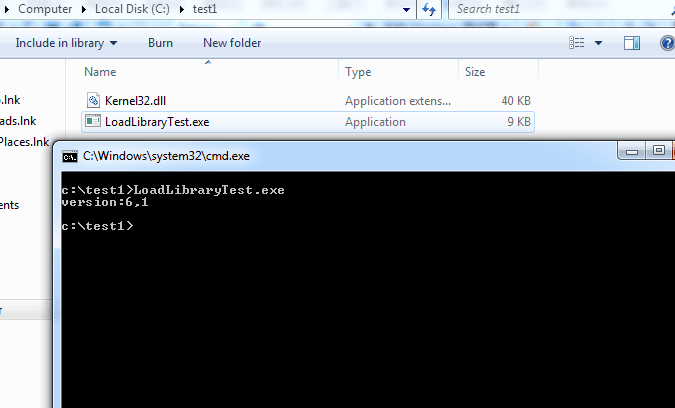
Since Kernel32.dll appears in the KnownDLLs list, the Kernel32.dll in the same directory as the program will not be loaded
Then rename the test DLL to CRYPTSP.dll, place it in the same directory as the program, and run it as shown in the figure
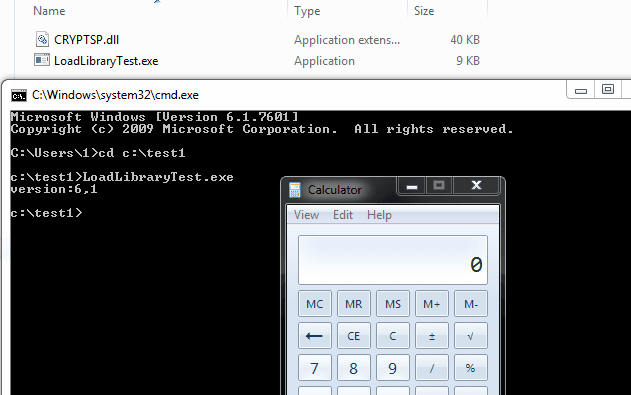
Since CRYPTSP.dll is not in the KnownDLLs list, the CRYPTSP.dll in the same directory as the program is loaded, successfully launching the calculator
0x03 Practical Exploitation
---
This section demonstrates how to use Process Monitor to identify DLL hijacking vulnerabilities in programs, using the example of NDP461-KB3102438-Web.exe mentioned by Chris Le Roy in his blog about Rattler
The blog address is as follows:
https://sensepost.com/blog/2016/rattleridentifying-and-exploiting-dll-preloading-vulnerabilities/
Download address for NDP461-KB3102438-Web.exe:
http://www.microsoft.com/zh-cn/download/details.aspx?id=49981&134b2bb0-86c1-fe9f-d523-281faef41695=1&fa43d42b-25b5-4a42-fe9b-1634f450f5ee=True
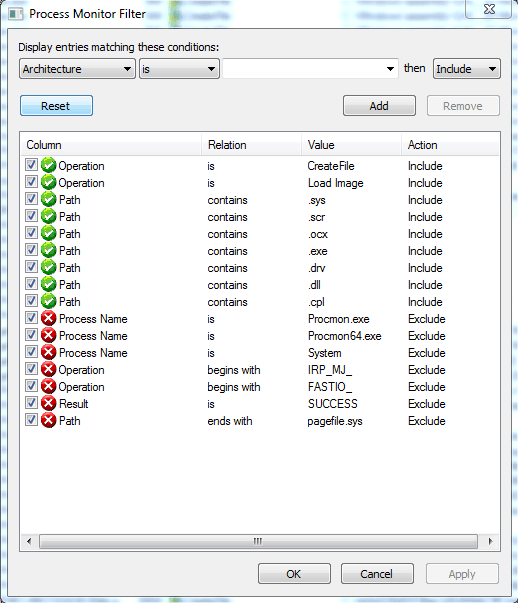
Configure Process Monitor with the following settings:
Include the following filters: |
Reference:
https://msdn.microsoft.com/library/ff919712
Note:
Setting 'Exclude Result is SUCCESS' will only display NAME NOT FOUND items, meaning only DLLs that failed to load are shown. This displays DLL names not included in the KnownDLLs list, which can be used to identify vulnerable DLL paths. |
As shown in the figure
After launching NDP461-KB3102438-Web.exe, observe Process Monitor as shown
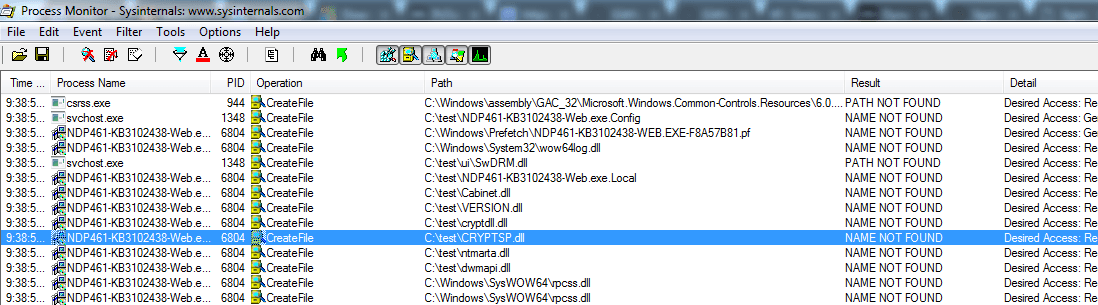
It can be seen that during startup, NDP461-KB3102438-Web.exe attempts to load CRYPTSP.dll and shows NAME NOT FOUND, indicating the file cannot be found and loading fails.
Now rename the test DLL to CRYPTSP.dll and place it in the same directory as NDP461-KB3102438-Web.exe.
Open Process Monitor, set Filter to remove the 'Exclude Result is SUCCESS' option, then launch NDP461-KB3102438-Web.exe again and record.
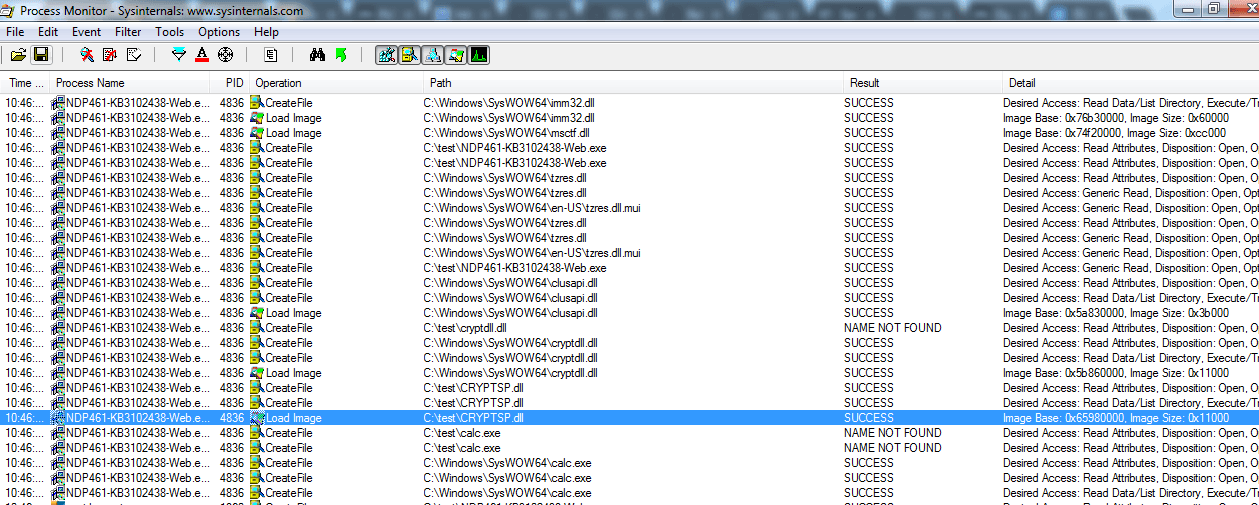
As shown below, C:\test\CRYPTSP.dll is successfully loaded with Result as Success, indicating successful DLL hijacking.
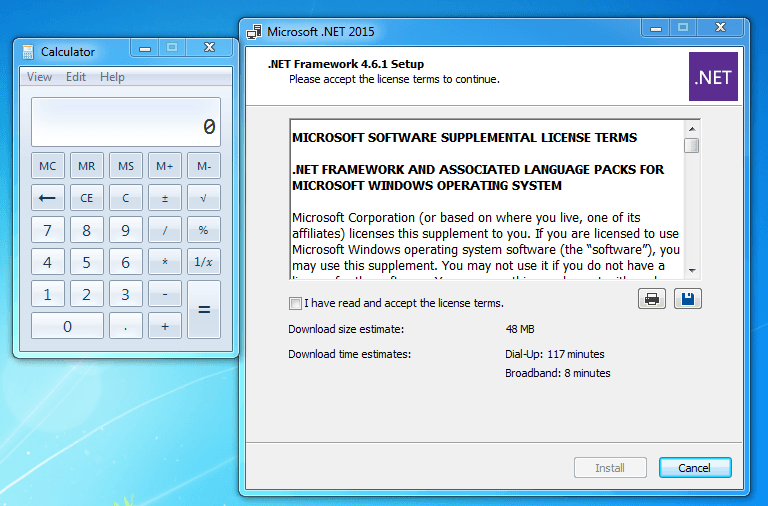
As shown in the figure below, the program successfully launched the calculator during execution
0x04 Program Automation Implementation
---
Using Process Monitor to view DLL hijacking vulnerabilities is a relatively straightforward method. However, for larger programs that load numerous DLLs, manual searching is impractical and labor-intensive. Therefore, automating the above process to automatically detect and exploit vulnerabilities can significantly improve efficiency. This is the problem that Rattler solves.
Project address:
https://github.com/sensepost/rattler
Approach:
- Enumerate the list of DLLs called by the process and parse out the DLL names.
- Rename the test DLLs to match the names in the list.
- Restart the program and check if the process calc.exe is successfully created. If successful, it indicates a vulnerability exists; otherwise, it does not.
Actual testing:
Compile Rattler using Visual Studio.
Place payload.dll in the same directory.
payload.dll download address:
https://github.com/sensepost/rattler/releases/download/v1.0/payload.dll
Run the command in an administrator Command Prompt:
Rattler.exe NDP461-KB3102438-Web.exe 1 |
Note:
Since NDP461-KB3102438-Web.exe requires administrator privileges to run, the Command Prompt also needs administrator privileges. |
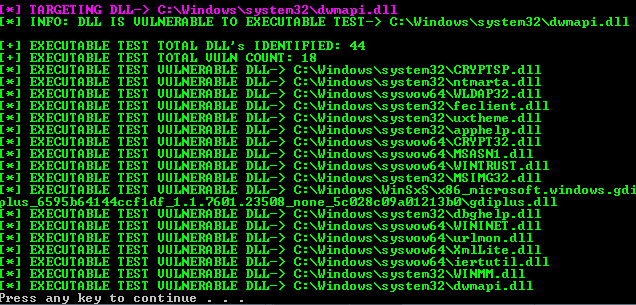
As shown below, automatically find the list of DLLs with preloading vulnerabilities.
Note:
During the repeated process launches, calc.exe was not properly closed, so the results obtained are more than the actual results. |
Additional note:
The downloaded NDP461-KB3102438-Web.exe is usually located in the Downloads folder. Therefore, by pre-placing CRYPTSP.dll in that directory, CRYPTSP.dll can be loaded during the user's download and execution of NDP461-KB3102438-Web.exe.
Simultaneously, since installing NDP461-KB3102438-Web.exe requires administrator privileges, CRYPTSP.dll also gains administrator privileges at that moment.
0x05 Verification Test
---
After mastering this method, test other programs, such as the CFF Explorer installation package Explorer Suite.
Download address:
http://www.ntcore.com/exsuite.php
Similarly, use Process Monitor to observe the operations of CFF Explorer's installer ExplorerSuite.exe during startup
As shown in the figure, locate the list of DLLs loaded by ExplorerSuite.exe during startup
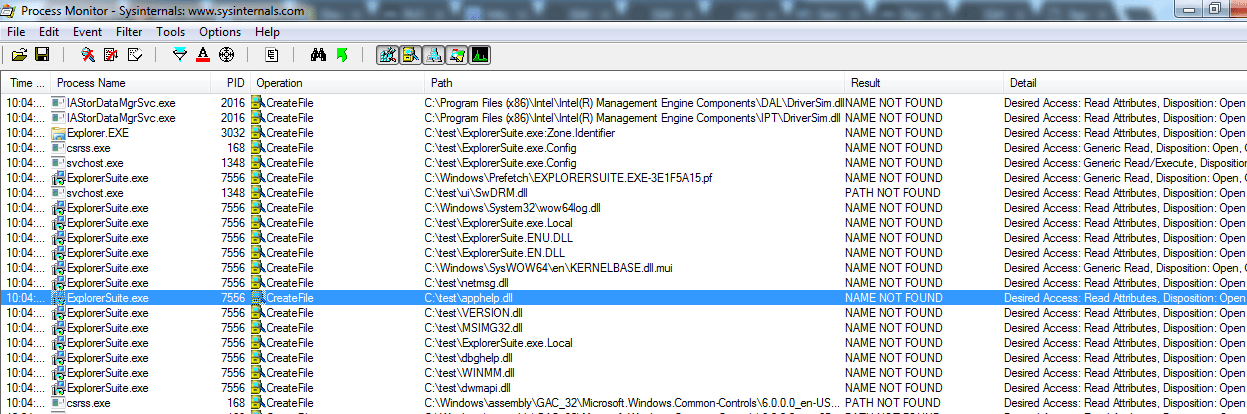
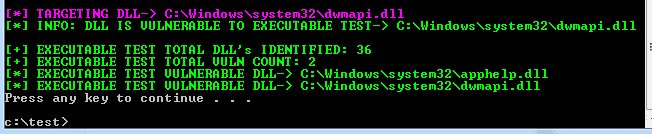
Actual testing shows that renaming payload.dll to apphelp.dll or dwmapi.dll can trigger the payload and launch the calculator
Automated program testing:
As shown in the figure, obtain the list of DLLs vulnerable to hijacking
Note:
During repeated process launches, calc.exe closes normally, so the results are accurate |
0x06 Defense
---
1. Issues developers should pay attention to:
- When calling third-party DLLs, use absolute paths with LoadLibrary API. Similar cases include other APIs like LoadLibraryEx, CreateProcess, ShellExecute, etc. Place all required DLLs in the application directory, not in system directories or other locations
- Use absolute paths when calling system DLLs.
- Call API SetDllDirectory(L"") at program startup to remove the current directory from the DLL loading order.
Additional note:
Starting with the KB2533623 patch for Windows 7, Microsoft updated three new APIs to address DLL hijacking issues: SetDefaultDllDirectories, AddDllDirectory, RemoveDllDirectory. Using these APIs together can effectively avoid DLL hijacking problems.
However, these APIs can only be used on Windows 7 and Server 2008 with the KB2533623 patch installed.
For details, see:
https://support.microsoft.com/zh-cn/kb/2533623
2. Issues users need to be aware of:
- Check for suspicious DLLs in the browser download directory to prevent them from hijacking downloaded installers.
- For "untrusted" programs, it is recommended to use Process Monitor or Rattler to check for DLL hijacking vulnerabilities.
0x07 Summary
---
During my research on the principles of DLL hijacking vulnerabilities, I took a slight detour. Some materials mentioned that
if a process attempts to load a DLL that does not exist, the process will still try to load this DLL from the current directory, which SafeDllSearchMode cannot prevent.
This raised the following questions for me:
- What exactly are the 'non-existent DLLs' mentioned here? Are they DLLs that do not exist in the system? However, CRYPTSP.dll is a DLL included by default in the system.
- What exactly is the 'DLL hijacking that SafeDllSearchMode cannot prevent'? Does DLL hijacking have multiple types? How many are there?
Fortunately, these issues were ultimately resolved. I hope this article can also help those with similar doubts.
Using the automated DLL hijacking vulnerability identification tool Rattler to test common tools can quickly identify existing vulnerability locations. It is efficient, convenient, and worth testing and using.


