
0x00 Preface
---
In the previous article 'Domain Penetration – Hook PasswordChangeNotify', we introduced the method of recording new passwords by injecting a DLL to hook PasswordChangeNotify, which essentially exploits the API PasswordChangeNotify.
We know that API PasswordChangeNotify is a functional function of the Password Filter DLL. So, for the Password Filter DLL itself, can we directly develop a DLL that can be exploited?
0x01 Introduction
---
This article will cover the following:
- Introduction to Password Filter DLL
- Using Password Filter DLL to Record Plaintext Passwords
- Backdoor Implementation Using Password Filter DLL
- Application in Non-Windows Server Systems
0x02 Introduction to Password Filter DLL
---
In real-world use of Windows systems, to enhance security and prevent brute-force attacks on user passwords, system administrators often impose complexity requirements for user passwords, which can be enabled by configuring Group Policy.
The location is as follows:
gpedit.msc -> Local Computer Policy -> Computer Configuration -> Windows Settings -> Security Settings -> Account Policies -> Password Policy -> Password must meet complexity requirements
When enabled, passwords must meet the following minimum requirements:
- Cannot contain the user's account name or more than two consecutive characters from the user's full name
- At least six characters long
- Contain characters from three of the following four categories:
- Uppercase English letters (A through Z)
- Lowercase English letters (a through z)
- Base 10 digits (0 through 9)
- Non-alphabetic characters (e.g., !, $, #, %)
Default:
- Enabled on domain controllers
- Disabled on standalone servers
If this policy still does not meet password complexity requirements, a Password Filter DLL can be used to further enhance password complexity
Implementation approach:
- Installing Password Filter DLL by modifying the registry
- Automatically loading Password Filter DLL and importing plaintext passwords when users change passwords
- Developers can define password complexity in the Password Filter DLL and compare it with the complexity of plaintext passwords; if the plaintext password does not meet the complexity requirements, a dialog box prompts the user and the password change fails
For specific usage, refer to the official documentation:
https://msdn.microsoft.com/en-us/library/windows/desktop/ms721766(v=vs.85).aspx
0x03 Development of Password Filter DLL
---
Supports the following three functions:
- BOOLEAN InitializeChangeNotify(void);
- NTSTATUS PasswordChangeNotify(_In_ PUNICODE_STRING UserName,_In_ ULONG RelativeId,_In_ PUNICODE_STRING NewPassword);
- BOOLEAN PasswordFilter(_In_ PUNICODE_STRING AccountName,_In_ PUNICODE_STRING FullName,_In_ PUNICODE_STRING Password,_In_ BOOLEAN SetOperation);
Reference materials:
https://msdn.microsoft.com/en-us/library/windows/desktop/ms721849(v=vs.85).aspx#password_filter_functions
Notable points:
- The input parameters for the APIs PasswordChangeNotify and PasswordFilter both include the user's plaintext password
- When the API PasswordFilter returns TRUE, it indicates the password meets requirements; returning FALSE means the password does not meet complexity requirements, and a dialog prompts the user to modify it.
- When writing a Password Filter DLL, it is necessary to declare export functions.
A proof-of-concept (POC) for reference is provided at the following address:
An open-source project
This project declares the export functions InitializeChangeNotify, PasswordChangeNotify, and PasswordFilter.
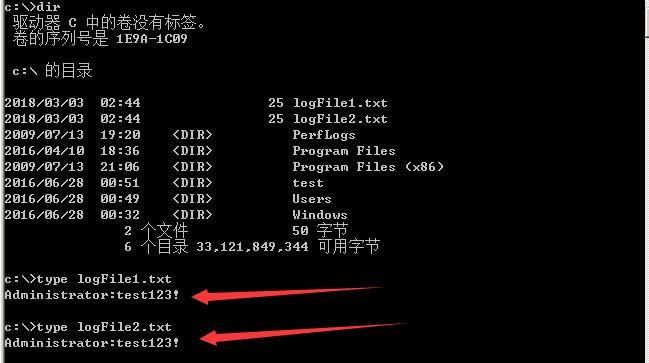
Use PasswordChangeNotify and PasswordFilter respectively to record plaintext passwords, saved in c:\logFile1 and c:\logFile2.
During compilation, it must correspond to the target system's platform.
%wZ indicates outputting PUNICODE_STRING, a Unicode string pointer type.
0x04 Installation of Password Filter DLL
---
1. In the registry at HKEY_LOCAL_MACHINE\SYSTEM\CurrentControlSet\Control\Lsa, under Notification Packages, add the name of the Password Filter DLL, excluding the .dll suffix.
2. Save the Password Filter DLL in %windir%\system32\.
3. Enable the group policy 'Password must meet complexity requirements'.
4. Restart the system (logging off the current user will not take effect).
5. Modify any user's password to load the Password Filter DLL.
Actual test:
Test system: Windows Server 2008 R2 x64
Compile the Password Filter DLL project to generate the 64-bit Win32Project3.dll
1. Save Win32Project3.dll under %windir%\system32\
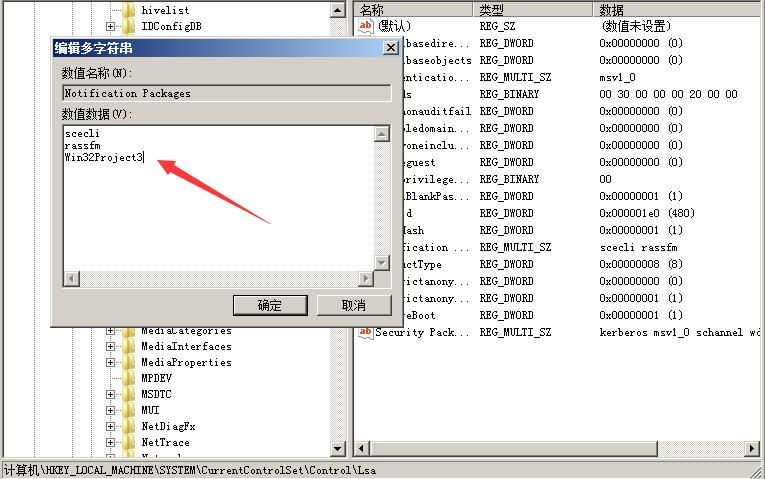
2. Modify the Notification Packages registry key under HKEY_LOCAL_MACHINE\SYSTEM\CurrentControlSet\Control\Lsa, add Win32Project3
As shown in the figure below
The method to achieve via command line is as follows:
Read the key value:
REG QUERY "HKLM\SYSTEM\CurrentControlSet\Control\Lsa" /v "Notification Packages" |
Obtain the key value content:
HKEY_LOCAL_MACHINE\SYSTEM\CurrentControlSet\Control\Lsa |
Add Win32Project3:
REG ADD "HKLM\SYSTEM\CurrentControlSet\Control\Lsa" /v "Notification Packages" /t REG_MULTI_SZ /d "scecli\0rassfm\0Win32Project3" /f |
Note:
\0 indicates a line break
3. The group policy of Windows Server systems by default enforces that passwords must meet complexity requirements
4. Restart the system
5. Change user password
6. Record plaintext password
As shown in the figure below
Note:
Can record all users, including those not logged in
0x05 Applications in Domain Environment
---
1. Record plaintext password
For domain controller servers, domain controller server permissions are required. Place the Password Filter DLL under %windir%\system32\ and modify the registry key value
Advantages:
Domain controller servers have the group policy 'Password must meet complexity requirements' enabled by default
Drawback:
Requires a system reboot to take effect, which is rare for domain controllers
Extension:
Modify the payload to send plaintext passwords to a web server; refer to the code at:
https://malicious.link/post/2013/2013-09-11-stealing-passwords-every-time-they-change/
2. Backdoor
Change the Password Filter DLL to launch a backdoor, such as returning a Meterpreter shell
When any domain user changes their password, the Password Filter DLL loads and returns a high-privilege shell
0x06 Application on Non-Windows Server Systems
---
Most current information suggests Password Filter DLLs are only applicable to Windows Server systems
For non-Windows Server systems, they can also be used, but the group policy 'Password must meet complexity requirements' is disabled by default
Therefore, note the following issues:
1. Check the current system's group policy configuration via command line
Group Policy configuration is stored in a database located at %windir%\security\database\secedit.sdb
The read command is as follows (administrator privileges):
secedit /export /cfg gp.inf /quiet |
Parameter description:
- The /db parameter is not set, indicating the database uses the default %windir%\security\database\secedit.sdb
- /quiet means no log is generated; otherwise, the generated log is saved by default at %windir%\security\logs\scesrv.log
After command execution, the file gp.inf is generated. Check the PasswordComplexity item in gp.inf; 1 indicates enabled, 0 indicates disabled
Note:
The content in gp.inf is incomplete; to obtain the complete Group Policy configuration, the registry must also be read
2. Modify Group Policy configuration to enable the policy that passwords must meet complexity requirements
First, export the configuration file gp.inf, set the PasswordComplexity item to 1, and save
Import into the database:
secedit /configure /db gp.sdb /cfg gp.inf /quiet |
Refresh Group Policy to take effect immediately (otherwise, it takes effect after restart):
gpupdate /force |
0x07 Defense Detection
---
According to the exploitation methodology, the attacker first needs to obtain administrator privileges on the current system.
The detection approach is as follows:
1. Check for suspicious DLLs under %windir%\system32\
2. Check the Notification Packages registry key value under HKEY_LOCAL_MACHINE\SYSTEM\CurrentControlSet\Control\Lsa
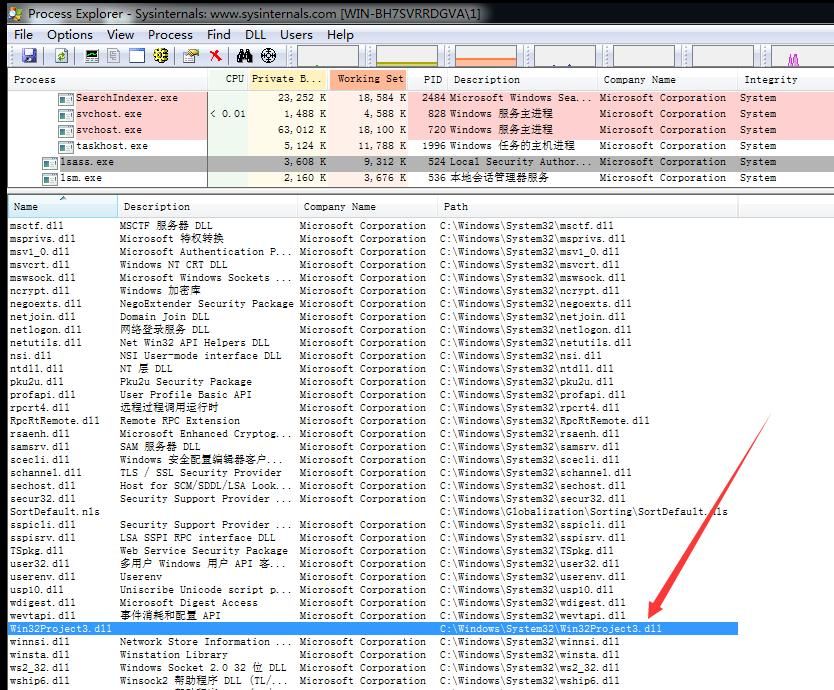
3. Check the DLLs loaded by the lsass.exe process
As shown in the figure below
0x08 Summary
---
Password Filter DLL is a legitimate function provided by the system. However, if system administrator privileges are obtained, this functionality can be exploited not only to record plaintext passwords but also to serve as a backdoor.
This article, in conjunction with specific exploitation methodologies, introduces detection methods.


