
0x00 Preface
---
Recently, I came across an interesting article titled 'Abusing Exported Functions and Exposed DCOM Interfaces for Pass-Thru Command Execution and Lateral Movement', which introduced a method of using rundll32.exe to load url.dll and execute programs via the exported function OpenURL. I conducted research on this topic and compiled it into an article to address the following issues:
- Details and principles of executing programs using rundll32
- Using scripts to batch scan DLLs and find DLLs capable of executing programs
0x01 Introduction
---
This article will cover the following:
- Usage of rundll32 loading DLLs
- Usage of OpenURL
- Usage of the API ShellExecute
- Combining the three to achieve direct program execution via rundll32
- Finding other available exported functions
- Using PowerShell scripts to batch obtain DLL exported functions and filter specific DLLs
0x02 Related Details
---
1. Usage of rundll32 loading dll
Official documentation:
https://support.microsoft.com/sk-sk/help/164787/info-windows-rundll-and-rundll32-interface
Usage:
rundll32 |
The parameter
void CALLBACK EntryPoint(HWND hwnd, HINSTANCE hinst, LPSTR lpszCmdLine, int nCmdShow); |
The parameter
This means that through rundll32, the LPSTR lpszCmdLine parameter of the dll's exported function can be controlled
2. Usage of OpenURL
Here, directly refer to the hints in the article, find url.dll, which contains the exported function OpenURL
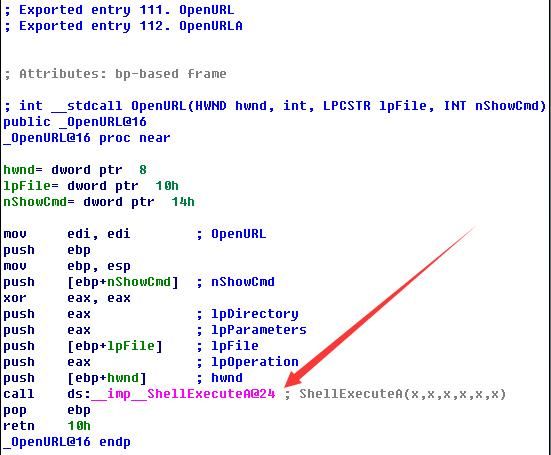
Use IDA to view the exported function OpenURL in url.dll, which calls the API ShellExecute, as shown in the figure below
View the pseudocode, as shown in the figure below

Note that the second parameter of ShellExecute is NULL, and the third parameter lpFile corresponds to the passed parameter lpFile
3. Usage of the API ShellExecute
The function prototype and parameter definitions are as follows:
HINSTANCE ShellExecute( |
When the second parameter is NULL, it indicates the default operation "open"
The third parameter lpFile represents the program or file path to be opened
That is to say, the parameter lpFile of the exported function OpenURL in url.dll determines the program or file path that API ShellExecute will open.
In summary,
rundll32.exe url.dll,OpenURL calc.exe |
The actual operation is ShellExecuteA(hwnd, NULL, "calc.exe", NULL, NULL, nShowCmd);, which executes the calculator.
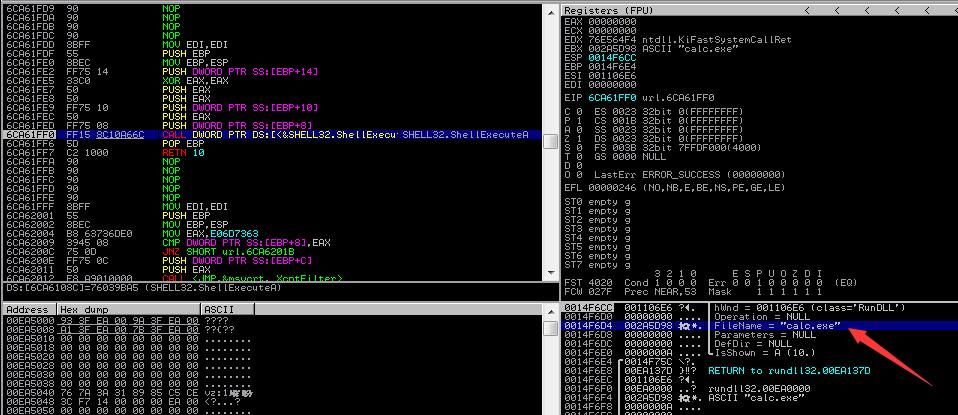
Using Immunity Debugger for dynamic debugging, trace to ShellExecuteA, verify the judgment, the passed parameter is calc.exe, as shown in the figure below.
0x03 Extended Exploitation
---
1. Find other exploitable exported functions in url.dll
Load url.dll in IDA, select Search - text..., search for ShellExecuteA
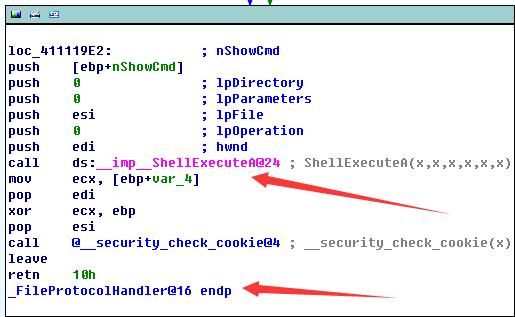
The exported function FileProtocolHandler also calls API ShellExecute, as shown in the figure below.
The test command is as follows:
rundll32.exe url.dll,FileProtocolHandler calc.exe |
Execute the calculator.
2. Check if other DLLs contain the export function OpenURL
Implementation approach:
Enumerate the export functions of all DLLs under %windir%/system32, and filter out DLLs that contain the export function OpenURL
To obtain DLL export functions via PowerShell, refer to FuzzySecurity's code at the following address:
https://github.com/FuzzySecurity/PowerShell-Suite/blob/master/Get-Exports.ps1
Based on this code, add functionality to enumerate DLLs, retrieve their export functions separately, and perform the judgment
Implementation details:
(1) Enumerate all DLLs under c:\windows\system32:
$DllSearchPath = dir c:\windows\system32\*.dll |
(2) For c:\windows\system32\auditpolmsg.dll
An error will be reported indicating incorrect input string format, so add try-catch judgment to the statement $OffsetPtr = New-Object System.Intptr -ArgumentList $($HModule.ToInt64() + $ExportRVA)
Code location:
https://github.com/FuzzySecurity/PowerShell-Suite/blob/master/Get-Exports.ps1#L141
(3) For c:\windows\system32\avicap.dll
An error occurs: Attempted to read or write protected memory. For the statement $EXPORT_DIRECTORY_FLAGS = [system.runtime.interopservices.marshal]::PtrToStructure($OffsetPtr, [type]$IMAGE_EXPORT_DIRECTORY)
Add try-catch handling
(4) The current code only supports 32-bit DLL detection
Complete code can be referenced at:
https://raw.githubusercontent.com/3gstudent/Writeup/master/Find-OpenURL.ps1
Execution as shown below, obtaining the other two DLLs: ieframe.dll and shdocvw.dll

Load ieframe.dll with IDA, view the export function OpenURL, pseudocode as shown below
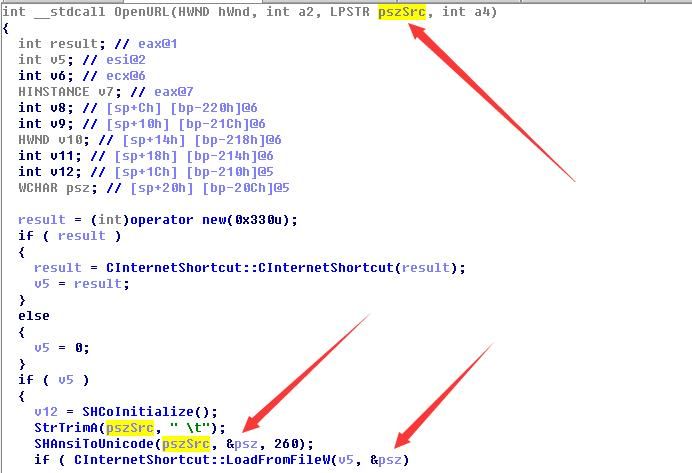
From CInternetShortcut, it can be inferred that the executed file is a .url file
Create a .url file with the following content:
[InternetShortcut] |
cmd:
rundll32.exe ieframe.dll,OpenURL C:\4\calc.url |
Successfully executed, calculator popped up
Similarly, shdocvw.dll yields the same test result
3. Types of executed programs
Calling API ShellExecute to execute programs supports not only exe but also scripts
For example, executing a js file with the following content:
WScript.Echo("1"); |
cmd:
rundll32.exe url.dll,OpenURL C:\4\echo.js |
Dialog box popped up after execution
For example, an hta file with the following content:
|
cmd:
rundll32.exe url.dll,OpenURLA C:\4\calc.hta |
Calculator pops up after execution
For example, a URL file with the following content:
[InternetShortcut] |
cmd:
rundll32.exe ieframe.dll,OpenURL C:\4\calc.url |
Successfully executed, calculator pops up
4. More exploitation methods
Hexacorn shared another usable DLL and export function in his article:
rundll32 zipfldr.dll, RouteTheCall calc.exe |
Of course, there are more DLLs available for use, which will not be introduced in this article for now
0x04 Summary
---
This article analyzes the details of using rundll32.exe to load url.dll and execute programs through the export function OpenURL, extends it, attempts to use scripts to batch scan DLLs under %windir%/system32, finds DLLs capable of executing programs, and verifies the conclusions of bohops and Hexacorn respectively.


