
0x00 Preface
---
Cobalt Strike 3.14 added the blockdlls feature, restricting child processes to only load DLLs signed by Microsoft.
This feature prevents third-party security software from injecting DLLs into child processes, thereby disabling hooks on child processes and ultimately protecting them.
XPN also covered related content in his blog at the following address:
https://blog.xpnsec.com/protecting-your-malware/
This article will expand on the exploitation methods of blockdlls, covering how to check if a process has blockdlls enabled and how to modify the current process to enable blockdlls, comparing differences in usage between Win8 and Win10 systems, providing open-source C code, and sharing script development details.
0x01 Introduction
---
This article will cover the following topics:
- blockdlls in Cobalt Strike
- Methods to check if a process has blockdlls enabled
- Methods to modify the current process to enable blockdlls
- Differences in usage between Win8 and Win10 systems
- Utilization Analysis
0x02 blockdlls in Cobalt Strike
---
blockdlls in Cobalt Strike will create a child process and enable the blockdlls functionality
XPN shared C code to achieve the same functionality in a blog post, the address is as follows:
https://blog.xpnsec.com/protecting-your-malware/
The code is as follows:
#include |
Specified the security policy for creating a child process through the STARTUPINFOEX structure (enabling PROCESS_CREATION_MITIGATION_POLICY_BLOCK_NON_MICROSOFT_BINARIES_ALWAYS_ON), which prevents loading non-Microsoft signed DLLs.
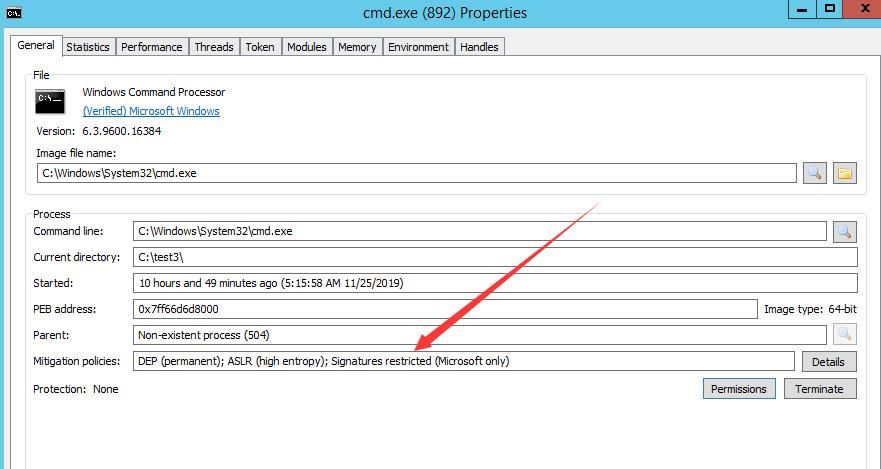
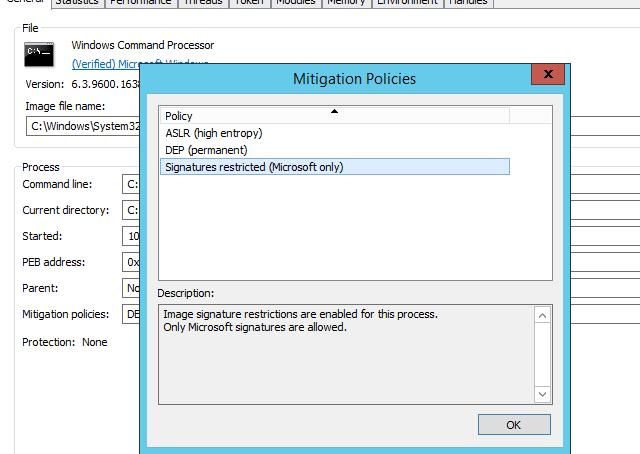
After generating the child process, using ProcessHacker shows a prompt indicating the blockdlls feature is enabled, as shown in the figure below.
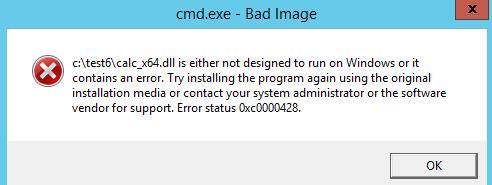
After enabling the blockdlls feature, attempting DLL injection into this process, the injection code can be referenced from:
An open-source project
An error occurs during injection, as shown in the figure below.
Successfully reproduced the blockdlls feature in Cobalt Strike.
Next, the details related to this feature need to be found.
After some searching, the relevant API GetProcessMitigationPolicy() was found, which can be used to read the security policy of a process.
Reference materials are as follows:
https://docs.microsoft.com/en-us/windows/win32/api/processthreadsapi/nf-processthreadsapi-getprocessmitigationpolicy
The structure corresponding to the signature policy is PROCESS_MITIGATION_BINARY_SIGNATURE_POLICY, with reference materials as follows:
https://docs.microsoft.com/zh-cn/windows/win32/api/winnt/ns-winnt-process_mitigation_binary_signature_policy
Documentation indicates the minimum supported system for this API is Windows 8. It is speculated that the API GetProcessMitigationPolicy() should support the same operating system versions as blockdlls.
Testing reveals that the minimum system supported by blockdlls in Cobalt Strike is Windows 8.
0x03 Method to check if a process has blockdlls enabled
---
Enabling blockdlls is equivalent to the process enabling the security policy ProcessSignaturePolicy (enabling the MicrosoftSignedOnly feature).
The API GetProcessMitigationPolicy() can be used to retrieve the process's security policies and determine if the blockdlls feature is enabled.
The API GetProcessMitigationPolicy() can query multiple security policies of a process. Reference materials:
https://docs.microsoft.com/en-us/windows/win32/api/processthreadsapi/nf-processthreadsapi-getprocessmitigationpolicy
Attempted to write code according to the API's calling format. The code has been uploaded to GitHub at the following address:
An open-source project
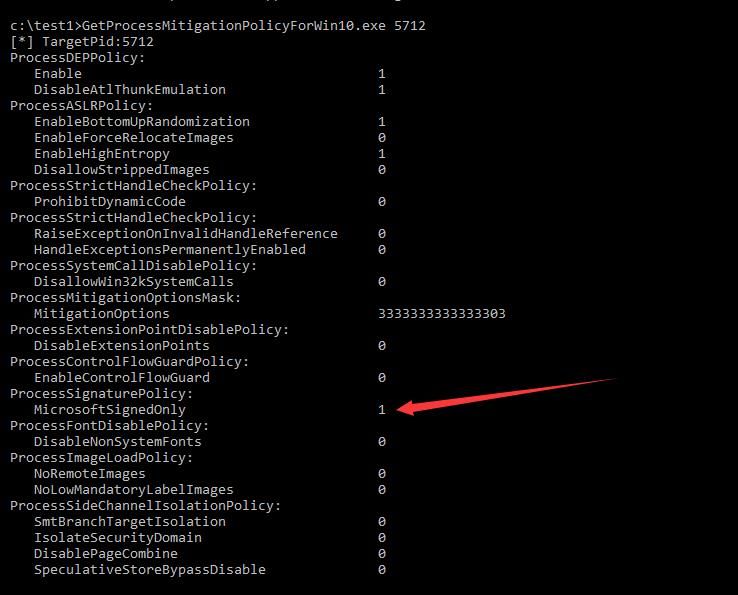
The code can query all security policies of a specified process.
Tested without issues on Windows 10, as shown in the image below.
Testing on Windows 8 (same for Server 2012) shows that information for the security policy ProcessSignaturePolicy cannot be retrieved, whereas ProcessHacker does not have this issue on Windows 8.
By examining the source code of ProcessHacker, a solution was found:
This requires implementation via NtQueryInformationProcess().
The complete code usable on Windows 8 has been uploaded to GitHub at the following address:
An open-source project
The code can query all security policies for a specified process on Windows 8. Note that Windows 8 does not support the following security policies:
- ControlFlowGuardPolicy
- FontDisablePolicy
- ImageLoadPolicy
- SystemCallFilterPolicy
- PayloadRestrictionPolicy
- ChildProcessPolicy
- SideChannelIsolationPolicy
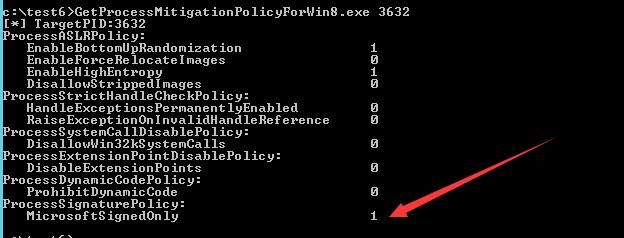
Tested on Windows 8 without issues, as shown in the image below
0x04 Modifying the current process to enable blockdlls method
---
Modifying the current process to enable blockdlls is equivalent to modifying the security policy ProcessSignaturePolicy of the current process (enabling the MicrosoftSignedOnly feature).
First, use the API GetProcessMitigationPolicy() to obtain the process's security policy, then modify the security policy ProcessSignaturePolicy via the API SetProcessMitigationPolicy() (enabling the MicrosoftSignedOnly feature).
Attempt to write code according to the API calling format; the code has been uploaded to GitHub at the following address:
An open-source project) ForWin10_CurrentProcess.cpp
The code can modify the security policy of the current process and enable the MicrosoftSignedOnly feature.
Tested without issues on Windows 10 systems.
Tested on Windows 8 systems (same for Server 2012), issues occurred and modifications failed.
The solution is the same as above:
Implement via NtSetInformationProcess().
The complete code usable on Windows 8 systems has been uploaded to GitHub at the following address:
An open-source project) ForWin8_CurrentProcess.cpp
The code can modify the security policy of the current process on Windows 8 systems, enabling blockdlls.
0x05 Exploitation Analysis
---
Enabling blockdlls is equivalent to enabling the ProcessSignaturePolicy security policy (with MicrosoftSignedOnly functionality) for a process, which can be applied not only to child processes but also to the current process.
Supported systems: Windows 8 to Windows 10
After enabling blockdlls, it can prevent third-party security software from injecting DLLs into this process, thereby preventing hooks on the process and ultimately protecting it.
On Windows 8 systems, NtQueryInformationProcess() and NtSetInformationProcess() must be used to view and modify the security policy.
Cannot use NtSetInformationProcess() to modify the security policy of a remote process, error code c000000d (STATUS_ILLEGAL_INSTRUCTION).
Cannot bypass blockdlls protection using 'Authenticode Signature Forgery—Forging Signatures of PE Files and Hijacking Signature Verification'
and 'Catalog Signature Forgery—Long UNC Filename Spoofing'.
0x06 Summary
---
This article expands on the utilization methods of blockdlls, detailing how to check if a process has blockdlls enabled and how to enable it for the current process, compares the differences in usage between Windows 8 and Windows 10 systems, provides open-source C code, shares details on script writing, and summarizes exploitation ideas.


