
0x00 Preface
---
Jason is another tool leaked by Lab Dookhtegan on June 3, 2019, used for brute-force attacks on Exchange accounts
However, although the leaked tool includes source code, it contains some bugs and cannot function properly
This article will not analyze the connection between Jason and APT34, but will only focus on technical research: fixing Jason's bugs, restoring its functionality, analyzing the techniques used, and making horizontal comparisons with other open-source tools
Note:
Previous analysis articles on APT34:
"Analysis of APT34 Leaked Tools - PoisonFrog and Glimpse"
"Analysis of APT34 Leaked Tools - HighShell and HyperShell"
0x01 Introduction
---
This article will cover the following:
- Open-source information about Jason
- Fixing Jason's bugs
- Actual testing of Jason
- Horizontal comparison with other open-source tools
0x02 Open-source materials of Jason
---
Jason was first leaked on a Telegram channel: https://t.me/lab_dookhtegana
p3pperp0tts uploaded it to GitHub at the following address:
https://github.com/p3pperp0tts/APT34/tree/master/Jason
The decompiled_code folder contains the source code of Jason
Jason uses EWS Managed API to access Exchange resources
Note:
For details on using EWS Managed API, refer to the previous article "Exchange Web Service (EWS) Development Guide"
After simple fixes, I was able to compile it successfully in VS2015
However, in the test environment, Jason failed to recognize the correct mailbox username and password, and all test results were unsuccessful
0x03 Fixing Jason's bug
---
Compilation environment: VS2015
To restore normal functionality, the source code needs to be modified at the following 4 locations
1. Add a reference to Microsoft.Exchange.WebServices.dll
Here, I placed Microsoft.Exchange.WebServices.dll in the same directory as the project and added a reference to it
2. Bug fix for certificate trust policy
Location: Form1.cs
Original code:
ServicePointManager.ServerCertificateValidationCallback = ((object |
Modified code:
ServicePointManager.ServerCertificateValidationCallback = (sender, certificate, chain, sslPolicyErrors) => { return true; }; |
3. Bug fix for variable assignment
Location: Form1.cs
(1) There are two locations in total
Original code:
MainConfig.AppLocation + "out.txt"; |
Modified code:
MainConfig.AppLocation = MainConfig.AppLocation + "out.txt"; |
(2) There are two locations
Original code:
MainConfig.UsernameStart + userClass.Username + MainConfig.UsernameEnd; |
Modified code:
userClass.Username = MainConfig.UsernameStart + userClass.Username + MainConfig.UsernameEnd; |
4. Issues with EWS and OAB judgment
After testing, the value of variable MainConfig.Method is always empty
Need to fix the bug where MainConfig.Method cannot retrieve a value
Location: Form1.cs
Original code:
MainConfig.Method = this.cmbMethod.SelectedText; |
Modified code:
MainConfig.Method = (string)this.cmbMethod.SelectedItem; |
I have uploaded the complete functional project to GitHub at the following address:
An open-source project
0x04 Actual Test Jason
---
After successful compilation, the file Jason.exe is generated
The file Microsoft.Exchange.WebServices.dll is required in the same directory for the program to run properly
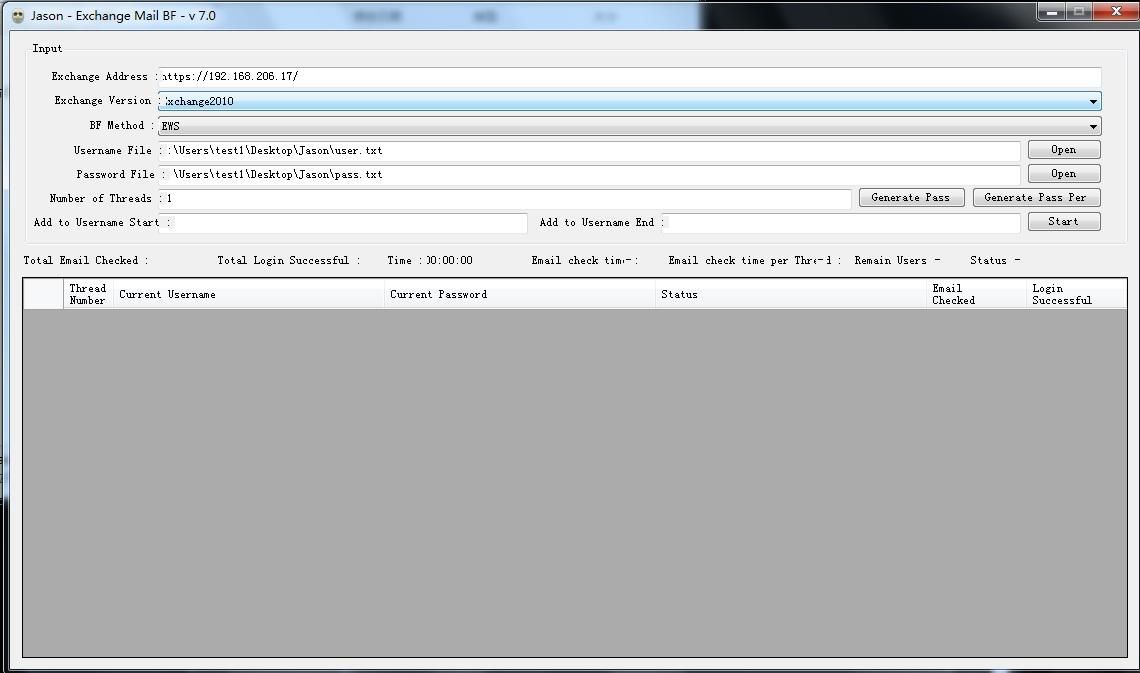
After the program starts, the following configurations need to be set:
1. Exchange Address
Enter the URL of the Exchange server
In my test environment, the Exchange Address is: https://192.168.206.17
2. Exchange Version
Select the corresponding version
Choosing a lower version here can be compatible with higher versions of the Exchange server
3. BF Method
Three options:
- EWS (Exchange Web Service)
- OAB (Offline Address Book)
- Full
Typically select EWS
4. Username File
Username dictionary file
Format can refer to the format indicated in PassSample.txt
In my test environment, the format example I used is:
5. Password File
Password dictionary file
6. Number of Threads
Set the number of scanning threads
7. Generate Pass
Click to display the dictionary used for brute force attacks
8.Generate Pass Per
Click to generate a folder named PasswordPerUser, containing txt files named after each username with password dictionary content
9.Add to Username Start
Generate new users by adding input characters before the username
Not recommended to set in test environments
10.Add to Username End
Generate new users by adding input characters after the username
Not recommended to set in test environments
In my test environment, the configuration is as shown in the figure below
After successful brute force attack, generate log file out-year-month-day-hour-minute-second.txt, saving usernames and corresponding passwords
0x05 Horizontal comparison with other open-source tools
---
1.Jason
- C# Implementation
- Brute force attack locations for Exchange:
- https://url/ews/exchange.asmx
- https://url/oab
- Supports multithreading
- GUI operation
2.MailSniper
- https://github.com/dafthack/MailSniper
- PowerShell implementation
- Brute force attack locations for Exchange:
- https://url/ews/exchange.asmx
- https://url/owa
- Supports multithreading
- Command-line operation
3.Ruler
- https://github.com/sensepost/ruler
- Go implementation
- Location for brute-forcing Exchange:
- https://url/autodiscover/autodiscover.xml
- Does not support multithreading
- Command-line operation
For brute-forcing Exchange accounts, the principles are largely similar: all involve accessing Exchange web resources. A 401 response indicates authentication failure, while obtaining the expected result indicates correct user credentials.
Compared to MailSniper and Ruler, Jason shares essentially the same principles and functionality. Personally, I believe this tool does not pose a risk of widespread abuse nor will it lead to advancements in malware techniques.
0x06 Summary
---
This article describes how to fix Jason's bug, analyzes its underlying technology, provides a comparative analysis with other open-source tools, and concludes: personally, I believe this tool does not pose a risk of widespread abuse nor will it lead to advancements in malware techniques.


