
0x00 Preface
---
Recently, the Tencent Computer Manager team analyzed the "Loli" worm that spreads by exploiting vulnerabilities in "Warcraft III", introducing the operational process of the "Loli" worm. Subsequently, the author of this "worm" clarified the matter on their website. Without delving into the gossip surrounding this event, we will focus solely on the technical aspects to analyze what this "Warcraft III" vulnerability actually is, how it can be exploited, and how to defend against it.
"Loli" worm analysis link:
http://www.freebuf.com/news/120136.html
Author's blog link of the "worm":
https://blog.loxve.com/
0x01 Introduction
---
The process of this "Warcraft III" vulnerability is as follows:
1. The attacker uploads a modified Warcraft map and waits for other players to join the room to play.
2. After the player enters the room, since the map is not available locally, it will be automatically downloaded.
3. After the map is synchronized, the player enters the game, triggering the script in the map, which writes a bat file in the startup directory.
4. After the player's computer restarts, the bat file in the startup directory is executed, successfully loading the payload.
0x02 Related Concepts
---
JASS
is the scripting language for "Warcraft III," used to control the progression and behavior of maps, serving as the foundation for Warcraft games and maps
Units (Unit) placed and triggers (Trigger) set during normal map editing are ultimately translated into JASS language, saved in the map file, and called during game runtime
HkeW3mModifier
is a tool for modifying MPQ format files, capable of editing encrypted MPQ files, featuring powerful resource search functionality to locate most resources in Warcraft maps, rebuild lists, and intelligently extract related textures
It can be used to view and edit the file resources contained in maps
Operation Instructions:
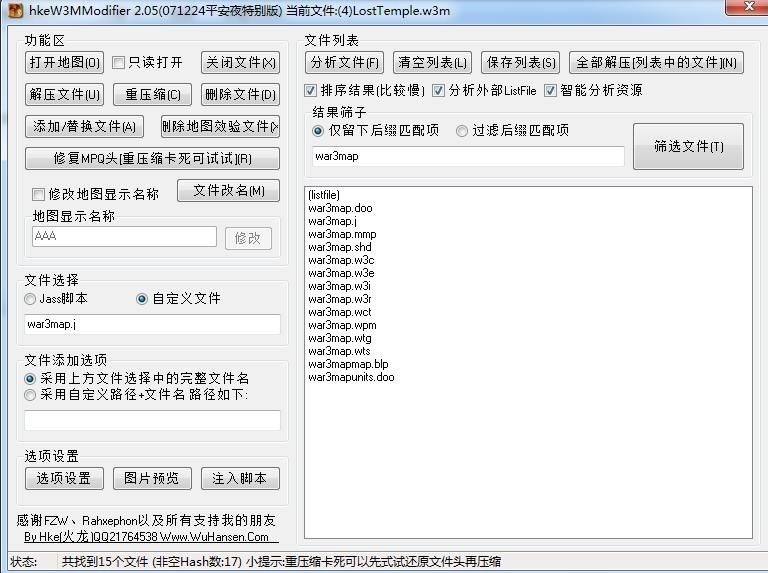
Download HkeW3mModifier.exe, select a map, click "Analyze Files" to view the list of files contained in the map, as shown in the figure
Among them, war3map.j contains the logical control code of the map. Right-click to extract war3map.j to view its code, with a portion of the code shown in the figure
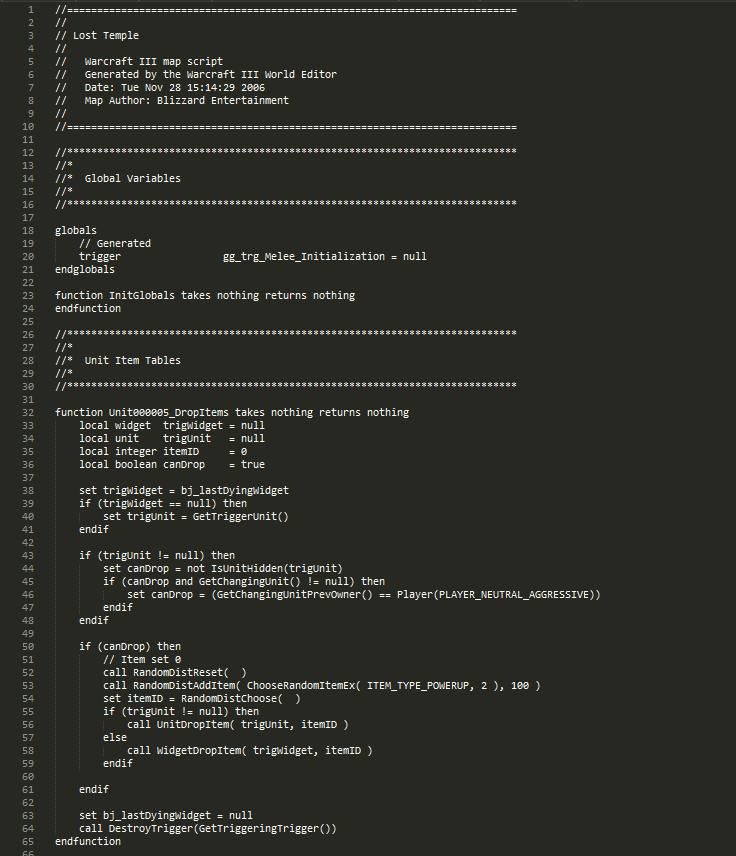
File structure in war3map.j
1. Variable Declaration
Declared global variables used in the script file
Variable declarations in Lost Temple are as follows:
//*************************************************************************** |
2. Trigger Section
Declared triggers used in the map
The trigger section in Lost Temple is as follows:
//*************************************************************************** |
The meaning can be inferred from the function name
function Trig_Melee_Initialization_Actions represents the operations performed by the trigger
function InitTrig_Melee_Initialization is used for initialization
function InitCustomTriggers registers user-defined triggers
The function of RunInitializationTriggers is to run triggers
3. Main function main
Entry point of the script file
The main section in Lost Temple is as follows:
//*************************************************************************** |
4. Other Settings
Such as Unit Item Tables, Unit Creation, Players, Map Configuration are omitted for now
0x03 Jass Preload File Vulnerability
---
Reference:
http://bbs.islga.org/forum.php?mod=viewthread&tid=48422&extra=page%3D1&page=1
Three special functions in JASS:
- native PreloadGenClear takes nothing returns nothing
- native PreloadGenStart takes nothing returns nothing
- native PreloadGenEnd takes string filename returns nothing
The above three functions are used to record all Preload() statements executed between PreloadGenStart() and PreloadGenEnd(), and write them into the pld file specified by the PreloadGenEnd() function
Note:
Similar to outputting a log file
Example:
The JASS code is as follows:
function Test takes nothing returns nothing |
After executing the function Test(), a new file test.pld will be created under c:\test\, with the following content written:
function Test takes nothing returns nothing |
Vulnerability Principle
1. Setting the output as a .bat file
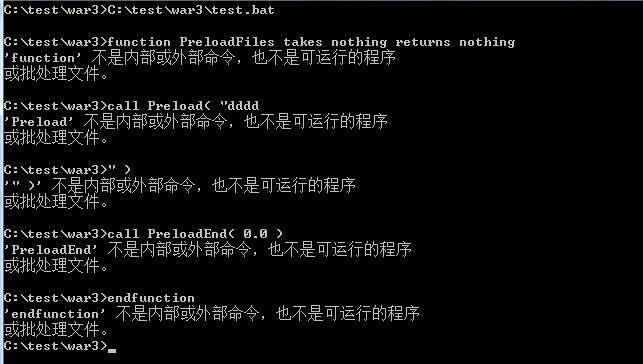
If the output .pld file extension is changed to .bat, each line in the file is executed as a piece of code (though the statements are invalid and do not conform to batch processing syntax), as shown in the figure
2. Adding line breaks \n
In batch syntax, \n represents a line break. Although each line of the .pld file output has a fixed format, by using \n to break the content in the call Preload() line, it becomes possible to display an executable batch command on a new line.
Example:
JASS code is as follows:
function Test takes nothing returns nothing |
After outputting to test.bat, it will contain line breaks. The content of the output file is as follows:
function Test takes nothing returns nothing |
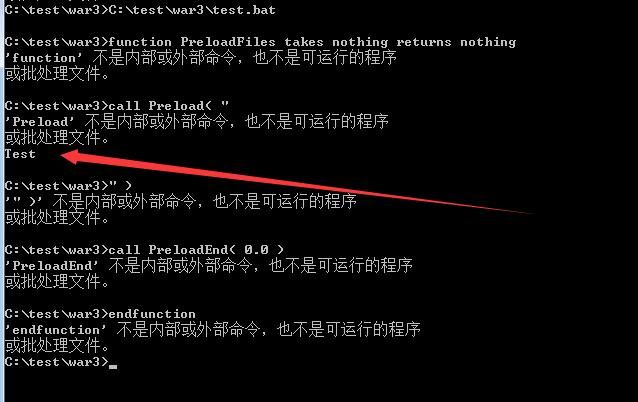
At this point, a new line of code @echo Test is generated, and @echo Test gets executed, as shown in the figure
3. Execute batch processing
By default, JASS can only output files but cannot execute them, so files can only be output to the startup items directory and executed after restarting
0x04 Actual Testing
---
1. Test HelloGA2012.w3m
Download link:
Attachment from: http://bbs.islga.org/forum.php?mod=viewthread&tid=48422&extra=page%3D1&page=1
War3 version: 1.27.0.52240
After loading the map HelloGA2012 and entering the game, press the Esc key. As shown in the figure, a prompt pops up, and the file test.pld is generated under D:\XX\
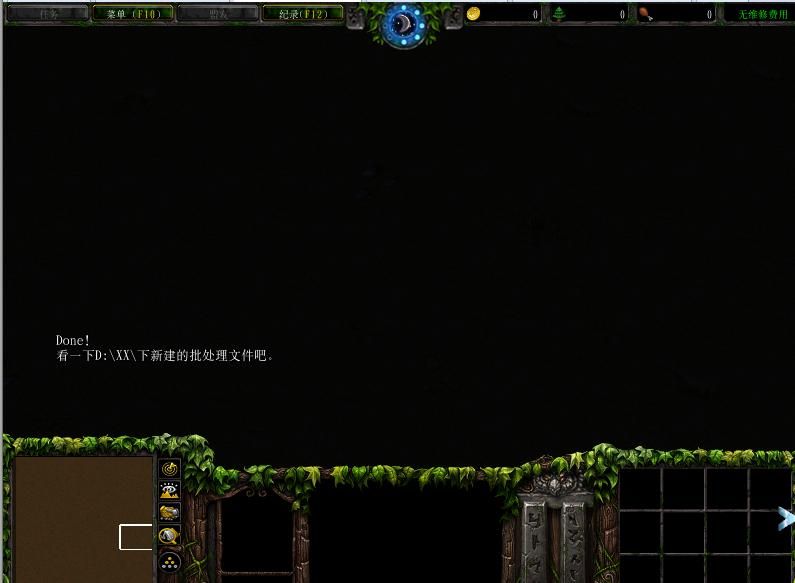
Navigate to directory D:\XX\, locate test.pld with the following content:
function PreloadFiles takes nothing returns nothing |
Test successful
2. Manually modify the official map LostTemple
(1) Obtain source file
Open the official map (4)LostTemple.w3m using HkeW3mModifier, export war3map.j
(2) Add payload
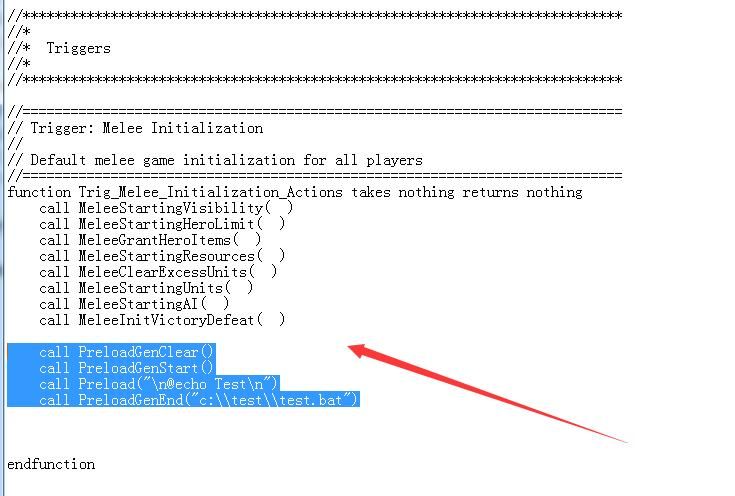
Based on the analysis of the file structure in war3map.j above, add the following code within function Trig_Melee_Initialization_Actions:
call PreloadGenClear() |
As shown in the figure
(3) Save
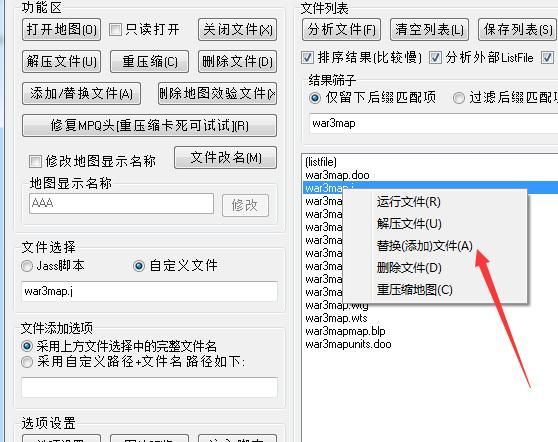
After saving war3map.j, select replace (add) file in HkeW3mModifier, as shown in the figure
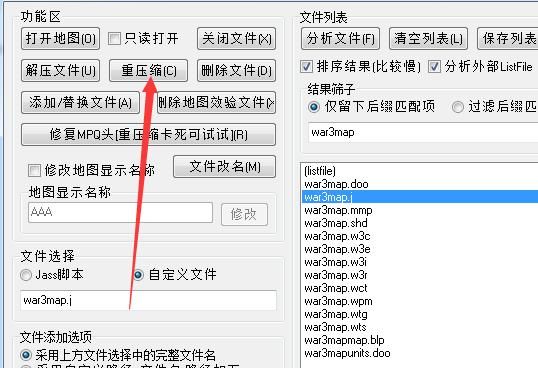
Select recompress, save the map file, as shown in the figure
(4) Testing
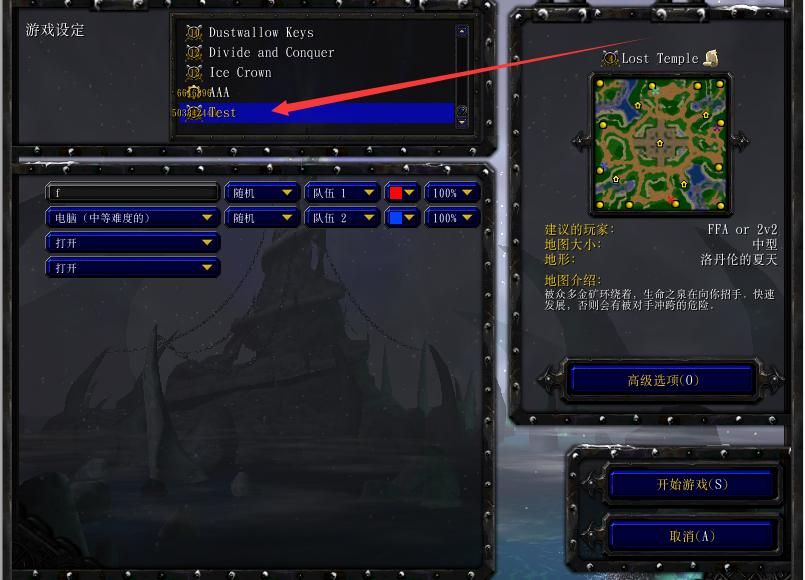
Place the map in the Maps folder, launch the game, and the map is recognized, as shown in the figure
Note:
For testing convenience, the map name has been changed to Test; overwriting the original map provides greater stealth
Start the game, a file test.bat is generated under c:\test\ with the following content:
function PreloadFiles takes nothing returns nothing |
If this file is output to the startup directory, it will execute after a reboot
Test successful
0x05 Supplement
---
1. This vulnerability itself does not include code execution functionality, so the key to successful exploitation lies in finding a method to execute code. The most direct approach is to output files to the startup folder. Of course, this vulnerability can also be used to modify specified files.
2. In Dota maps, the location of war3map.j is scripts\war3map.j, which can also be utilized.
0x06 Summary
---
Strictly speaking, this Warcraft III vulnerability is not a vulnerability per se, but rather a normal function within Warcraft III maps that supports outputting files. By exploiting this function, carefully crafted code can be output to specific locations and then executed in conjunction with other methods.
Therefore, the key to exploiting this vulnerability lies in the execution method, with the common approach being writing to the startup folder.
For ordinary users, it is important to pay attention to the startup folder on their own machines. Additionally, antivirus software is already capable of detecting this exploitation method.
Stay vigilant and protect yourself to avoid being deceived.
Moderate gaming benefits the mind, while excessive gaming harms the body.


