0x00 Introduction
---
The previous article "Setting Up the ADAudit Plus Vulnerability Debugging Environment" detailed the setup of the vulnerability debugging environment. Testing revealed that some data in the database is encrypted. This article will introduce the relevant algorithms for data encryption.
0x01 Overview
---
This article will cover the following:
- Location of data encryption
- Algorithm analysis
- Algorithm implementation
0x02 Location of Data Encryption
---
The test environment remains consistent with "Setting Up the ADAudit Plus Vulnerability Debugging Environment".
Complete database connection command: "C:\Program Files\ManageEngine\ADAudit Plus\pgsql\bin\psql" "host=127.0.0.1 port=33307 dbname=adap user=postgres password=Stonebraker"
Example command to query encrypted passwords: SELECT * FROM public.aaapassword ORDER BY password_id ASC;
Return result example:
password_id | password | algorithm | salt | passwdprofile_id | passwdrule_id | createdtime | factor
-------------+--------------------------------------------------------------+-----------+------------------------------------------------------------------------------------------------------------------------------------------------------------------------------------------------+------------------+---------------+---------------+--------
1 | $2a$12$e.lzmqKXyh8m8KTd9WBkxeqr90qeTrDKwBhlSsdjMf7yIlj1ygbqm | bcrypt | \xc30c040901028b43e9beabaec7d8d24e01623a1d3e917176f836602c04ee285d87c01c64174cf0bb7c11ab314b2cc8a8507cf04b297eb410d83ba29e6b3adc208fde8b7adfbc96be5dbf53485069cb4625a7ddf9d423b4c151c46367ba58 | 3 | 1 | 1680771305487 | 12
301 | $2a$12$abyhGRg2fsQ27NoHsR2xae8vuOFVbONpayxfctUAFpSvbM68kL1q2 | bcrypt | \xc30c04090102c69b4884afb59f93d24e01a926a128b8a91eb20272877d093518b7ef759db0e85117467c93244d3a832a517d34e1b120164bd6717e2d5aa07ec5d95c2f5ef1c6eaed91126b649d4ee06dba3f7233f61254d1b67f7e56903c | 3 | 1 | 1681264745532 | 12
(2 rows) |
After testing, the corresponding location in the web management page is Admin->Technicians, as shown in the figure below
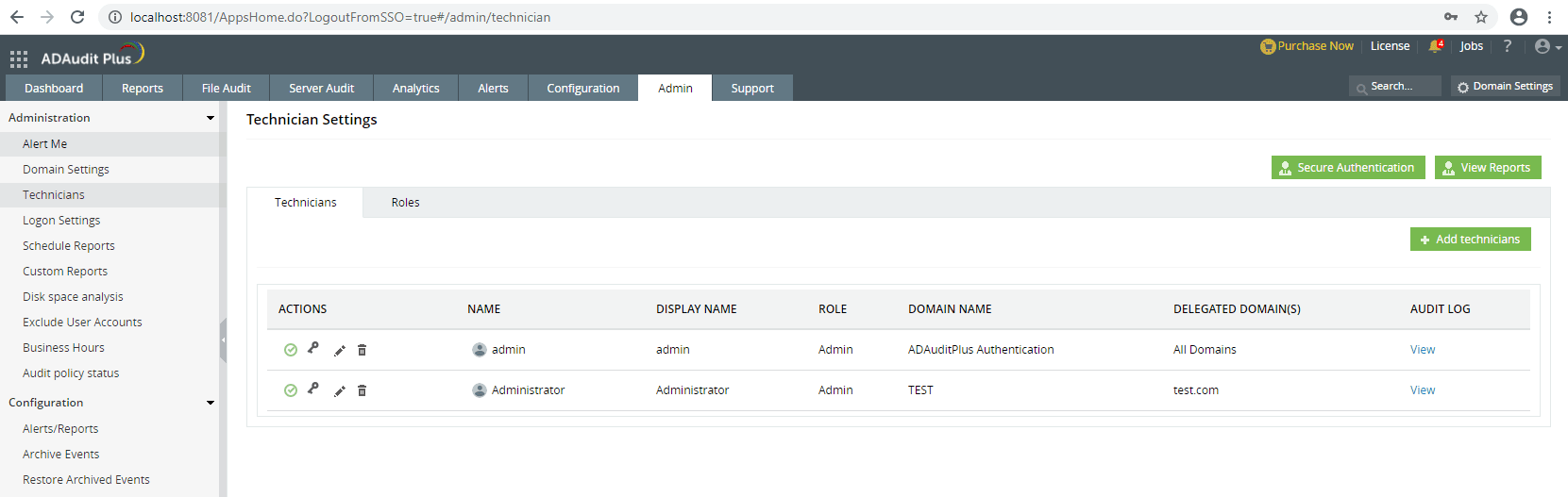
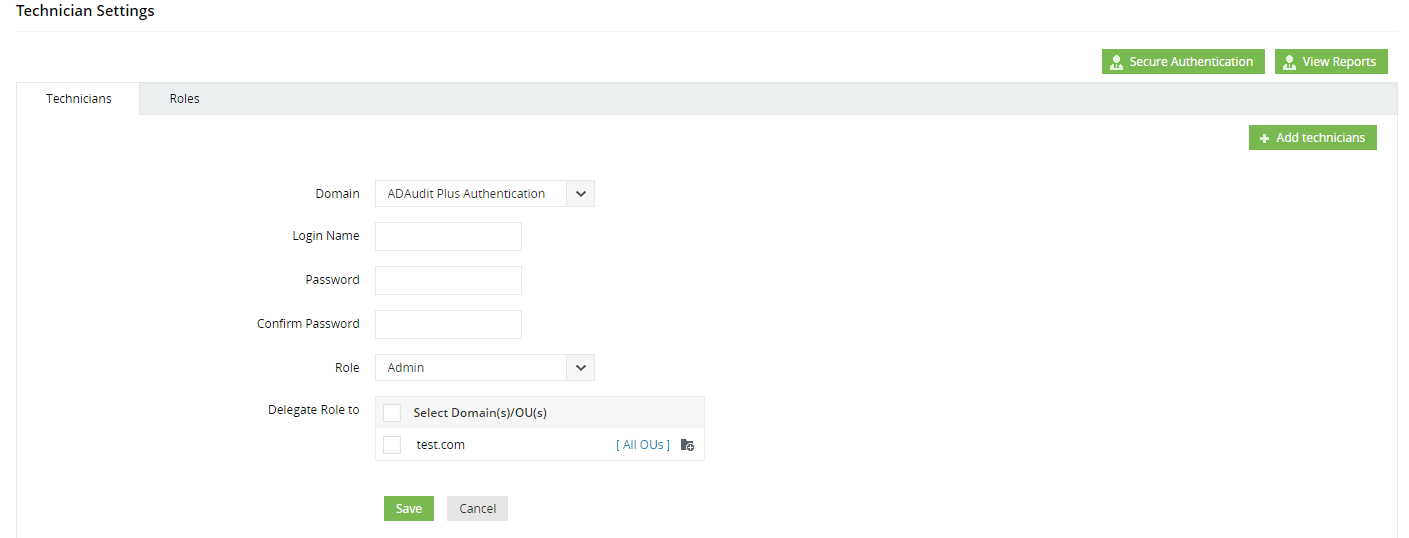
Clicking Add technicians allows adding users, where you can choose to add custom users or domain users
Adding custom users requires entering a password, as shown in the figure below
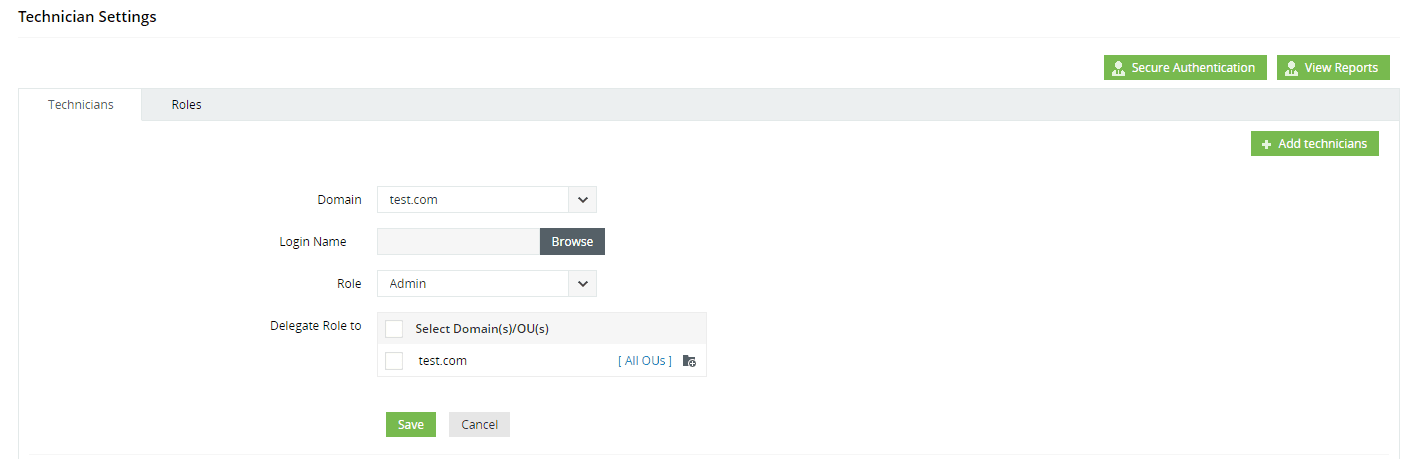
Adding domain users does not require entering the domain user's password, as shown in the figure below
0x03 Algorithm Analysis
---
1. Encryption Algorithm Details
Analysis shows that the encryption algorithm details are located in com.adventnet.authentication.util->AuthUtil.class within C:\Program Files\ManageEngine\ADAudit Plus\lib\AdvAuthentication.jar
Implementation code for adding users:
public static DataObject createUserAccount(DataObject accountDO) throws DataAccessException, PasswordException {
int workload = false;
LOGGER.log(Level.FINEST, "createUserAccount invoked with dataobject : {0}", accountDO);
Iterator accItr = accountDO.getRows("AaaAccount");
int numOfAcc = getCount(accItr);
Credential credential = getUserCredential();
if (credential != null) {
validateForAccountCreation(credential.getAccountId(), numOfAcc);
}
List requiredTables = Arrays.asList("AaaUser", "AaaLogin", "AaaAccount", "AaaPassword", "AaaAccPassword");
List tablesFromDO = accountDO.getTableNames();
if (!tablesFromDO.containsAll(requiredTables)) {
throw new DataAccessException("In sufficient data for creating an account, required tables in dataobject " + requiredTables);
} else {
long now = System.currentTimeMillis();
Row userRow = accountDO.getFirstRow("AaaUser");
userRow.set("CREATEDTIME", new Long(now));
Row userStatusRow = new Row("AaaUserStatus");
userStatusRow.set("USER_ID", userRow.get("USER_ID"));
userStatusRow.set("STATUS", "ACTIVE");
userStatusRow.set("UPDATEDTIME", new Long(now));
accountDO.addRow(userStatusRow);
Row loginRow = accountDO.getFirstRow("AaaLogin");
try {
String domain = (String)loginRow.get("DOMAINNAME");
loginRow.set("DOMAINNAME", domain != null && domain.trim().length() != 0 ? domain : (String)MetaDataUtil.getTableDefinitionByName("AaaLogin").getColumnDefinitionByName("DOMAINNAME").getDefaultValue());
} catch (MetaDataException var28) {
throw new DataAccessException("Exception occurred while obtaining default value of [AAALOGIN.DOMAINNAME]" + var28);
}
Criteria c = new Criteria(Column.getColumn("AaaLogin", "NAME"), loginRow.get("NAME"), 0, false);
c = c.and(new Criteria(Column.getColumn("AaaLogin", "DOMAINNAME"), loginRow.get("DOMAINNAME"), 0));
DataObject dobj = DataAccess.get("AaaLogin", c);
if (!dobj.isEmpty()) {
LOGGER.log(Level.SEVERE, "Could not create new User :: {0}, as the user with given LoginName and DomainName already exists", new Object[]{loginRow.get("NAME")});
throw new DataAccessException("Could not create new User ::" + loginRow.get("NAME") + ", as the given LoginName and DomainName :: " + loginRow.get("DOMAINNAME") + " already exists");
} else {
if (loginRow.get("USER_ID") == null) {
loginRow.set("USER_ID", userRow.get("USER_ID"));
accountDO.updateRow(loginRow);
}
accItr = accountDO.getRows("AaaAccount");
Row accountRow = null;
List serviceIds = new ArrayList();
Row passwordRow;
while(accItr.hasNext()) {
accountRow = (Row)accItr.next();
serviceIds.add(accountRow.get("SERVICE_ID"));
if (accountRow.get("LOGIN_ID") == null) {
accountRow.set("LOGIN_ID", loginRow.get("LOGIN_ID"));
}
accountRow.set("CREATEDTIME", new Long(now));
accountDO.updateRow(accountRow);
Row accOwnerProfileRow = null;
try {
accOwnerProfileRow = accountDO.getFirstRow("AaaAccOwnerProfile", accountRow);
} catch (DataAccessException var27) {
}
if (accOwnerProfileRow == null) {
accOwnerProfileRow = new Row("AaaAccOwnerProfile");
accOwnerProfileRow.set("ACCOUNT_ID", accountRow.get("ACCOUNT_ID"));
accOwnerProfileRow.set("ALLOWED_SUBACCOUNT", new Integer(0));
accountDO.addRow(accOwnerProfileRow);
}
if (!accountDO.containsTable("AaaAccountOwner") && credential != null) {
passwordRow = new Row("AaaAccountOwner");
passwordRow.set("ACCOUNT_ID", accountRow.get("ACCOUNT_ID"));
passwordRow.set("OWNERACCOUNT_ID", credential.getAccountId());
accountDO.addRow(passwordRow);
}
String accAdminProfile = (String)AuthDBUtil.getObject("AaaAccAdminProfile", "NAME", "ACCOUNTPROFILE_ID", accountRow.get("ACCOUNTPROFILE_ID"));
Row accStatusRow = constructAccStatusRow(accountRow, accAdminProfile);
accountDO.addRow(accStatusRow);
}
Iterator passItr = accountDO.getRows("AaaPassword");
passwordRow = null;
while(passItr.hasNext()) {
passwordRow = (Row)passItr.next();
Long passRuleId = (Long)passwordRow.get("PASSWDRULE_ID");
Long passProfileId = (Long)passwordRow.get("PASSWDPROFILE_ID");
if (passRuleId == null) {
String[] serviceNames = getServiceNames(serviceIds);
passRuleId = getCompatiblePassRuleId(serviceNames);
passwordRow.set("PASSWDRULE_ID", passRuleId);
}
Row passRuleRow = AuthDBUtil.getRowMatching("AaaPasswordRule", "PASSWDRULE_ID", passRuleId);
validateForPasswordRule((String)loginRow.get("NAME"), (String)passwordRow.get("PASSWORD"), passRuleRow);
String passwordProfile = (String)AuthDBUtil.getObject("AaaPasswordProfile", "NAME", "PASSWDPROFILE_ID", passProfileId);
Row passProfileRow = AuthDBUtil.getRowMatching("AaaPasswordProfile", "NAME", passwordProfile);
Object workFactor = passProfileRow.get("FACTOR");
if (!((String)passwordRow.get("ALGORITHM")).equalsIgnoreCase("bcrypt")) {
LOGGER.log(Level.INFO, "algorithm used to hash password should be bcrypt, hence updating algorithm as bcrypt");
passwordRow.set("ALGORITHM", "bcrypt");
}
int workload;
if (workFactor != null && Integer.parseInt(workFactor.toString()) > 0) {
workload = Integer.parseInt(workFactor.toString());
} else {
workload = PAM.workload;
}
String salt = BCrypt.gensalt(workload);
String encPass = getEncryptedPassword((String)passwordRow.get("PASSWORD"), salt, (String)passwordRow.get("ALGORITHM"));
passwordRow.set("PASSWORD", encPass);
passwordRow.set("FACTOR", workload);
passwordRow.set("ALGORITHM", passwordRow.get("ALGORITHM"));
passwordRow.set("CREATEDTIME", new Long(now));
passwordRow.set("SALT", salt);
accountDO.updateRow(passwordRow);
Row passStatusRow = constructPassStatusRow(passwordRow, passwordProfile);
accountDO.addRow(passStatusRow);
}
LOGGER.log(Level.FINEST, "account validated dataobject is : {0}", accountDO);
DataObject addedDO = AuthDBUtil.getPersistence("Persistence").add(accountDO);
LOGGER.log(Level.FINEST, "account added successfully");
return addedDO;
}
}
} |
Code to obtain encrypted Password:
String encPass = getEncryptedPassword((String)passwordRow.get("PASSWORD"), salt, (String)passwordRow.get("ALGORITHM")); |
Code to generate salt:
String salt = BCrypt.gensalt(workload); |
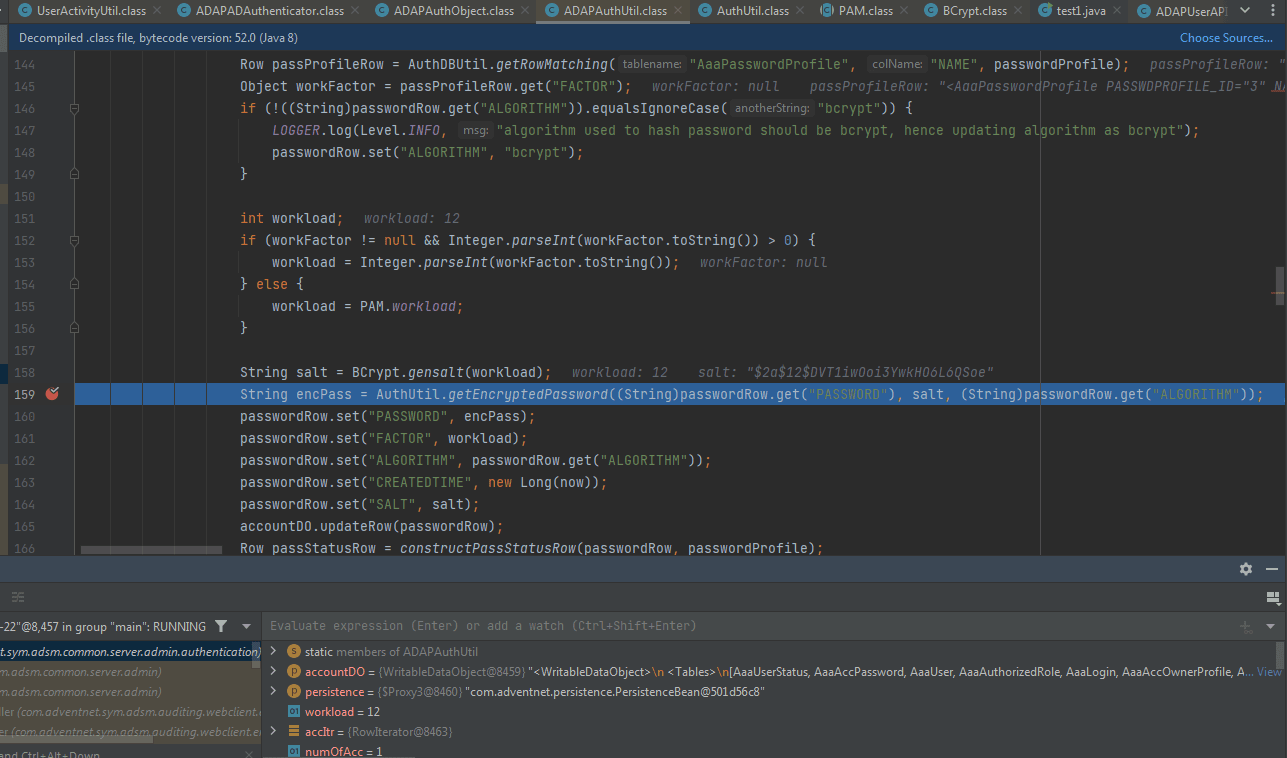
Through dynamic debugging, it was found that the default workload is 12. Example format of generated salt: $2a$12$DVT1iwOoi3YwkHO6L6QSoe, as shown in the figure below
Implementation details of the specific encryption algorithm getEncryptedPassword():
public static String getEncryptedPassword(String password, String salt, String algorithm) {
if (algorithm.equals("bcrypt")) {
String hashedPassword = null;
if (salt.matches("\\$2a\\$.*\\$.*")) {
hashedPassword = BCrypt.hashpw(password, salt);
return hashedPassword;
} else {
throw new IllegalArgumentException("Invalid Salt value.. To use Bcrypt hashing, salt should be generated through 'Bcrypt.genSalt(workload)' or in the form '$2a$(workload)$(22char)' ");
}
} else {
byte[] password_ba = convertToByteArray(password);
byte[] salt_ba = convertToByteArray(salt);
try {
MessageDigest md = MessageDigest.getInstance(algorithm);
md.update(password_ba);
md.update(salt_ba);
byte[] cipher = md.digest();
return convertToString(cipher);
} catch (NoSuchAlgorithmException var7) {
LOGGER.log(Level.SEVERE, "Exception occurred when getting MessageDigest Instance for Algorithm {0}. Returning unencrypted Password", algorithm);
return password;
}
}
} |
Set a breakpoint here, and through dynamic debugging, the following conclusions are drawn:
- If it is a domain user, the default password 'admin' is used as the plaintext, a random salt is generated, the bcrypt algorithm is employed, and the ciphertext is calculated through a fixed algorithm. The first 29 bytes of the ciphertext correspond to the salt used for encryption.
- If it is not a domain user, the user's actual password is used as the plaintext for calculation. For example, for the default user 'admin', the actual password is used as the plaintext to encrypt and obtain the ciphertext.
That is to say, when querying the table public.aaapassword, we only need to take the first 29 bytes of the password field as the salt used for encryption, and there is no need to pay attention to the salt field in the table public.aaapassword.
2. Distinguish whether it is a domain user
Example query command: SELECT * FROM public.aaalogin ORDER BY login_id ASC;
Example return result:
login_id | user_id | name | domainname
----------+---------+---------------+----------------------------
1 | 1 | admin | ADAuditPlus Authentication
301 | 301 | Administrator | TEST
310 | 310 | test1 | TEST
311 | 311 | testadmin | ADAuditPlus Authentication
(4 rows) |
Here, domainname as ADAuditPlus Authentication represents custom-added users.
Here, an inner join query is used to automatically filter out non-domain users and their corresponding hashes. Example command: SELECT aaalogin.login_id, aaalogin.name, aaalogin.domainname, aaapassword.password FROM public.aaalogin AS aaalogin INNER JOIN public.aaapassword AS aaapassword ON aaalogin.login_id = aaapassword.password_id WHERE aaalogin.domainname = 'ADAuditPlus Authentication';
Example of returned results:
login_id| name | domainname | password
---------+-----------+----------------------------+--------------------------------------------------------------
1 | admin | ADAuditPlus Authentication | $2a$12$1hKeH4aM2LY4BvYpKT9Z5.p9cD453FjBAPYjp0ek94n936WRRAYme
311 | testadmin | ADAuditPlus Authentication | $2a$12$1hKeH4aM2LY4BvYpKT9Z5.6zPb3SEFvW6PbGrU11Ilc96/YqJAEua
(2 rows) |
0x04 Algorithm Implementation
---
Test parameters are as follows:
- Known plaintext is 123456
- The password field obtained from querying the database is $2a$12$1hKeH4aM2LY4BvYpKT9Z5.p9cD453FjBAPYjp0ek94n936WRRAYme
From this, it is known that the salt is the first 29 bytes of the password field, i.e., $2a$12$1hKeH4aM2LY4BvYpKT9Z5.
The test code for computing the ciphertext is as follows:
import org.mindrot.jbcrypt.BCrypt;
import java.security.MessageDigest;
import java.security.NoSuchAlgorithmException;
import static com.adventnet.authentication.util.AuthUtil.convertToByteArray;
import static com.adventnet.authentication.util.AuthUtil.convertToString;
public class test1 {
public static String getEncryptedPassword(String password, String salt, String algorithm) {
if (algorithm.equals("bcrypt")) {
String hashedPassword = null;
if (salt.matches("\\$2a\\$.*\\$.*")) {
hashedPassword = BCrypt.hashpw(password, salt);
return hashedPassword;
} else {
throw new IllegalArgumentException("Invalid Salt value.. To use Bcrypt hashing, salt should be generated through 'Bcrypt.genSalt(workload)' or in the form '$2a$(workload)$(22char)' ");
}
} else {
byte[] password_ba = convertToByteArray(password);
byte[] salt_ba = convertToByteArray(salt);
try {
MessageDigest md = MessageDigest.getInstance(algorithm);
md.update(password_ba);
md.update(salt_ba);
byte[] cipher = md.digest();
return convertToString(cipher);
} catch (NoSuchAlgorithmException var7) {
System.out.println("Exception occurred when getting MessageDigest Instance for Algorithm "+ algorithm + ". Returning unencrypted Password");
return password;
}
}
}
public static void main(String[] args) throws Exception, Exception {
String password = "123456";
String salt = "$2a$12$uVCggMRqSCSEwi6wh06Kd.";
String encPass = getEncryptedPassword(password, salt, "bcrypt");
System.out.println(encPass);
}
} |
The calculation result is $2a$12$1hKeH4aM2LY4BvYpKT9Z5.p9cD453FjBAPYjp0ek94n936WRRAYme, which matches the password field obtained from the database.
In summary, based on the above algorithm, it can be used to brute-force user passwords.
0x05 Summary
---
This article analyzed the data encryption algorithm of ADAudit Plus, distinguished domain users, and wrote implementation code. Subsequently, based on the algorithm, it can be used to brute-force user passwords.



